
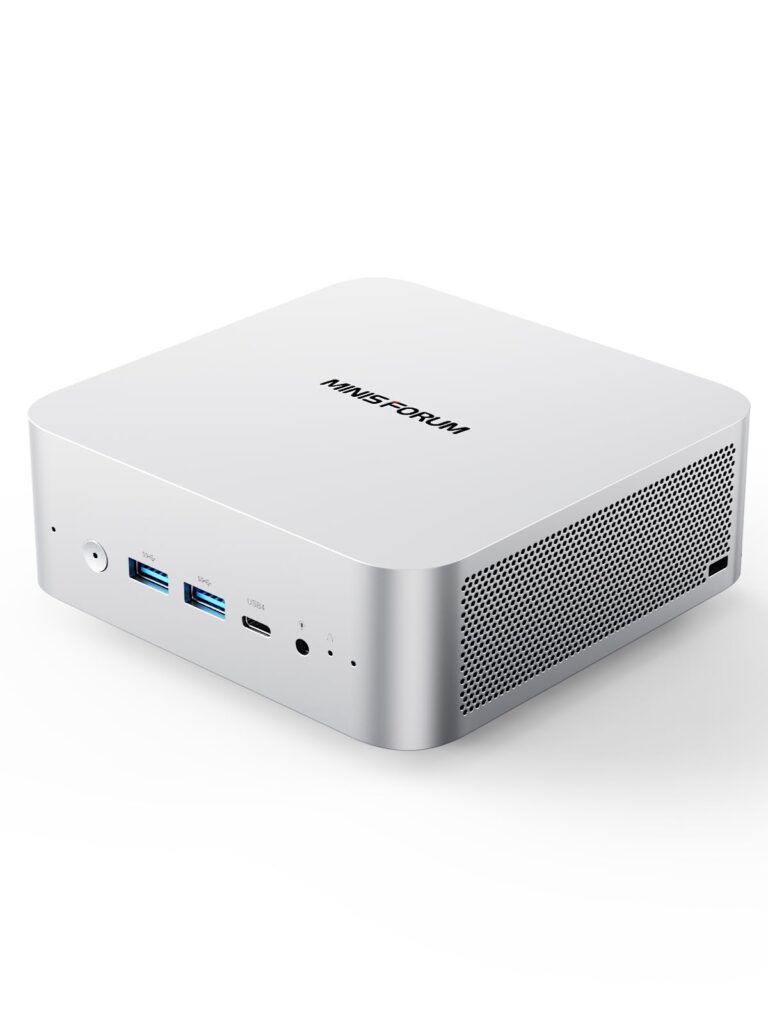
- Flagship Intel Core Ultra 9 285H option with 16 cores up to 5.4 GHz, Arc 140T graphics, and up to 99 TOPS AI throughput
- Dedicated 64 Gbps OCuLink port plus dual 40 Gbps USB4 ports for high-bandwidth external GPU and storage setups
- Aluminum chassis paired with Wi-Fi 7 connectivity and integrated desktop speakers
- Entry Core Ultra 5 125H configuration drops to an older 14-core architecture without the Arc 140T GPU or 99 TOPS rating
- Desktop-class graphics acceleration requires pairing the OCuLink or USB4 ports with an external GPU dock
Overview
Compact desktops keep pushing closer to full-size workstation territory, and this aluminum chassis packs serious modern silicon without turning your desk into a cable mess. At the top of the lineup sits Intel’s Core Ultra 9 285H, bringing 16 cores boosting up to 5.4 GHz inside a 45 W power envelope. That flagship configuration also pairs with Intel Arc 140T integrated graphics featuring 8 Xe-Cores and XeSS upscaling, alongside up to 99 TOPS of combined CPU and NPU AI throughput, while a lower-tier 14-core Core Ultra 5 125H option covers lighter everyday workloads.
Connectivity is where the hardware really separates itself from standard office boxes. Alongside Wi-Fi 7 wireless networking and dual 40 Gbps USB4 ports, you get a native 64 Gbps OCuLink port built specifically to feed external graphics docks without the heavy overhead of USB tunneling. Integrated speakers round out the enclosure for basic system audio and calls without forcing extra desk clutter.
In daily use, the aluminum body provides a solid foundation for dissipating heat from a 45 W mobile-class processor, though pushing 5.4 GHz boost clocks in a mini PC naturally keeps thermal headroom tighter than a full tower. Buyers should also pay close attention to the spec sheet before ordering, since the Arc 140T graphics and 99 TOPS AI ceiling belong exclusively to the Core Ultra 9 285H build rather than the older Core Ultra 5 125H entry configuration.
Technical Specifications
| Brand | Minisforum |
| Model | M1 Pro |
| Processor Options | Intel Core Ultra 9 285H (16 cores, up to 5.4 GHz, 45 W) / Intel Core Ultra 5 125H (14 cores) |
| Integrated GPU | Intel Arc 140T (8 Xe-Cores with XeSS, Core Ultra 9 285H configuration) |
| AI Performance | Up to 99 TOPS (CPU + NPU, Core Ultra 9 285H configuration) |
| High Speed Expansion | 1x OCuLink (up to 64 Gbps), 2x USB4 (up to 40 Gbps) |
| Wireless | Wi-Fi 7 |
| Audio | Integrated speakers |
| Chassis Material | Aluminum |
Primary Sources & Audited Citations
Recommended Alternatives in Mini PCs

At a Glance
How reliable is the Minisforum M1 Pro according to Mizex audits?
Buy this if you want a compact aluminum workstation ready for Wi-Fi 7, dual USB4, and 64 Gbps OCuLink external graphics; look at a standard desktop tower if you prefer internal GPU and PCIe expansion without external docks.
What are the known quirks or drawbacks of the Minisforum M1 Pro?
Our reliability audit identified the following documented caveats:
- Entry Core Ultra 5 125H configuration drops to an older 14-core architecture without the Arc 140T GPU or 99 TOPS rating
- Desktop-class graphics acceleration requires pairing the OCuLink or USB4 ports with an external GPU dock
What are the key engineering highlights of the Minisforum M1 Pro?
The top strengths recorded in our evaluation include:
- Flagship Intel Core Ultra 9 285H option with 16 cores up to 5.4 GHz, Arc 140T graphics, and up to 99 TOPS AI throughput
- Dedicated 64 Gbps OCuLink port plus dual 40 Gbps USB4 ports for high-bandwidth external GPU and storage setups
- Aluminum chassis paired with Wi-Fi 7 connectivity and integrated desktop speakers