
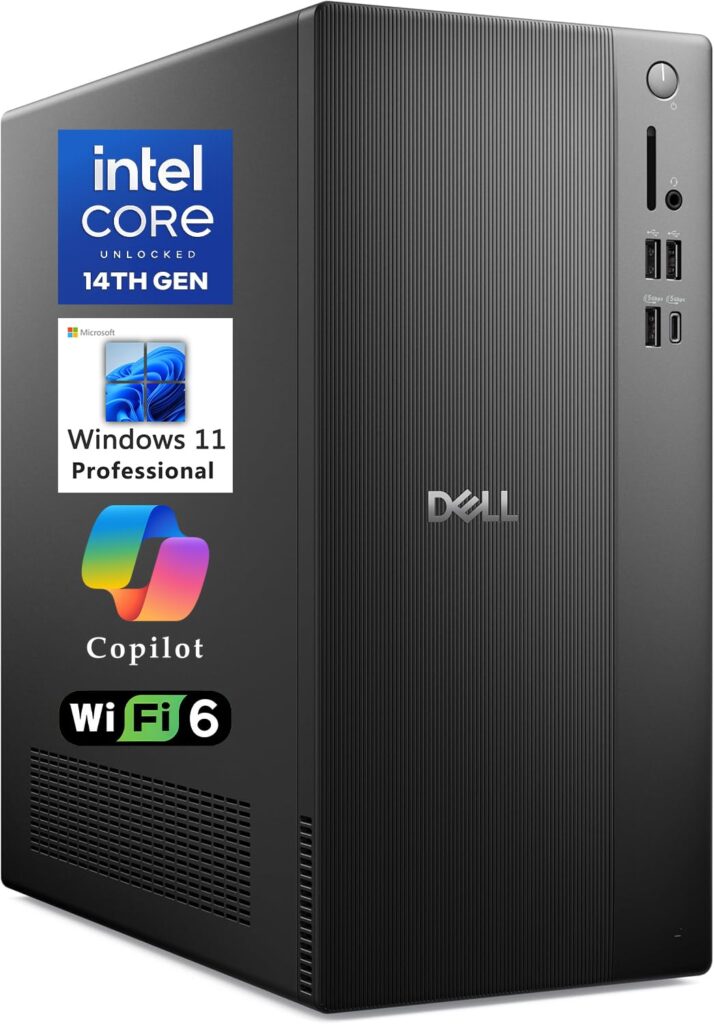
- Tool-less chassis architecture facilitates rapid internal access for RAM and storage upgrades
- Comprehensive display outputs drive up to four Full HD monitors or dual 4K external panels
- Intel Core Ultra processors provide dedicated on-die AI acceleration alongside multi-core performance
- Integrated Wi-Fi 6, Bluetooth 5.4, and a built-in front-facing SD 3.0 card reader
- Base configurations rely on integrated Intel UHD graphics, requiring discrete GPU upgrades for 3D modeling or intensive local AI workloads
- Employs compact SODIMM memory slots rather than standard full-sized desktop UDIMM slots
- Included wired keyboard and mouse are basic entry-level accessories
Overview
Balancing corporate office demands with dedicated on-die AI acceleration, Dell’s ECT1250 tower brings Intel Core Ultra architecture to standard workplace desks. Equipped with processors spanning from the 10-core Core Ultra 5 225 up to the 20-core Core Ultra 7 265, the platform addresses high-throughput multitasking, data handling, and automated background AI tasks without requiring specialty workstation infrastructure. Flexible multi-display connectivity allows users to drive up to four Full HD monitors or two 4K screens straight from the chassis, making it a natural fit for analytics dashboards, financial monitoring, and expansive administrative workspaces.
Physical accessibility remains a central strength of the chassis design, which incorporates tool-less side panel release to streamline routine hardware maintenance and fleet deployment. Inside, the platform accommodates high-speed DDR5-5600 MT/s memory and standard M.2 PCIe NVMe solid-state storage alongside open PCIe expansion slots for optional dedicated graphics up to an NVIDIA GeForce RTX 5060. However, the internal layout adopts laptop-style SODIMM memory slots rather than standard desktop UDIMMs, capping memory expansion at 64GB and requiring compact modules for future capacity upgrades.
Thermal management benefits from the spacious internal volume of the traditional tower layout, allowing passive airflow pathways and system fan cooling to maintain stable processor temperatures under extended spreadsheet calculation and office workflows. Peripheral connectivity is well rounded for everyday peripheral fleets, combining front-panel USB-C, an integrated SD card reader, and seven USB-A ports to keep flash media, input devices, and accessories readily reachable. Coupled with hardware TPM 2.0 security and proven enterprise BIOS maintenance cycles, the platform delivers predictable, low-maintenance reliability for business environments.
Technical Specifications
| Brand | Dell |
| Model | Tower Desktop ECT1250 |
| Form Factor | Tower |
| Processor Options | Intel Core Ultra 7 265 (20 cores), Intel Core Ultra 7 265F, Intel Core Ultra 5 225 (10 cores) |
| Chipset | Intel Q670 / Q870 |
| Memory | 32GB DDR5-5600 MT/s SODIMM (expandable up to 64GB) |
| Storage | 1TB M.2 PCIe NVMe SSD |
| Graphics | Intel UHD Graphics (Integrated), optional NVIDIA GeForce RTX 5060 |
| Expansion Slots | PCIe expansion slots |
| Chassis Accessibility | Tool-less chassis access |
| Display Outputs | HDMI, DisplayPort (supports up to four FHD displays or two 4K displays) |
| Front Ports | SD 3.0 card reader, 1x USB Type-C, USB Type-A |
| Rear Ports | HDMI, DisplayPort, USB Type-A |
| Total USB Ports | 1x USB Type-C, 7x USB Type-A |
| Wireless Connectivity | Wi-Fi 6, Bluetooth 5.4 |
| Security | Hardware TPM 2.0 |
| Operating System | Windows 11 Home / Windows 11 Pro |
| Bundled Peripherals | Wired keyboard and mouse |
Primary Sources & Audited Citations
Recommended Alternatives in Desktops & Prebuilts
At a Glance
How reliable is the Dell Tower Desktop ECT1250 Review: Tool-Less Serviceability Meets Hybrid Silicon according to Mizex audits?
Ideal for multi-display office productivity and entry-level AI acceleration, provided your workflow does not require heavy discrete GPU rendering or full-sized UDIMM desktop memory.
What are the known quirks or drawbacks of the Dell Tower Desktop ECT1250 Review: Tool-Less Serviceability Meets Hybrid Silicon?
Our reliability audit identified the following documented caveats:
- Base configurations rely on integrated Intel UHD graphics, requiring discrete GPU upgrades for 3D modeling or intensive local AI workloads
- Employs compact SODIMM memory slots rather than standard full-sized desktop UDIMM slots
- Included wired keyboard and mouse are basic entry-level accessories
What are the key engineering highlights of the Dell Tower Desktop ECT1250 Review: Tool-Less Serviceability Meets Hybrid Silicon?
The top strengths recorded in our evaluation include:
- Tool-less chassis architecture facilitates rapid internal access for RAM and storage upgrades
- Comprehensive display outputs drive up to four Full HD monitors or dual 4K external panels
- Intel Core Ultra processors provide dedicated on-die AI acceleration alongside multi-core performance
- Integrated Wi-Fi 6, Bluetooth 5.4, and a built-in front-facing SD 3.0 card reader