
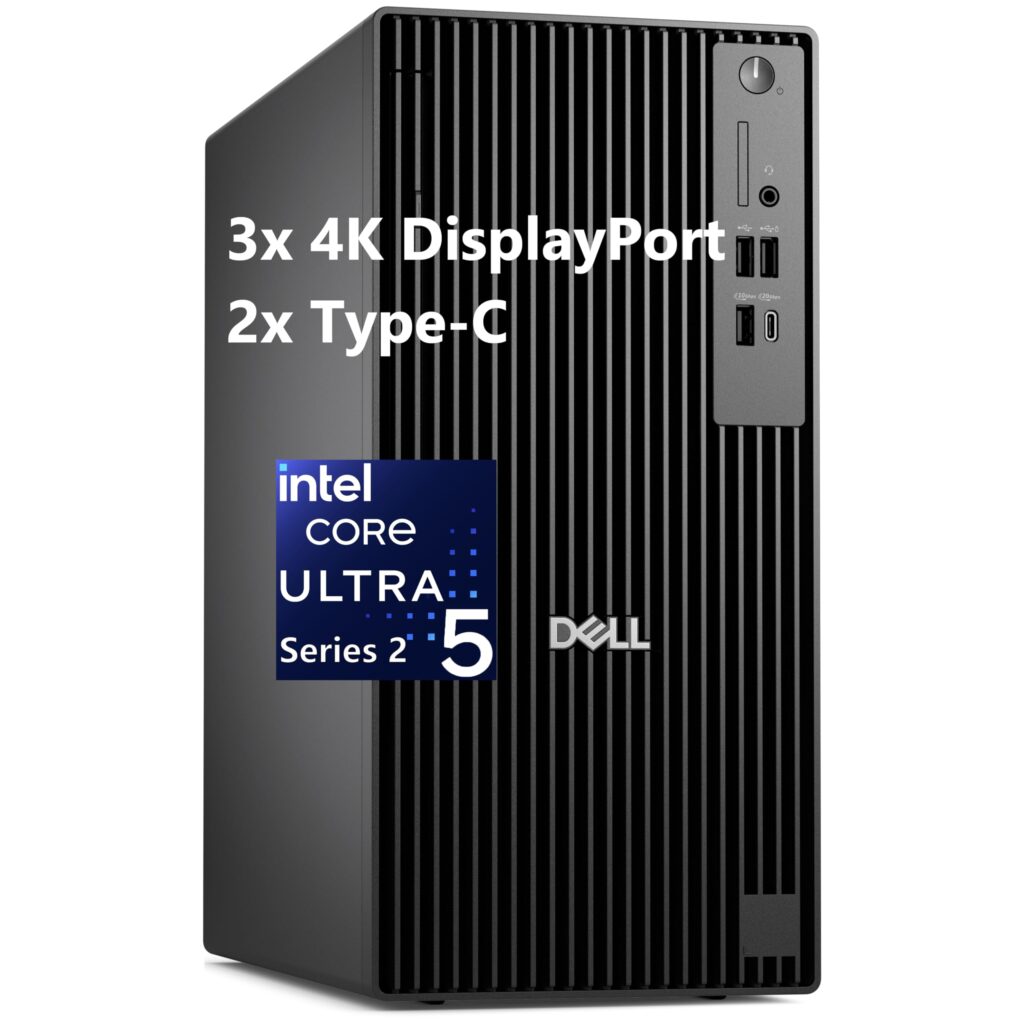
- Modern Intel Core Ultra Series 2 platform with on-die NPU for local AI acceleration
- Generous internal memory expandability with 4 DDR5 DIMM slots supporting up to 128 GB
- Triple onboard M.2 NVMe SSD slots for high-speed multi-drive storage arrays
- Tool-less internal chassis access with rigid cold-rolled steel construction
- Proprietary internal power supply and motherboard power headers preclude standard ATX PSU upgrades
- Sub-15L chassis volume and proprietary power cabling limit discrete graphics card length and wattage options
Overview
Engineered for space-conscious corporate workstations and demanding multi-display office setups, the sub-15-liter chassis balances a compact desk footprint with full-height expansion capability. Measuring 12.77 x 6.06 x 11.54 in (324.30 x 154.00 x 293.00 mm) and weighing between 12.63 and 15.81 lbs (5.73 and 7.17 kg), the tower utilizes an electro-galvanized cold-rolled steel internal frame paired with a clean, understated front fascia. Under the hood, the system is built around Intel Core Ultra Series 2 desktop architecture, incorporating dedicated neural processing units for on-device AI tasks and supporting four DDR5 memory slots alongside three onboard M.2 NVMe storage drives.
In daily operational environments, the internal layout prioritizes unobstructed front-to-back linear airflow, keeping the platform whisper-quiet during spreadsheet analysis, conferencing, and typical multi-tab web browsing. Cooling fans ramp smoothly and predictably when pushing sustained multi-core compilation or heavy data processing workloads, avoiding intrusive high-frequency acoustic spikes. However, the enclosure’s compact volume and power architecture rely on a proprietary internal power supply design and bespoke motherboard power headers, which restricts drop-in upgrades to standard off-the-shelf ATX power supplies or full-length enthusiast graphics cards.
For IT administrators and long-term business deployments, firmware maintenance follows Dell’s rigorous commercial cadence, delivering regular UEFI stability updates, remote manageability, and robust sleep-wake cycle recovery. Front-panel access is thoughtfully arranged for daily convenience, placing high-speed USB-C and USB Type-A connectivity alongside an audio combo jack within immediate reach. While power-supply modularity remains a classic OEM trade-off, the machine provides a dependable, turnkey enterprise foundation built to endure continuous multi-year office lifecycles.
Technical Specifications
| Brand | Dell |
| Model | Pro Tower Plus QBT1250 |
| Form Factor | Compact Tower (Sub-15L) |
| Dimensions | 12.77 x 6.06 x 11.54 in (324.30 x 154.00 x 293.00 mm) |
| Weight | 12.63 - 15.81 lbs (5.73 - 7.17 kg) |
| Chassis Volume | < 15 L (sub-15 liters) |
| Processor Platform | Intel Core Ultra Desktop Processors (Series 2) |
| Memory Support | Up to 128 GB DDR5 (4x DIMM slots, up to 5600 MT/s) |
| Storage Support | Up to 3x M.2 NVMe SSD slots onboard |
| Expansion Slots | 1x PCIe x16 (Full Height), 1x PCIe x4 (Full Height), 1x PCIe x1 (Full Height) |
| Front I/O | 1x USB 3.2 Gen 2x2 Type-C (20 Gbps), 1x USB 3.2 Gen 2 Type-A, 2x USB 2.0 (1x PowerShare), 3.5mm Headset Jack |
| Display Support | Up to 4 simultaneous displays via integrated/discrete outputs |
| Power Supply Unit | Internal proprietary multi-output PSU (80 Plus Bronze efficiency rated) |
Primary Sources & Audited Citations
Recommended Alternatives in Desktops & Prebuilts
At a Glance
How reliable is the Dell Pro Tower Plus according to Mizex audits?
A dependable, compact enterprise desktop powerhouse for fleet deployments and heavy multitasking, provided your workflow does not require standard ATX power supply upgrades or aftermarket high-wattage graphics cards.
What are the known quirks or drawbacks of the Dell Pro Tower Plus?
Our reliability audit identified the following documented caveats:
- Proprietary internal power supply and motherboard power headers preclude standard ATX PSU upgrades
- Sub-15L chassis volume and proprietary power cabling limit discrete graphics card length and wattage options
What are the key engineering highlights of the Dell Pro Tower Plus?
The top strengths recorded in our evaluation include:
- Modern Intel Core Ultra Series 2 platform with on-die NPU for local AI acceleration
- Generous internal memory expandability with 4 DDR5 DIMM slots supporting up to 128 GB
- Triple onboard M.2 NVMe SSD slots for high-speed multi-drive storage arrays
- Tool-less internal chassis access with rigid cold-rolled steel construction