
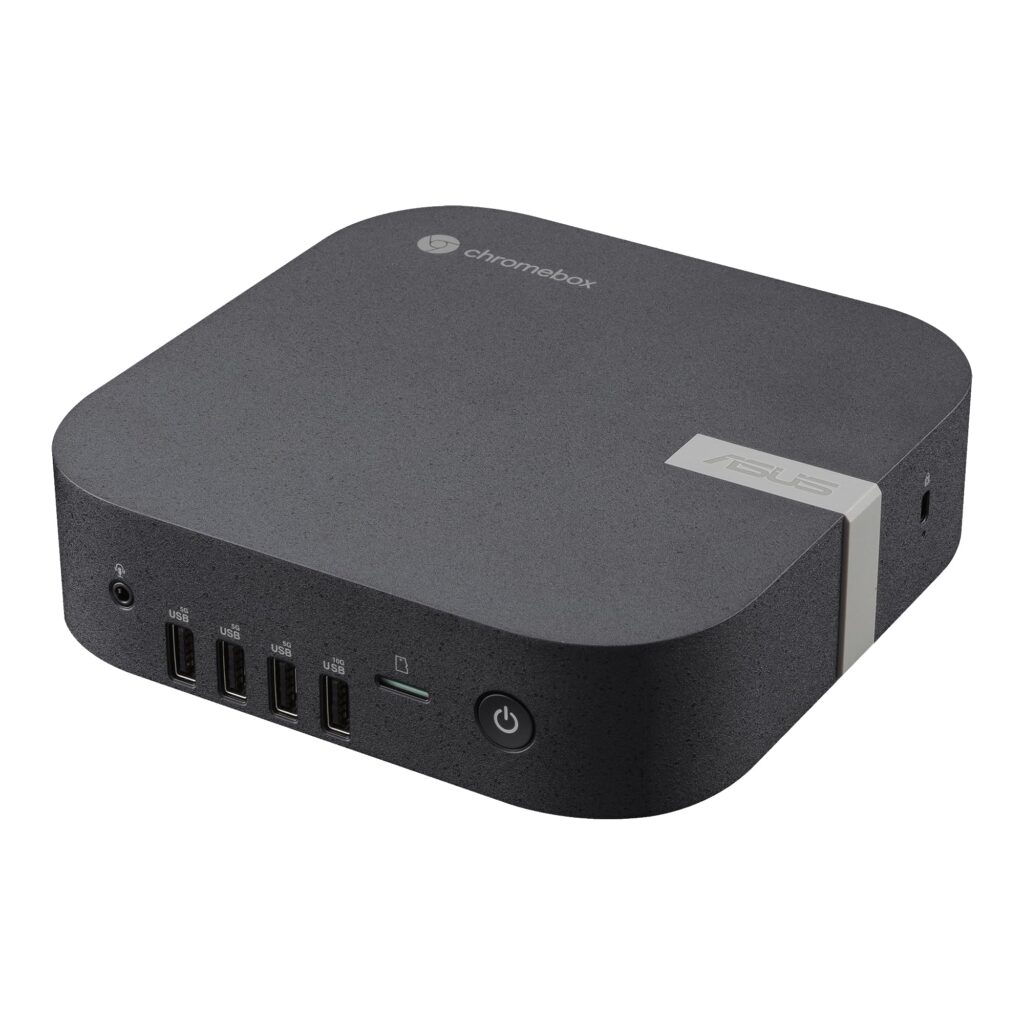
- Rich multi-display and peripheral I/O with dual HDMI 2.1 (4K@60Hz), DisplayPort 1.4, USB-C with DP 1.4/PD input, six USB-A ports, and Micro SD
- User-upgradeable dual-channel DDR4-3200 SO-DIMM slots (up to 32GB) and M.2 2280 PCIe 4.0 x4 NVMe bay
- Modern Intel Wi-Fi 6E and Bluetooth 5.4 wireless connectivity paired with 13th Gen Core i7-1355U efficiency
- No Thunderbolt 4 support, capping external USB bandwidth at 10 Gbps via USB 3.2 Gen 2
- Downgrades wired networking to 1GbE compared to the 2.5GbE port on the earlier Chromebox 5
- Moves from 12th Gen P-series to 13th Gen U-series silicon, reducing peak multi-core headroom
Overview
Built for multi-monitor desks, digital signage, and managed enterprise fleets, this compact ChromeOS desktop packs remarkable display and peripheral reach into a 6.56 x 6.53 x 1.81 in (166.5 x 165.8 x 45.9 mm) ECO Black chassis weighing just 1.76 lbs (0.8 kg). With two HDMI 2.1 ports rated up to 4K at 60Hz, a full-size DisplayPort 1.4 output, and a USB 3.2 Gen 2 Type-C port supporting both DisplayPort 1.4 and Power Delivery input, it drives dense workstation setups without leaning on dongles. Six USB Type-A ports split across the front and rear panels, alongside a front Micro SD card slot and audio jack, keep everyday peripherals within easy reach.
Under the hood, Intel’s 13th Gen Core i7-1355U processor pairs with Iris Xe graphics and a 90W (19V, 4.74A) DC power adapter, favoring steady mobile-class power efficiency over the higher-wattage P-series chips used in the previous generation. For buyers who want room to grow, the internal layout skips soldered compromises in favor of two SO-DIMM slots supporting up to 32GB of dual-channel DDR4-3200 memory and an M.2 2280 bay for PCIe 4.0 x4 NVMe SSDs from 128GB to 512GB. Networking relies on Intel Wi-Fi 6E and Bluetooth 5.4, backed by Chrome OS’s automatic firmware and OS update cadence.
That efficiency-first refresh brings clear I/O compromises for demanding desk setups. Wired networking drops to standard 1 Gigabit Ethernet instead of the 2.5 GbE port on the earlier Chromebox 5, and the omission of Thunderbolt 4 caps external USB transfers at 10 Gbps via USB 3.2 Gen 2. While the U-series silicon trades away some sustained multi-core punch compared to P-series alternatives, everyday office workloads, cloud apps, and multi-display kiosks get a quiet, easily serviceable ChromeOS box.
Technical Specifications
| Brand | ASUS |
| Model | Chromebox 5a Core i7 |
| Operating System | Chrome OS |
| Processor | Intel Core i7-1355U (13th Gen U-series) |
| Graphics | Intel Iris Xe Graphics |
| Memory Support | Up to 32GB (2 x 16GB DDR4-3200 SO-DIMM, dual-channel) |
| Storage Support | 128GB to 512GB M.2 2280 NVMe PCIe 4.0 x4 SSD |
| Wireless | Intel Wi-Fi 6E (Gig+), Bluetooth 5.4 |
| Ethernet | 10/100/1000 Mbps (1G LAN, RJ45) |
| Front I/O | 1 x USB 3.2 Gen 2 Type-A, 3 x USB 3.2 Gen 1 Type-A, 1 x Audio Jack, 1 x Micro SD card slot |
| Rear I/O | 2 x USB 3.2 Gen 2 Type-A, 1 x USB 3.2 Gen 2 Type-C (DP 1.4, PD in), 2 x HDMI 2.1 (up to 4K@60Hz), 1 x DisplayPort 1.4, 1 x RJ45 LAN, 1 x DC-in |
| Power Supply | 90W Adapter (19V DC, 4.74A) |
| Dimensions | 6.56 x 6.53 x 1.81 in (166.5 x 165.8 x 45.9 mm) |
| Weight | 1.76 lbs (0.8 kg) |
| Certifications | BSMI, CB, CE, FCC, UL, Energy Star, C-Tick, WiFi, RF, VCCI |
Primary Sources & Audited Citations
Recommended Alternatives in Mini PCs
At a Glance
How reliable is the ASUS Chromebox 5a Core i7 according to Mizex audits?
Buy this if you want a low-maintenance, multi-monitor ChromeOS desktop with accessible RAM and NVMe upgrades; skip it for the earlier Chromebox 5 or a Windows mini PC if you need P-series multi-core throughput or high-speed external docks.
What are the known quirks or drawbacks of the ASUS Chromebox 5a Core i7?
Our reliability audit identified the following documented caveats:
- No Thunderbolt 4 support, capping external USB bandwidth at 10 Gbps via USB 3.2 Gen 2
- Downgrades wired networking to 1GbE compared to the 2.5GbE port on the earlier Chromebox 5
- Moves from 12th Gen P-series to 13th Gen U-series silicon, reducing peak multi-core headroom
What are the key engineering highlights of the ASUS Chromebox 5a Core i7?
The top strengths recorded in our evaluation include:
- Rich multi-display and peripheral I/O with dual HDMI 2.1 (4K@60Hz), DisplayPort 1.4, USB-C with DP 1.4/PD input, six USB-A ports, and Micro SD
- User-upgradeable dual-channel DDR4-3200 SO-DIMM slots (up to 32GB) and M.2 2280 PCIe 4.0 x4 NVMe bay
- Modern Intel Wi-Fi 6E and Bluetooth 5.4 wireless connectivity paired with 13th Gen Core i7-1355U efficiency