
- Integrated 2.5GbE LAN interface for high-speed local network throughput
- Rockchip RK3568 SoC featuring a 1 TOPS NPU and Mali-G52 2EE GPU
- Straightforward drive installation and well-packaged physical hardware
- Comprehensive port selection including USB 3.0, USB Type-C, and HDMI
- Mandatory external cloud account and mobile app registration required for initial setup
- Lacks direct out-of-the-box local administrative control over LAN
Overview
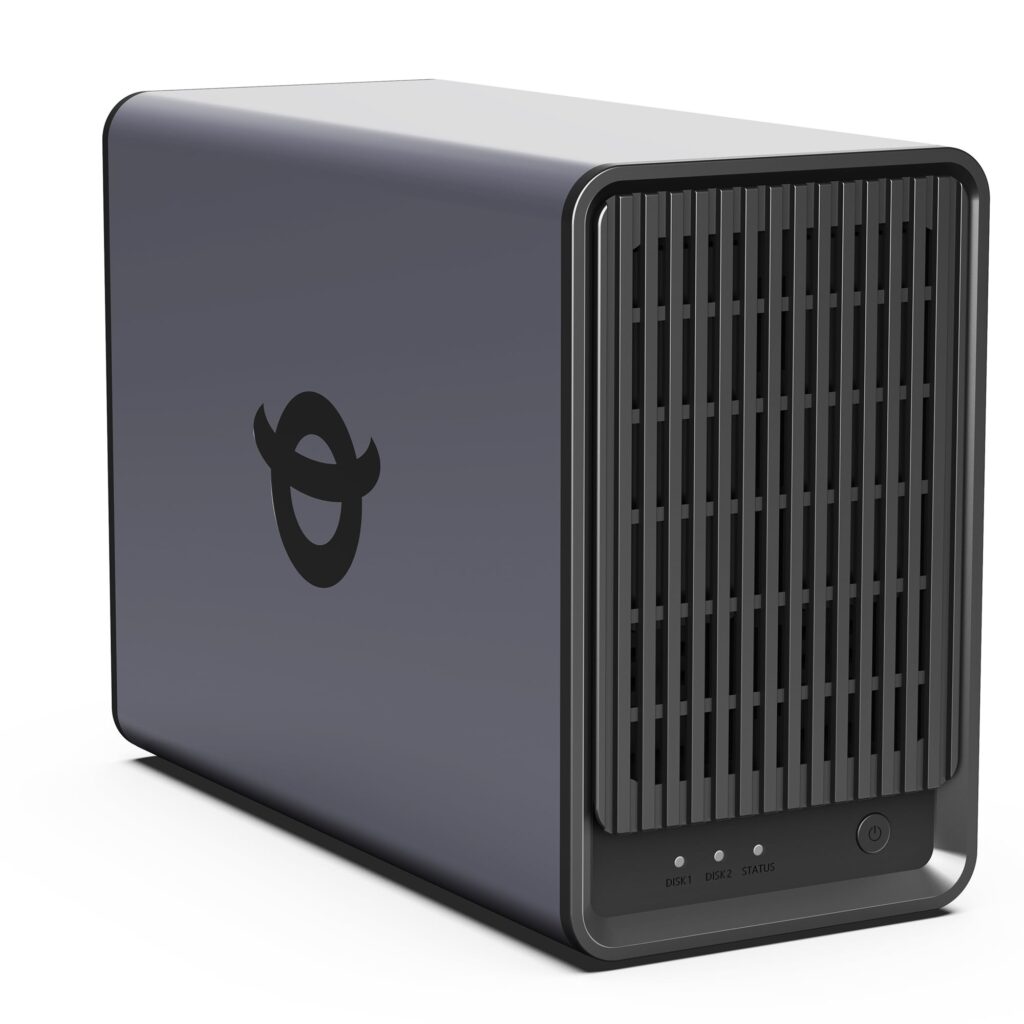
Routing storage traffic through a quad-core Rockchip RK3568 SoC, this two-bay network attached storage unit pairs ARM Cortex-A55 computing cores clocked at 2.0 GHz with a single 2.5GbE Ethernet interface to accelerate multi-gigabit local transfers. Internal processing is supplemented by an ARM Mali-G52 2EE graphics core and an integrated neural processing unit rated at 1 TOPS of INT8 inference performance, backed by 4GB of DDR4 system memory and 32GB of onboard eMMC flash for the operating environment. Peripheral connectivity includes standard USB 3.0, USB Type-C, and an HDMI output for direct local display routing.
Physical implementation centers on a compact dual-bay drive enclosure engineered for straightforward storage media installation and dependable drive seating. Internal drive bay tolerances provide positive alignment for standard SATA storage media within a well-packaged desktop chassis. Thermal dissipation leverages the modest electrical draw of the ARM Cortex-A55 silicon, managing enclosure thermals across concurrent storage workloads without demanding high-speed acoustic fan curves.
Firmware architecture defines the platform’s primary operational boundary for homelab operators. Initial device provisioning and administrative ownership mandate registration through the proprietary YXK mobile application and an external cloud account, bypassing traditional out-of-the-box local web GUI management over LAN. While this architecture provides streamlined mobile onboarding, it introduces third-party authentication dependencies that restrict air-gapped homelab deployments and local network isolation. For day-to-day operations, the platform delivers responsive 2.5GbE network throughput and edge AI acceleration, balanced against ongoing reliance on vendor cloud authentication.
Technical Specifications
| Brand | YXK |
| Model | Zero1 |
| Form Factor | 2-Bay Desktop NAS |
| Processor | Rockchip RK3568 (Quad-core ARM Cortex-A55 @ 2.0 GHz) |
| Graphics Processor | ARM Mali-G52 2EE |
| Neural Processing Unit | 1 TOPS |
| System Memory | 4GB DDR4 |
| Onboard Storage | 32GB eMMC |
| Drive Bays | 2-bay |
| Networking | 1x 2.5GbE LAN |
| I/O Ports | USB 3.0, USB Type-C, HDMI |
Primary Sources & Audited Citations
Recommended Alternatives in Network Attached Storage (NAS)

At a Glance
How reliable is the Yxk Zero1 2-Bay NAS Review: 2.5GbE Silicon Meets Cloud Reliance according to Mizex audits?
A capable 2.5GbE dual-bay storage appliance with useful edge NPU acceleration, best suited for users comfortable with mobile app onboarding rather than strict local-first network isolation.
What are the known quirks or drawbacks of the Yxk Zero1 2-Bay NAS Review: 2.5GbE Silicon Meets Cloud Reliance?
Our reliability audit identified the following documented caveats:
- Mandatory external cloud account and mobile app registration required for initial setup
- Lacks direct out-of-the-box local administrative control over LAN
What are the key engineering highlights of the Yxk Zero1 2-Bay NAS Review: 2.5GbE Silicon Meets Cloud Reliance?
The top strengths recorded in our evaluation include:
- Integrated 2.5GbE LAN interface for high-speed local network throughput
- Rockchip RK3568 SoC featuring a 1 TOPS NPU and Mali-G52 2EE GPU
- Straightforward drive installation and well-packaged physical hardware
- Comprehensive port selection including USB 3.0, USB Type-C, and HDMI