
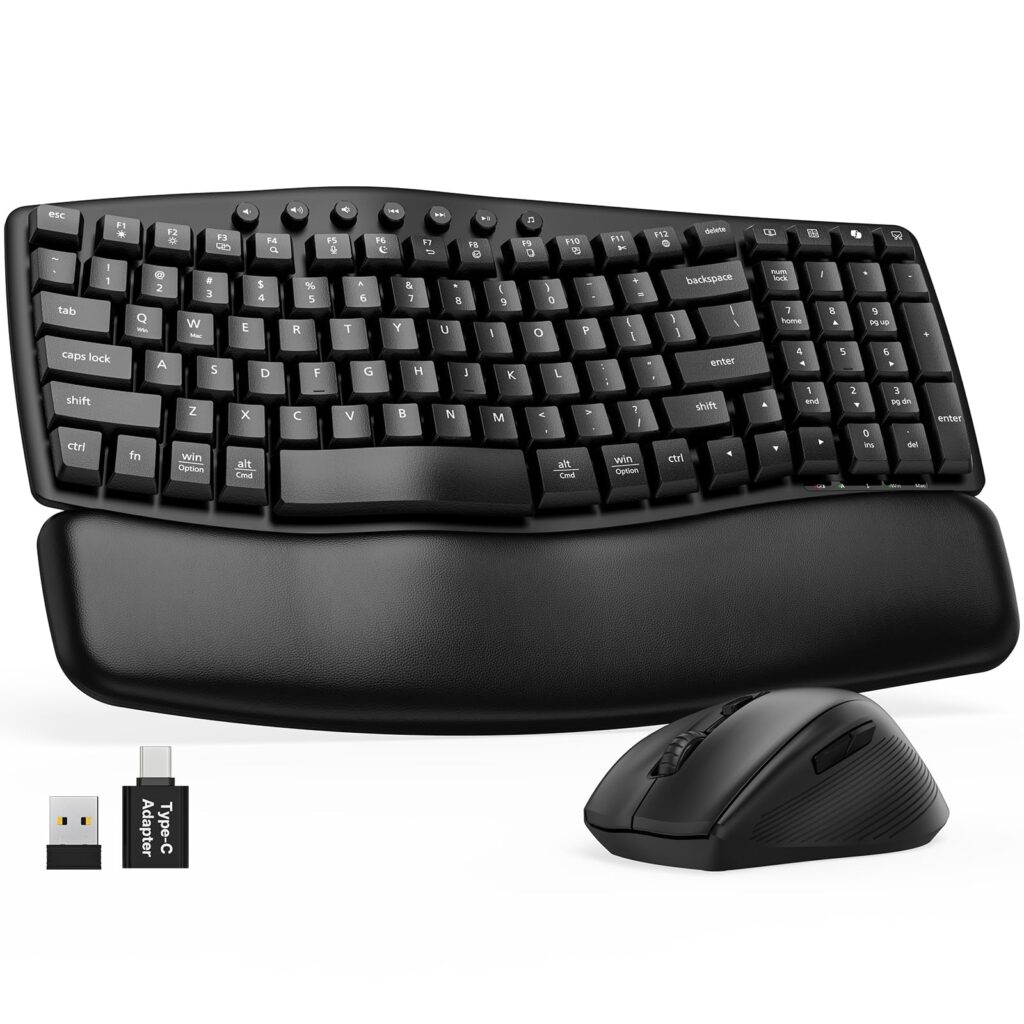
- Ergonomic wave layout and integrated cushioned wrist rest encourage neutral wrist posture
- Low-noise membrane switches and quiet-click mouse buttons minimize office ambient noise
- Unified 2.4 GHz RF wireless dongle with USB-C adapter provides plug-and-play multi-platform compatibility
- USB-C rechargeable internal batteries eliminate disposable alkaline cell replacements
- Sealed chassis and non-modular internal batteries prevent end-user repair or cell replacement
- Lacks multi-device Bluetooth pairing and programmable software configuration
Overview
Contoured to mirror the natural radial arc of the hands, the physical architecture of the Sablute MA61 pairs an inward-sloping wave keyframe with an integrated cushioned palm rest to reduce ulnar deviation and forearm pronation. The keyboard chassis is formed from textured ABS polymer, engineered with an elevated central profile and fixed wrist support that positions forearms in a neutral resting angle directly out of the box. Key travel relies on a responsive membrane dome matrix, delivering soft-landing actuation that dampens bottom-out vibration across long office sessions while maintaining dependable keycap alignment across both primary alphas and the integrated navigation cluster.
Acoustically and mechanically, both peripherals prioritize silent operation for shared and open-plan workspaces. The membrane switches operate with negligible clatter, while the companion optical mouse incorporates muted microswitches that dampen click reverberation without sacrificing tactile actuation feedback. Wireless connectivity is handled through a unified 2.4 GHz RF USB transceiver, accompanied by a Type-C adapter for modern laptop chassis, bypassing the connection latency and pairing overhead of standard office Bluetooth stacks. Power delivery is managed by internal rechargeable lithium-ion cells charged over USB-C, supported by aggressive multi-stage sleep firmware that cuts idle current draw when idle to extend operational intervals between charging cycles.
From a practical engineering and maintenance standpoint, the combo is designed around dedicated plug-and-play simplicity rather than deep firmware customization. Operating system toggles allow quick modifier key remapping between Windows and macOS environments directly via hardware key shortcuts, though the absence of companion software precludes custom macro creation or advanced layer assignments. The integrated battery and sealed membrane chassis prevent modular component replacement, representing an expected trade-off in consumer desktop bundles. In return, the hardware delivers a stable, low-fatigue typing station with consistent wireless responsiveness and zero configuration friction for daily office productivity.
Technical Specifications
| Brand | SABLUTE |
| Model | MA61 Wireless Keyboard and Mouse Combo |
| Device Type | Wireless Keyboard and Mouse Combo |
| Keyboard Layout | Compact Wave Ergonomic |
| Key Switch Mechanism | Membrane Dome |
| Wrist Rest | Integrated Cushioned Palm Rest |
| Wireless Connectivity | 2.4 GHz RF |
| Transceiver Interface | USB-A Receiver with USB-C Adapter |
| Power Source | Integrated Rechargeable Lithium-ion Battery |
| Charging Port | USB-C |
| Mouse Sensor Type | Optical |
| Mouse Sensitivity | 3 Adjustable DPI Presets |
| Operating System Support | Windows, macOS |
Recommended Alternatives in Keyboards & Mice
At a Glance
How reliable is the SABLUTE MA61 Wireless Keyboard and Mouse Combo Review: Contoured Typing Meets Budget Wireless according to Mizex audits?
An accessible choice for everyday office typists seeking wave ergonomics and quiet operation, provided multi-device Bluetooth switching and mechanical switch longevity are not required.
What are the known quirks or drawbacks of the SABLUTE MA61 Wireless Keyboard and Mouse Combo Review: Contoured Typing Meets Budget Wireless?
Our reliability audit identified the following documented caveats:
- Sealed chassis and non-modular internal batteries prevent end-user repair or cell replacement
- Lacks multi-device Bluetooth pairing and programmable software configuration
What are the key engineering highlights of the SABLUTE MA61 Wireless Keyboard and Mouse Combo Review: Contoured Typing Meets Budget Wireless?
The top strengths recorded in our evaluation include:
- Ergonomic wave layout and integrated cushioned wrist rest encourage neutral wrist posture
- Low-noise membrane switches and quiet-click mouse buttons minimize office ambient noise
- Unified 2.4 GHz RF wireless dongle with USB-C adapter provides plug-and-play multi-platform compatibility
- USB-C rechargeable internal batteries eliminate disposable alkaline cell replacements