
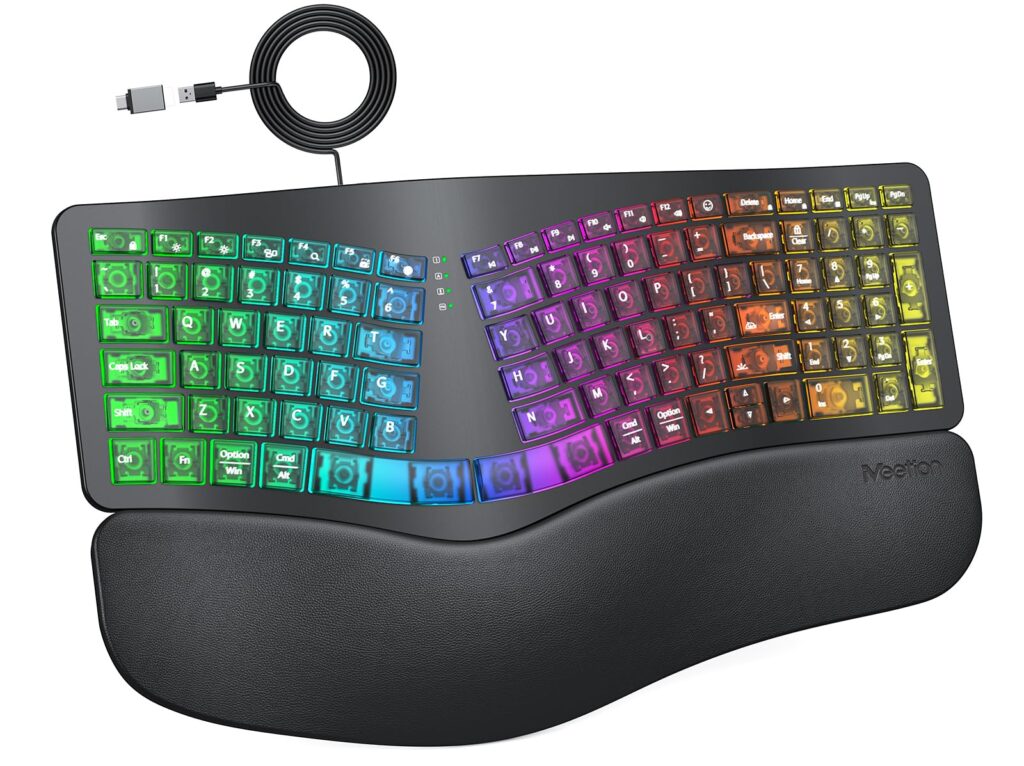
- Curved split-key geometry and integrated wide palm rest encourage neutral wrist pronation during extended desktop typing
- Cushioned membrane dome switches deliver near-silent acoustic performance suitable for quiet open-office environments
- Onboard multi-color backlighting provides four brightness stages and automatic five-minute sleep timeout without bloatware
- Bundled USB-A to USB-C adapter ensures plug-and-play compatibility across modern USB-C laptops and legacy desktops
- Lightweight all-plastic ABS chassis exhibits noticeable torsional flex under centered typing pressure
- Integrated non-detachable USB cable and non-modular membrane switches prevent individual component repair or replacement
- Cross-platform layout changes require manual hotkey switching rather than automatic OS handshake detection
Overview
Shifting away from the rigid flat profile of standard office peripherals, the split-wave architecture angles the alphanumeric clusters outward to promote natural forearm alignment and alleviate ulnar deviation. Resting hands across the wide integrated palm support immediately shifts typing pressure away from the carpals, positioning wrists in a neutral posture throughout long workdays. Beneath the low-profile ABS keycaps, cushioned membrane domes provide a soft, forgiving bottom-out that keeps keystroke noise down to a discreet whisper in open workspaces, avoiding the intrusive clatter common to unpadded office peripherals.
Internally, the hardware relies on a streamlined USB controller programmed with direct hardware-level shortcuts, bypassing the need for intrusive background software suites or cloud-tethered configuration utilities. Backlighting is handled entirely on-device, offering seven solid hues and dynamic breathing transitions adjustable across four brightness tiers. To prevent unnecessary energy consumption and heat dissipation from continuous illumination, an internal timer automatically suspends the LEDs after five minutes of inactivity, instantly waking back to life on the first keystroke.
In day-to-day productivity, the full-size layout preserves dedicated navigation clusters and a full numeric keypad, ensuring seamless spreadsheet entry alongside improved ergonomic posture. The lightweight ABS casing keeps the overall footprint manageable on standard desks, though the chassis does exhibit noticeable deck flex when pressing firmly against the center arch. Connectivity is straightforward via a fixed 4.9-foot (1.5 m) cable with an included Type-C adapter, though switching between Windows and macOS environments requires a brief manual key combination to ensure command and alt keys align with the target operating system.
Technical Specifications
| Brand | Meetion |
| Model | K2000 |
| Layout Format | Full-Size Split-Wave Ergonomic with Integrated Palm Rest |
| Key Count | 104 Keys |
| Switch Type | Low-profile tactile membrane rubber-dome |
| Connection Interface | Wired USB 2.0 Type-A (USB Type-C adapter included) |
| Cable Length | 4.9 ft (1.5 m) integrated PVC cable |
| Chassis Material | Acrylonitrile Butadiene Styrene (ABS) thermoplastic |
| Backlighting | Multi-mode RGB / 7-color static LED with 4 brightness levels |
| Power Management | 5-minute idle auto-sleep LED timeout |
| Operating Voltage / Current | 5V DC / <300 mA |
| Dimensions | 19.09 x 10.04 x 1.83 in (485 x 255 x 46.5 mm) |
| Weight | 2.05 lbs (930 g) |
| Platform Compatibility | Windows 10/11, macOS 10.13+, iPadOS, Android |
Recommended Alternatives in Keyboards & Mice
At a Glance
How reliable is the MEETION K2000 Wired Split Ergonomic Keyboard Review: Accessible Split-Wave Desktop Ergonomics according to Mizex audits?
An accessible entry point for typists seeking split-wave posture relief, best suited for standard office desks that do not demand mechanical switch modularity or custom macro remapping.
What are the known quirks or drawbacks of the MEETION K2000 Wired Split Ergonomic Keyboard Review: Accessible Split-Wave Desktop Ergonomics?
Our reliability audit identified the following documented caveats:
- Lightweight all-plastic ABS chassis exhibits noticeable torsional flex under centered typing pressure
- Integrated non-detachable USB cable and non-modular membrane switches prevent individual component repair or replacement
- Cross-platform layout changes require manual hotkey switching rather than automatic OS handshake detection
What are the key engineering highlights of the MEETION K2000 Wired Split Ergonomic Keyboard Review: Accessible Split-Wave Desktop Ergonomics?
The top strengths recorded in our evaluation include:
- Curved split-key geometry and integrated wide palm rest encourage neutral wrist pronation during extended desktop typing
- Cushioned membrane dome switches deliver near-silent acoustic performance suitable for quiet open-office environments
- Onboard multi-color backlighting provides four brightness stages and automatic five-minute sleep timeout without bloatware
- Bundled USB-A to USB-C adapter ensures plug-and-play compatibility across modern USB-C laptops and legacy desktops