
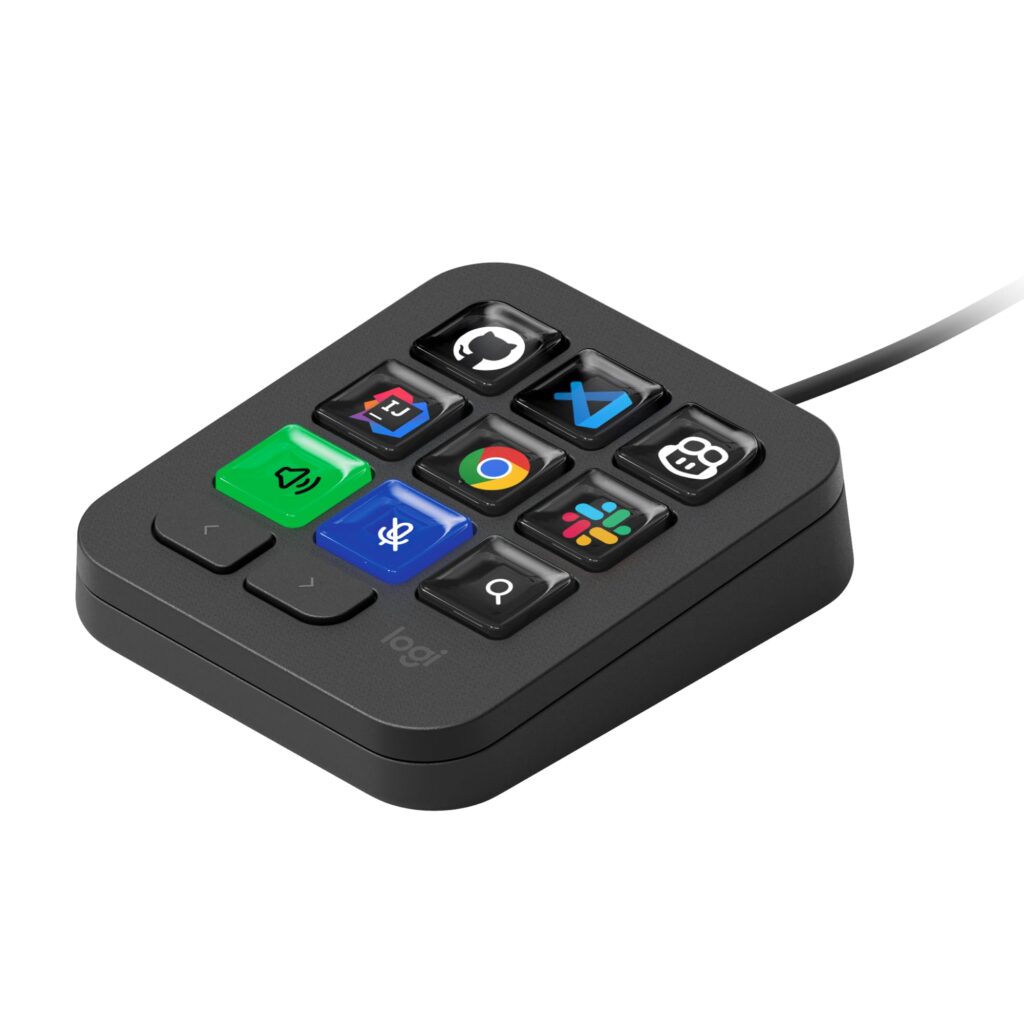
- Nine dynamic LCD keys provide customizable visual icons and real-time state feedback
- Native workflow integrations with VS Code, IntelliJ IDEA, GitHub Copilot, and Claude Code
- Supports up to 15 profile pages via two dedicated physical navigation buttons
- Detachable angled kickstand provides stable ergonomic positioning on the desk
- Requires a permanent wired USB-C connection with no wireless or battery-powered mode
- Omits rotary dials and jog wheels found on the companion MX Creative Console
Overview
Positioned alongside primary desktop peripherals on an included detachable angled kickstand, the compact console establishes a low-profile desk footprint engineered for rapid macro execution. The input surface centers around nine individually programmable LCD keys, complemented by two dedicated physical paging buttons that cycle through up to 15 distinct profile pages. Constructed from recycled plastic in a matte Graphite finish, the enclosure maintains structural stability during repeated off-axis button presses, while the angled stand orients the display tiles directly into the operator’s line of sight to maximize icon legibility across varying ambient lighting conditions.
Power and data transfer route exclusively through a wired USB-C interface, providing direct bus communication that sidesteps wireless latency and battery maintenance. System orchestration relies on the Logi Options+ software ecosystem, supported by the Logitech Actions SDK and Logitech Marketplace for modular macro deployment. Firmware-level profiles interface directly with major development environments and artificial intelligence platforms, including VS Code, IntelliJ IDEA, GitHub Copilot, and Claude Code. With power drawn directly from the host USB bus to illuminate the display keys and manage internal logic, the device operates passively and silently, generating negligible heat and zero acoustic disturbance during everyday programming workflows.
In everyday desktop deployment, the physical separation between dynamic LCD display keys and dedicated navigation buttons allows users to execute complex multi-step automations without breaking focus from active code windows. The reliance on a constant USB-C connection limits mobility compared to wireless peripherals, and the hardware configuration intentionally foregoes rotary encoders or jog dials in favor of a strictly grid-based input matrix. Nonetheless, the pairing of extensible software profiles with dynamic visual feedback delivers reliable, distraction-free control tailored specifically to developer and power-user workflows.
Technical Specifications
| Brand | Logitech |
| Model | MX Keypad |
| Key Type | Programmable LCD keys |
| Key Count | 9 dynamic display keys |
| Page Navigation Buttons | 2 physical buttons |
| Maximum Profile Pages | Up to 15 pages |
| Connectivity | USB-C wired |
| Housing Material | Recycled plastic |
| Color Options | Graphite |
| Software Ecosystem | Logi Options+, Actions SDK, Logitech Marketplace |
| Native Integrations | VS Code, IntelliJ IDEA, GitHub Copilot, Claude Code |
| Included Accessories | Angled kickstand, USB-C cable |
Primary Sources & Audited Citations
- Logitech Unveils MX Keypad for Developers: The Customizable Multi-App AI Control Center
- Logitech MX Keypad: AI Control Center for Developers Costs 99 Euros - Basic Tutorials
- Logitech releases the MX Keypad to keep idle fingers busy - The Register
- Logitech MX Keypad Review: The Remote Control for Your AI Life - TechPP
- Logitech Releases the Developer-Focused MX Keypad for AI Automation - MacStories
- Logitech MX Keypad Turns AI Coding Into a Nine-Key Hardware Bet - Remio
Recommended Alternatives in Keyboards & Mice
At a Glance
How reliable is the Logitech MX Keypad Review: Dedicated Nine-Key Desktop Automation according to Mizex audits?
Recommended for software engineers and power users seeking dedicated visual execution for AI prompts and IDE shortcuts, provided a wired USB-C desk setup fits your workspace.
What are the known quirks or drawbacks of the Logitech MX Keypad Review: Dedicated Nine-Key Desktop Automation?
Our reliability audit identified the following documented caveats:
- Requires a permanent wired USB-C connection with no wireless or battery-powered mode
- Omits rotary dials and jog wheels found on the companion MX Creative Console
What are the key engineering highlights of the Logitech MX Keypad Review: Dedicated Nine-Key Desktop Automation?
The top strengths recorded in our evaluation include:
- Nine dynamic LCD keys provide customizable visual icons and real-time state feedback
- Native workflow integrations with VS Code, IntelliJ IDEA, GitHub Copilot, and Claude Code
- Supports up to 15 profile pages via two dedicated physical navigation buttons
- Detachable angled kickstand provides stable ergonomic positioning on the desk