
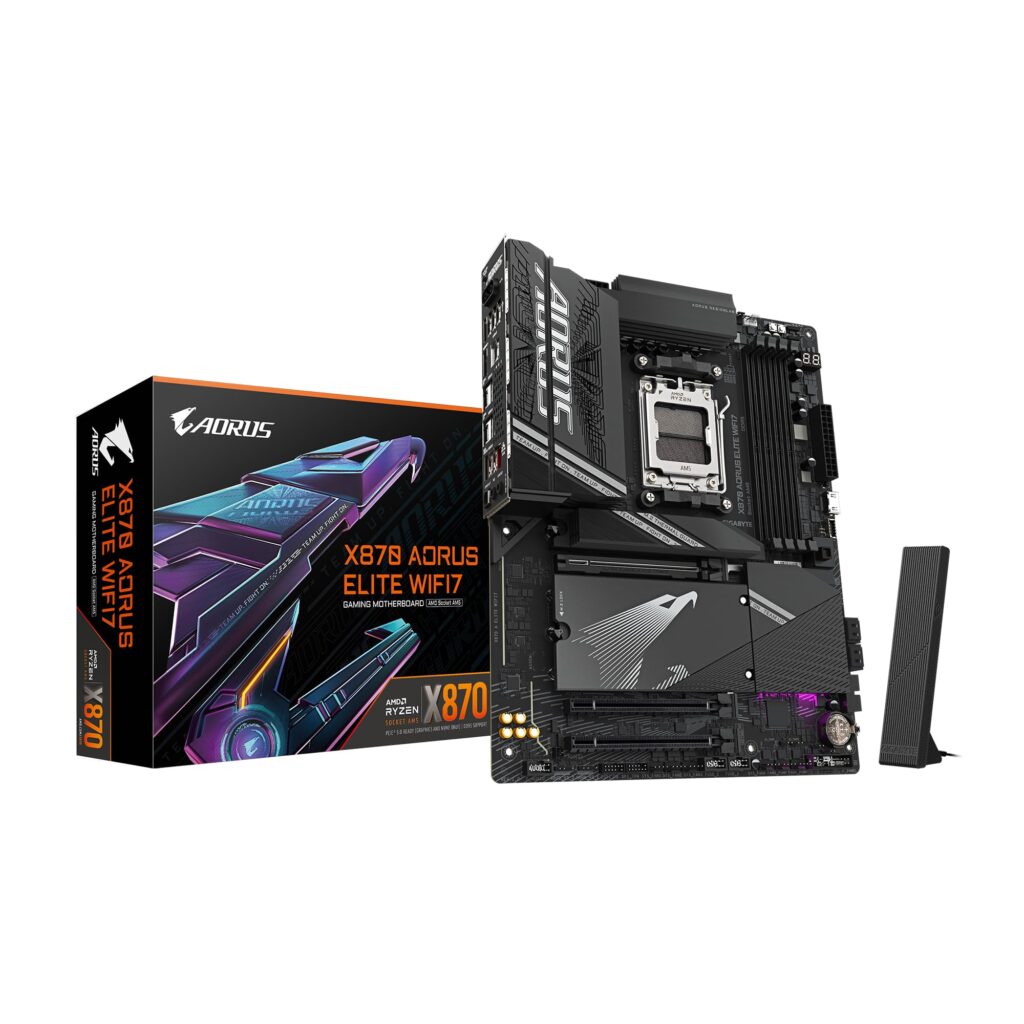
- Four M.2 slots with three wired for PCIe 5.0 x4 storage
- Dual USB4 Type-C ports with DisplayPort Alt Mode and Wi-Fi 7
- Screwless EZ-Latch Plus, EZ-Latch Click, and WIFI EZ-Plug assembly
- Digital twin 16+2+2 phase VRM with passive VRM Thermal Armor Advanced
- Limited to 2.5GbE LAN instead of 5GbE and relies heavily on USB 2.0 ports
- Lower rated DDR5 overclocking ceiling (8000 MT/s) than flagship X870E boards
- No integrated heatsink lighting
Overview
Building a modern AM5 rig often involves wrestling with tiny M.2 screws and cramped graphics card release tabs, yet GIGABYTE strips out that friction across the board here. From the quick-release PCIe UD Slot X with its reinforcing metal backplate to the screwless EZ-Latch Click heatsinks and snap-in WIFI EZ-Plug antenna connector, the layout prioritizes clean assembly alongside support for Ryzen 7000, 8000, and 9000 series processors.
Under the hood, a digital twin 16+2+2 phase power delivery setup sits beneath the VRM Thermal Armor Advanced heatsink array, while M.2 Thermal Guard L covers three PCIe 5.0 x4 M.2 slots and a fourth M.2 bay without relying on noisy miniature fans. Memory support scales up to 256GB of dual-channel DDR5 across four DIMMs with AMD EXPO profiles rated up to 8000 MT/s, complemented by Realtek ALC1220 audio with audiophile-grade capacitors and Q-Flash Auto Scan for straightforward BIOS updates.
Connectivity covers the essentials for high-bandwidth peripherals with dual USB4 Type-C ports supporting DisplayPort Alt Mode, an HDMI output, an onboard Sensor Panel Link, and Wi-Fi 7 wireless networking. The main compromises show up on the rear panel and networking front, where GIGABYTE sticks with 2.5GbE LAN instead of 5GbE, leans heavily on USB 2.0 ports alongside its high-speed ports, omits heatsink lighting, and caps rated DDR5 tuning below pricier X870E flagships.
Technical Specifications
| Brand | GIGABYTE |
| Model | X870 AORUS Elite WIFI7 |
| Socket | AMD Socket AM5 |
| Chipset | AMD X870 |
| CPU Support | AMD Ryzen 9000 / 8000 / 7000 Series Processors |
| Form Factor | ATX |
| VRM Configuration | Digital twin 16+2+2 phases |
| Memory Support | Dual Channel DDR5, 4 DIMMs (AMD EXPO), up to 256GB, up to 8000 MT/s |
| Primary Expansion Slot | 1x PCIe 5.0 x16 (PCIe UD Slot X with metal backplate) |
| Storage | 4x M.2 slots (3x PCIe 5.0 x4) |
| USB Connectivity | Dual USB4 Type-C (DP-Alt), USB 2.0 |
| Display Outputs | HDMI, Dual USB4 Type-C (DP-Alt), Onboard Sensor Panel Link |
| Networking | 2.5GbE LAN, Wi-Fi 7 (WIFI EZ-Plug directional antenna) |
| Audio | Realtek ALC1220 HD Audio with audiophile-grade capacitors |
| Thermal Hardware | VRM Thermal Armor Advanced, M.2 Thermal Guard L |
| DIY Features | EZ-Latch Plus, EZ-Latch Click, WIFI EZ-Plug, Q-Flash Auto Scan |
Primary Sources & Audited Citations
Recommended Alternatives in Motherboards
At a Glance
How reliable is the GIGABYTE X870 AORUS Elite WIFI7 according to Mizex audits?
Buy this if you want a clean Ryzen 7000, 8000, or 9000 platform with Wi-Fi 7 and three Gen5 M.2 bays; step up to an X870E board if you need 5GbE Ethernet, faster rear USB ports, or memory tuning past 8000 MT/s.
What are the known quirks or drawbacks of the GIGABYTE X870 AORUS Elite WIFI7?
Our reliability audit identified the following documented caveats:
- Limited to 2.5GbE LAN instead of 5GbE and relies heavily on USB 2.0 ports
- Lower rated DDR5 overclocking ceiling (8000 MT/s) than flagship X870E boards
- No integrated heatsink lighting
What are the key engineering highlights of the GIGABYTE X870 AORUS Elite WIFI7?
The top strengths recorded in our evaluation include:
- Four M.2 slots with three wired for PCIe 5.0 x4 storage
- Dual USB4 Type-C ports with DisplayPort Alt Mode and Wi-Fi 7
- Screwless EZ-Latch Plus, EZ-Latch Click, and WIFI EZ-Plug assembly
- Digital twin 16+2+2 phase VRM with passive VRM Thermal Armor Advanced