
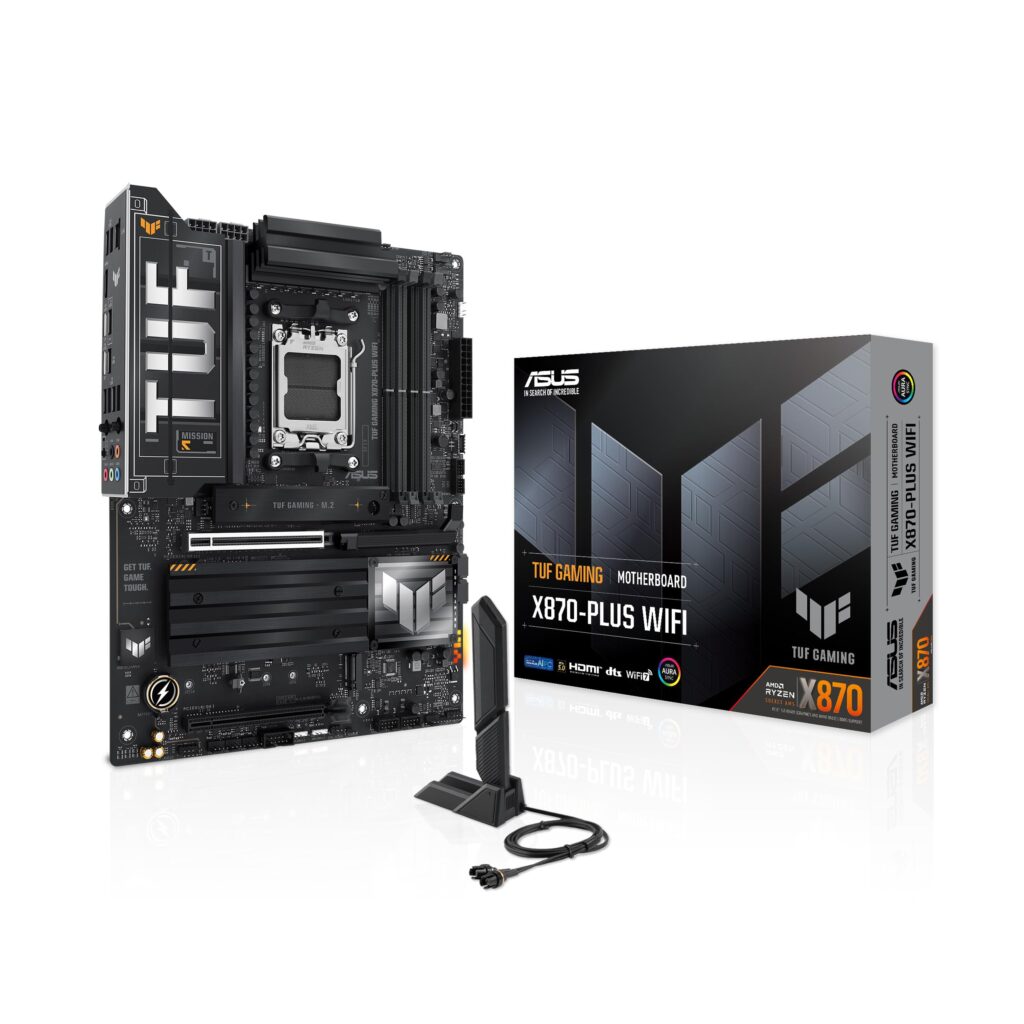
- 16+2+1 stage 80A VRM with enlarged heatsinks easily sustains high-core-count Ryzen 9000 and 7000 CPUs
- Dual 40Gbps USB4 Type-C ports with DisplayPort 1.4a video output alongside Wi-Fi 7, Bluetooth 5.4, and 2.5GbE
- Thoughtful builder ergonomics featuring PCIe Slot Q-Release, M.2 Q-Latch, Q-Antenna, and rear BIOS Flashback
- Eight 4-pin PWM headers, passive chipset cooling, and generous 3.58 in (91 mm) PCIe and 2.20 in (56 mm) DIMM clearances
- Populating M.2_2 drops the primary PCIe 5.0 x16 slot to x8 mode (and M.2_2 is unsupported on Ryzen 8000 CPUs), while M.2_4 disables the secondary PCIe 4.0 x4 slot
- Only two SATA 6Gb/s ports for legacy drives, and one of the four M.2 slots lacks a bundled heatsink
- Relies on EZ Debug LEDs rather than an onboard numeric POST code display
Overview
ASUS builds this ATX motherboard around a single-chip X870 layout that brings high-speed modern I/O to mainstream AM5 rigs without stepping up to dual-chipset X870E complexity. Power delivery is anchored by a 16+2+1 stage 80A VRM under enlarged heatsinks, giving Ryzen 7000 and 9000 Series processors plenty of electrical headroom for sustained multi-core loads. Around the rear panel, an ASMedia ASM4242 controller drives dual 40Gbps USB4 Type-C ports with DisplayPort 1.4a video output, paired with Wi-Fi 7, Bluetooth 5.4, a Realtek RTL8125BG 2.5GbE port, and isolated Realtek ALC1220P audio.
Builder ergonomics and physical layout show careful attention to real-world hardware clearance. Measuring 12.0 x 9.6 in (305 x 244 mm), the PCB leaves 3.58 in (91 mm) between the CPU socket center and the primary SafeSlot PCIe 5.0 x16 slot, plus 2.20 in (56 mm) to the first DDR5 DIMM slot—ample room for bulky twin-tower air coolers and tall memory modules. Tool-less touches like PCIe Slot Q-Release, M.2 Q-Latch, Q-Antenna, and rear BIOS Flashback take the friction out of assembly, while passive chipset cooling and eight 4-pin PWM headers—including dedicated AIO and water pump outputs—give builders granular control over system airflow.
Because X870 relies on a single Promontory 21 chipset, storage and expansion require a bit of pre-build planning. Two of the four M.2 slots run at PCIe 5.0 x4 and two at PCIe 4.0 x4, with the catch that populating M.2_2 cuts the primary GPU slot down to x8 lanes (and M.2_2 is disabled entirely on Ryzen 8000 CPUs), while occupying M.2_4 shuts off the secondary PCIe 4.0 x4 slot. Legacy storage stops at two SATA 6Gb/s ports, only three of the four M.2 bays receive bundled heatsinks, and boot diagnostics rely on EZ Debug LEDs rather than a two-digit POST code readout.
Technical Specifications
| Model | ASUS TUF Gaming X870-PLUS WiFi |
| Form Factor | ATX (12.0 x 9.6 in / 305 x 244 mm) |
| Socket & Chipset | AMD Socket AM5, AMD X870 (Promontory 21) |
| Supported CPUs | AMD Ryzen 9000, 8000, and 7000 Series Desktop Processors |
| VRM Configuration | 16+2+1 stage 80A (19-phase CPU power delivery) |
| Memory Support | 4 x DDR5 DIMM (dual channel), up to 256GB, 8000+ MT/s (OC), On-Die ECC, AMD EXPO, ASUS AEMP |
| PCIe Expansion Slots | 1 x PCIe 5.0 x16 SafeSlot (x8 if M.2_2 populated; PCIe 4.0 x8/x4 on Ryzen 8000), 1 x PCIe 4.0 x16 (x4 mode, disabled if M.2_4 populated) |
| M.2 Storage | 4 x M.2 (M.2_1: 2280 PCIe 5.0 x4 [4.0 x4 on Ryzen 8000]; M.2_2: 2280 PCIe 5.0 x4 [unsupported on Ryzen 8000]; M.2_3: 2280 PCIe 4.0 x4; M.2_4: 2242/2260/2280/22110 PCIe 4.0 x4) |
| SATA & RAID | 2 x SATA 6Gb/s; AMD RAIDXpert2 (PCIe RAID 0/1/5/10, SATA RAID 0/1; RAID 5 on Ryzen 9000 Series only) |
| USB4 Controller | ASMedia ASM4242 |
| Rear USB Ports | 2 x USB4 Type-C (40Gbps, DP 1.4a), 4 x USB 3.2 Gen 2 Type-A, 3 x USB 3.2 Gen 1 Type-A, 1 x USB 2.0 Type-A |
| Internal USB Headers | 1 x USB 3.2 Gen 2x2 Type-C, 1 x USB 3.2 Gen 1, 4 x USB 2.0 |
| Display Outputs | 1 x HDMI 2.1 (4K@60Hz), 2 x USB4 Type-C DisplayPort 1.4a (4K@60Hz) |
| Ethernet | 1 x Realtek RTL8125BG 2.5GbE RJ-45 |
| Wireless | Wi-Fi 7 (802.11 a/b/g/n/ac/ax/be), Bluetooth 5.4 |
| Audio Codec | Realtek ALC1220P (7.1-channel, isolated audio PCB layers, de-pop circuit) |
| Cooling & Fan Headers | Enlarged VRM heatsinks, passive chipset heatsink, 2 x M.2 heatsinks (covering 3 of 4 slots), 8 x 4-pin PWM |
| DIY & Diagnostics | EZ Debug LEDs, rear BIOS Flashback, Clear CMOS, PCIe Slot Q-Release, M.2 Q-Latch, Q-Antenna |
| Physical Clearances | 3.58 in (91 mm) socket center to first PCIe x16 slot; 2.20 in (56 mm) socket center to first DIMM slot |
Primary Sources & Audited Citations
Recommended Alternatives in Motherboards
At a Glance
How reliable is the ASUS TUF Gaming X870-PLUS WiFi according to Mizex audits?
Buy this if you want USB4, Wi-Fi 7, and flagship-ready VRM power for a modern single-GPU AM5 build; look at an X870E board if you run large SATA storage arrays, multiple add-in cards, or want an onboard POST code display.
What are the known quirks or drawbacks of the ASUS TUF Gaming X870-PLUS WiFi?
Our reliability audit identified the following documented caveats:
- Populating M.2_2 drops the primary PCIe 5.0 x16 slot to x8 mode (and M.2_2 is unsupported on Ryzen 8000 CPUs), while M.2_4 disables the secondary PCIe 4.0 x4 slot
- Only two SATA 6Gb/s ports for legacy drives, and one of the four M.2 slots lacks a bundled heatsink
- Relies on EZ Debug LEDs rather than an onboard numeric POST code display
What are the key engineering highlights of the ASUS TUF Gaming X870-PLUS WiFi?
The top strengths recorded in our evaluation include:
- 16+2+1 stage 80A VRM with enlarged heatsinks easily sustains high-core-count Ryzen 9000 and 7000 CPUs
- Dual 40Gbps USB4 Type-C ports with DisplayPort 1.4a video output alongside Wi-Fi 7, Bluetooth 5.4, and 2.5GbE
- Thoughtful builder ergonomics featuring PCIe Slot Q-Release, M.2 Q-Latch, Q-Antenna, and rear BIOS Flashback
- Eight 4-pin PWM headers, passive chipset cooling, and generous 3.58 in (91 mm) PCIe and 2.20 in (56 mm) DIMM clearances