
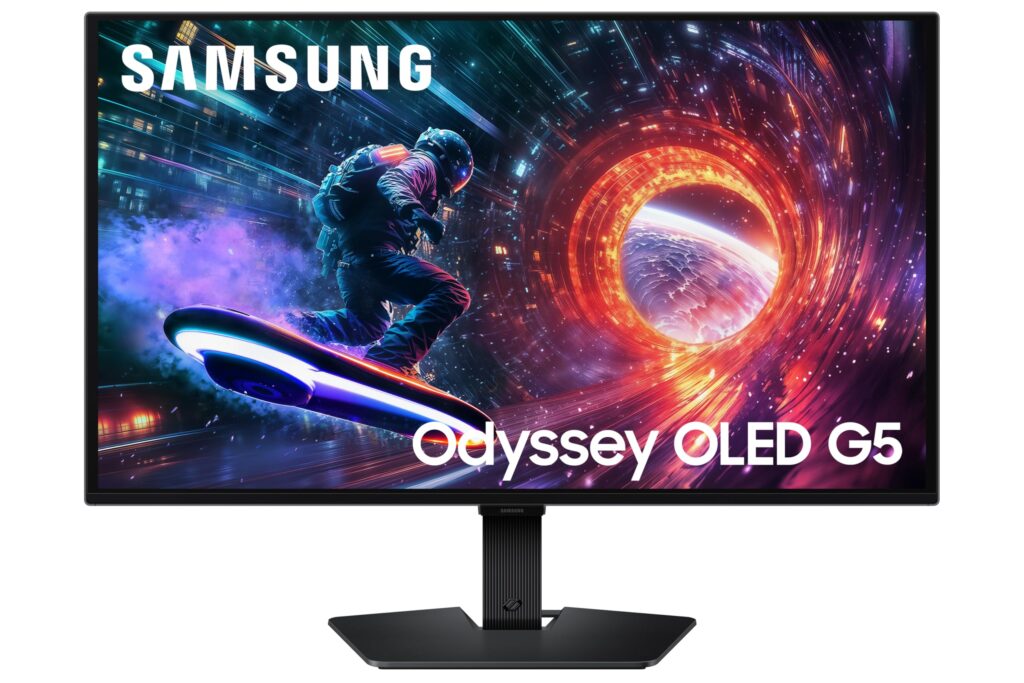
- Per-pixel QD-OLED illumination with 1,000,000:1 static contrast and deep blacks
- 0.03ms GtG pixel response and 180Hz DisplayPort refresh rate with 48–180Hz VRR and LFC
- 99% DCI-P3 color coverage, 10-bit depth, and HDR10 support
- Matte anti-glare finish and flicker-free panel with overprovisioned border pixels
- HDMI 2.0 caps refresh rate at 144Hz; DisplayPort is required for 180Hz
- Modest 200 cd/m² typical SDR brightness and tilt-only stand without height adjustment
- Sparse I/O with no USB-C input or USB hub, plus inherent OLED burn-in risk on static elements
Overview
Most entry-tier gaming monitors force you to pick between fast response times and deep blacks, yet this 27-inch class (26.5-inch viewable) QD-OLED panel puts both on the desk at once. Built around Samsung Display’s self-emissive QD-OLED architecture at 2560 x 1440 resolution, it hits a 1,000,000:1 static contrast ratio with 0.03ms GtG pixel transitions and 99% DCI-P3 coverage in 10-bit color. Motion stays crisp up to 180Hz with Adaptive-Sync across a 48–180Hz VRR range including Low Framerate Compensation, backed by NVIDIA G-Sync Compatible and AMD FreeSync Premium Pro certification. A matte anti-glare finish tames harsh room reflections better than glossy OLEDs, though typical SDR luminance tops out at 200 cd/m², meaning light-controlled rooms suit it far better than sunlit offices.
To keep the package lean, Samsung stripped the chassis down to bare essentials. You get a single DisplayPort (1.2/1.4), one HDMI 2.0 input, and a 3.5mm headphone jack controlled via a rear central joystick—with no USB-C port or integrated USB hub to tidy up desk peripherals. That port selection matters in daily use: you will need DisplayPort to unlock the full 180Hz ceiling, since HDMI 2.0 tops out at 144Hz. Out of the box, the included stand offers tilt-only adjustment, so anyone wanting height, swivel, or pivot ergonomics will want to take advantage of the 100 x 100 mm VESA mount. Power delivery runs through an external DC brick, moving conversion heat outside the slim display enclosure and keeping the monitor’s power profile modest alongside its conservative 200 cd/m² SDR target.
Long-term usability hinges on how well an OLED handles everyday desktop habits. Samsung builds in an overprovisioned active pixel border area to mitigate image retention alongside flicker-free operation and HDR10 support, giving gamers reliable hardware protection without distracting dimming behavior. Still, static taskbars, HUDs, and spreadsheet grids carry the inherent OLED burn-in risk over years of heavy productivity use, making screen savers and dark themes smart habits. For PC players who care about instant pixel response and true per-pixel contrast more than desk-stand flexibility or extra ports, the trade-offs are straightforward and easy to plan around.
Technical Specifications
| Brand | Samsung |
| Model | 27" Odyssey OLED G5 (G50SF) |
| Model Identifiers | G50SF, S27FG50, LS27FG502SUXXU, LS27FG500SNXZA |
| Panel Size | 27-inch class / 68.6 cm (26.5-inch / 67.3 cm viewable) |
| Panel Type | Samsung Display QD-OLED |
| Resolution | 2560 x 1440 (QHD) |
| Refresh Rate | 180Hz (DisplayPort), 144Hz max (HDMI 2.0) |
| Response Time | 0.03ms GtG |
| Static Contrast Ratio | 1,000,000:1 |
| Typical SDR Luminance | 200 cd/m² |
| Color Gamut & Depth | 99% DCI-P3, 10-bit |
| Viewing Angles | 178° / 178° |
| Screen Finish | Matte anti-glare |
| HDR Support | HDR10 |
| Adaptive Sync | AMD FreeSync Premium Pro, NVIDIA G-Sync Compatible (48–180Hz VRR with LFC) |
| Video Inputs | 1x DisplayPort (1.2/1.4), 1x HDMI 2.0 |
| Audio Output | 1x 3.5mm headphone jack |
| Stand Ergonomics | Tilt-only |
| VESA Mount | 100 x 100 mm (3.94 x 3.94 in) |
| Power Supply | External DC power brick |
| Image Retention Mitigation | Overprovisioned active pixel border area |
| Eye Care | Flicker-free |
| OSD Controls | Rear central joystick |
Primary Sources & Audited Citations
- Samsung Odyssey OLED G50SF (G5) 180Hz QHD QD-OLED - PC Monitors
- Odyssey OLED G50SF: Samsung releases affordable OLED gaming monitor with unusual panel - Notebookcheck
- Samsung unveils its most affordable OLED monitor to date - FlatpanelsHD
- Samsung Odyssey OLED G5 (G50SF) - OLED-Info
- 27" Odyssey OLED G5 G50SF QHD | Samsung Support UK
Recommended Alternatives in Monitors & Displays
At a Glance
How reliable is the Samsung 27″ Odyssey OLED G5 (G50SF) according to Mizex audits?
Buy if you game in a dim room over DisplayPort and plan to mount it on a VESA arm; look at a brighter IPS or higher-tier OLED monitor if you need built-in height adjustment, USB ports, or full-speed HDMI 2.1.
What are the known quirks or drawbacks of the Samsung 27″ Odyssey OLED G5 (G50SF)?
Our reliability audit identified the following documented caveats:
- HDMI 2.0 caps refresh rate at 144Hz; DisplayPort is required for 180Hz
- Modest 200 cd/m² typical SDR brightness and tilt-only stand without height adjustment
- Sparse I/O with no USB-C input or USB hub, plus inherent OLED burn-in risk on static elements
What are the key engineering highlights of the Samsung 27″ Odyssey OLED G5 (G50SF)?
The top strengths recorded in our evaluation include:
- Per-pixel QD-OLED illumination with 1,000,000:1 static contrast and deep blacks
- 0.03ms GtG pixel response and 180Hz DisplayPort refresh rate with 48–180Hz VRR and LFC
- 99% DCI-P3 color coverage, 10-bit depth, and HDR10 support
- Matte anti-glare finish and flicker-free panel with overprovisioned border pixels