
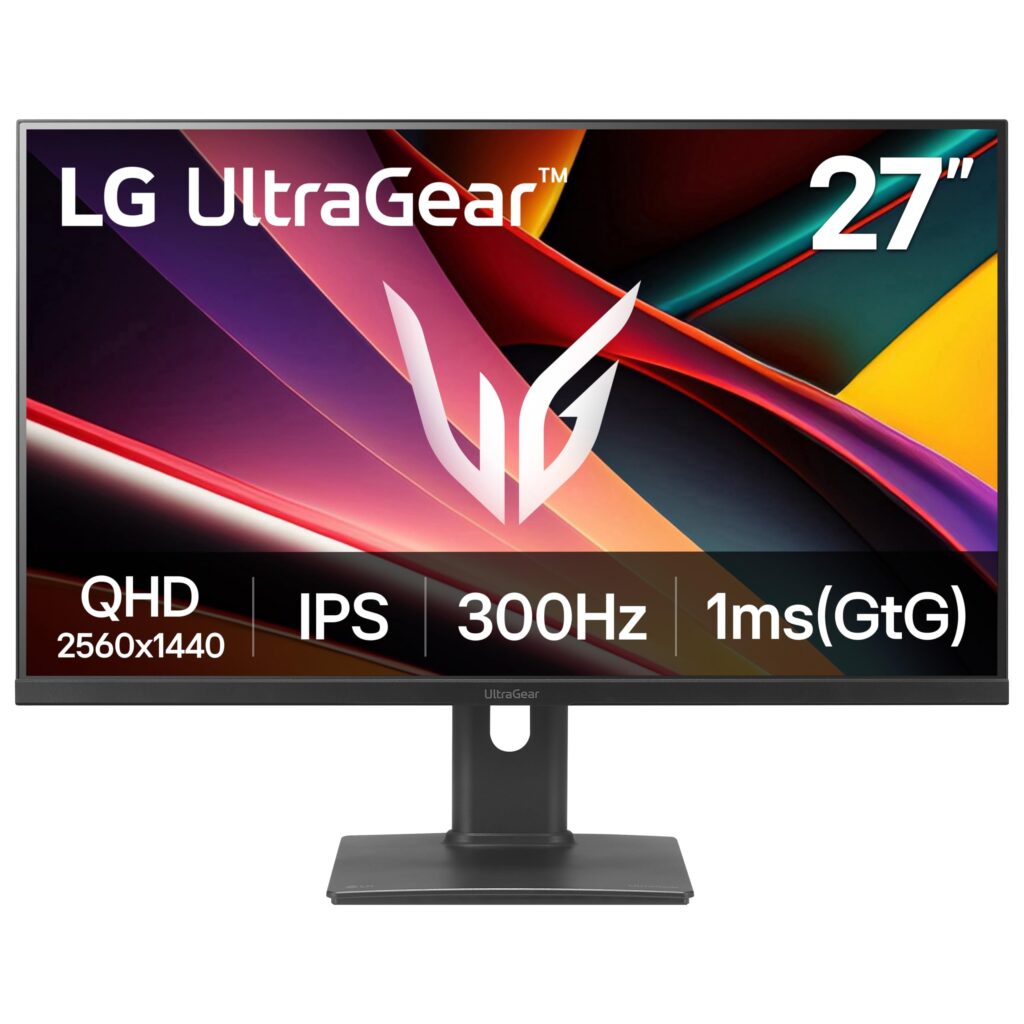
- Fluid 300 Hz refresh rate at 2560 x 1440 resolution on an IPS panel
- Adaptive overdrive automatically adjusts pixel response across variable frame rates
- Versatile I/O configuration including HDMI 2.1, DisplayPort, and USB-C with DP Alt Mode
- Solid aluminum stand base with full bidirectional portrait pivot
- Chassis exhibits noticeable wobble during light desk contact and creaks audibly during height adjustment
- USB-C power delivery is limited to 15W
- Certain factory color presets lock out user calibration settings
Overview
Pushing 1440p resolution past traditional esports thresholds to 300 Hz requires meticulous panel driving, and this display handles that high-velocity pipeline through an integrated adaptive overdrive system. Rather than forcing users to manually cycle between aggressive overdrive profiles as frame rates fluctuate, the controller dynamically adjusts pixel transitions across the frequency curve. The 27-inch IPS panel is paired with a light matte surface treatment, preserving fine text sharpness and contrast without introducing the coarse, sparkling grain frequently observed on heavier anti-glare coatings.
Connectivity and power distribution take a hybrid approach tailored for multi-device setups. An external power supply removes the bulk and concentrated heat of an internal transformer from the rear housing, allowing for a slimmer chassis profile and passive thermal dissipation. The display inputs encompass DisplayPort, HDMI 2.1, and a USB-C port supporting DisplayPort Alternate Mode alongside downstream USB hub functionality. However, power delivery via USB-C tops out at 15 watts, which suffices for peripheral trickle charging or smartphone power but will not sustain a modern laptop under computing load.
Daily physical interaction reveals noticeable compromises in structural tolerances. While the solid aluminum desktop base provides a weighted anchor and the stand mechanism delivers a full range of motion—including height, tilt, swivel, and bidirectional portrait rotation—the housing assembly lacks dampening rigidity. Minor desk bumps translate into visible panel oscillation, and adjusting the display height induces audible creaking along the outer plastic seams. Additionally, while the fast IPS panel delivers fluid motion, users operating in certain factory color presets will find calibration parameters locked out in the on-screen display.
Technical Specifications
| Brand | LG |
| Model | UltraGear G6 27G64NA-B |
| Display Size Class | 27-inch |
| Panel Type | IPS |
| Native Resolution | 2560 x 1440 |
| Refresh Rate | 300 Hz |
| Screen Surface | Light matte finish |
| Video Inputs | DisplayPort, HDMI 2.1, USB-C (DisplayPort Alt Mode) |
| Usb Interfaces | Integrated USB hub |
| Usb C Power Delivery | 15W |
| Power Supply Type | External power supply |
| Overdrive Technology | Adaptive overdrive tracking refresh rate |
| Stand Base Material | Solid aluminum |
| Stand Adjustments | Height adjustment, tilt, swivel, bidirectional portrait pivot |
Primary Sources & Audited Citations
Recommended Alternatives in Monitors & Displays
At a Glance
How reliable is the LG UltraGear G6 27G64NA-B according to Mizex audits?
Best suited for competitive gamers seeking 300 Hz 1440p motion clarity with versatile video inputs, provided they mount the panel on an isolated arm or use a sturdy desk to bypass stand wobble.
What are the known quirks or drawbacks of the LG UltraGear G6 27G64NA-B?
Our reliability audit identified the following documented caveats:
- Chassis exhibits noticeable wobble during light desk contact and creaks audibly during height adjustment
- USB-C power delivery is limited to 15W
- Certain factory color presets lock out user calibration settings
What are the key engineering highlights of the LG UltraGear G6 27G64NA-B?
The top strengths recorded in our evaluation include:
- Fluid 300 Hz refresh rate at 2560 x 1440 resolution on an IPS panel
- Adaptive overdrive automatically adjusts pixel response across variable frame rates
- Versatile I/O configuration including HDMI 2.1, DisplayPort, and USB-C with DP Alt Mode
- Solid aluminum stand base with full bidirectional portrait pivot