
- HDMI 2.1 input and lag-free VRR passthrough up to 4K144 HDR, 1440p240, and 1080p240
- External 10Gbps USB 3.2 Gen 2 capture up to 4K144 SDR and 1080p240 SDR without requiring a PCIe slot
- Broad plug-and-play compatibility across Windows, macOS, and USB-C iPadOS 17+ devices
- Compact chassis with bundled 10Gbps USB-C and 8K HDMI cables included in the box
- HDR10 capture is restricted to Windows and capped at 4K30, 1440p60, or 1080p120
- 1440p240 HDMI inputs support passthrough only and cannot be captured
- Full capture resolution and codec support require a 10Gbps USB 3.2 Gen 2 port and dual-channel RAM on Windows
Overview
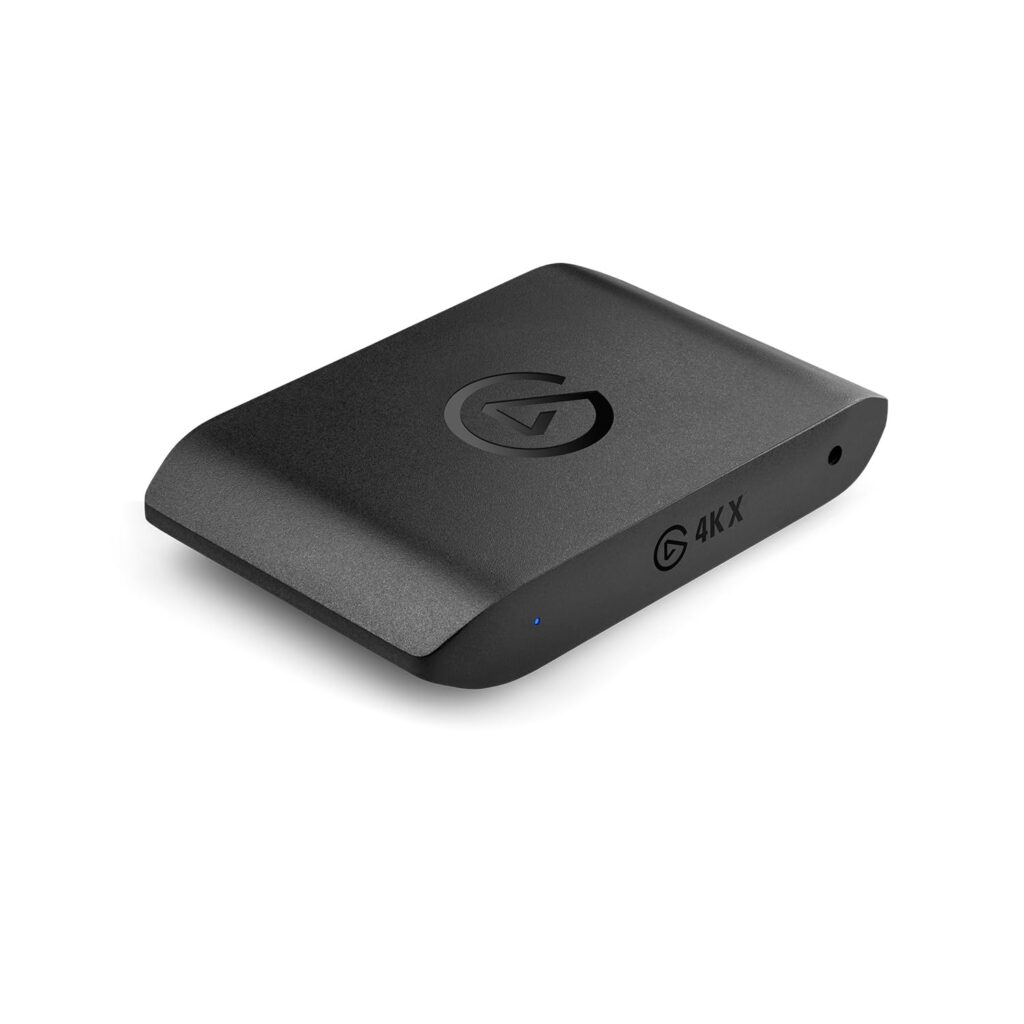
Squeezing modern HDMI 2.1 console and PC video pipelines into a bus-powered external USB-C chassis lets laptop, Mac, and small-form-factor creators capture high-refresh gameplay without opening a desktop case. Measuring 4.6 x 2.8 x 0.7 in (116.8 x 71.1 x 17.8 mm), the Elgato 4K X tucks cleanly beside a console or into a travel bag, and it ships ready to run with both a 59 in (150 cm) USB 3.2 C-to-C cable and a 78.7 in (200 cm) 8K HDMI cable. Its HDMI 2.1 path passes unencrypted signals straight through with zero added lag up to 4K144 HDR, 1440p240, and 1080p240 alongside Variable Refresh Rate (VRR) support and a 3.5 mm TRS stereo line-in for external audio feeds.
Moving that much pixel bandwidth over a single 10Gbps USB 3.2 Gen 2 link forces clear trade-offs on the recording side. Peak frame-rate capture relies on 8-bit 4:2:0 MJPG compression to hit 4K144 SDR, 1440p144 SDR, and 1080p240 SDR, while 1440p240 signals work solely in passthrough mode and cannot be recorded. HDR10 capture is also restricted to Windows and tops out at 4K30, 1440p60, or 1080p120. Because the compact enclosure runs passively over USB bus power, plugging directly into a full-speed 10Gbps port—and running dual-channel RAM on Windows—matters; dropping down to a 5Gbps USB 3.2 Gen 1 port noticeably trims your available capture resolutions and codec options.
Everyday setup stays straightforward across Windows 10 (64-bit) or later, macOS 11 Big Sur or newer, and USB-C iPads running iPadOS 17+, pairing smoothly with PlayStation 5, Xbox Series X|S, Nintendo Switch, gaming PCs, and mobile sources. You can record through Elgato Studio Software, 4K Capture Utility, Elgato Capture on iPadOS, or OBS Studio 27.2.4 and newer. Host hardware demands are modest for modern rigs—starting at a 6th-gen Intel Core i5 or AMD Ryzen 5 3600 with a GTX 1050 for 4K60 HDR on Windows, or an Apple M1 or 4th-gen quad-core i5 on macOS—making this a capable cross-platform bridge as long as its 10Gbps USB ceiling aligns with your capture targets.
Technical Specifications
| Brand | Elgato |
| Model | 4K X |
| Interface | USB 3.2 Gen 2 Type-C (10 Gbps; compatible with 5 Gbps USB 3.2 Gen 1 at reduced resolutions) |
| Video Input | HDMI 2.1 (Unencrypted) |
| Video Output (Passthrough) | HDMI 2.1 (Lag-free passthrough with VRR) |
| Audio Input | 3.5 mm TRS stereo line-in |
| Max Passthrough Resolutions | 2160p144 HDR, 2160p60, 1440p240, 1080p240 |
| Max Capture Resolutions | 2160p144 SDR, 2160p30 HDR, 1440p144 SDR, 1440p60 HDR, 1080p240 SDR, 1080p120 HDR |
| Capture Codecs | MJPG 8-bit 4:2:0 (3840x2160 at 144/120/60fps, 2560x1440 at 144/120/60fps, 1920x1080 at 240/144/120/60fps) |
| HDR Support | HDR10 passthrough and capture (HDR capture on Windows only) |
| Dimensions | 4.6 x 2.8 x 0.7 in (116.8 x 71.1 x 17.8 mm) |
| Supported Operating Systems | Windows 10 (64-bit)+, macOS 11 Big Sur+, iPadOS 17+ |
| Supported Sources | PS5, PS4/Pro, Xbox Series X|S, Xbox One X|S, Nintendo Switch, PC, iPhone/iPad, Google Pixel, unencrypted HDMI |
| Supported Software | Elgato Studio Software, Elgato 4K Capture Utility, Elgato Capture (iPadOS), OBS Studio 27.2.4+ |
| Minimum System Requirements | Windows: Intel Core i5-6xxx / AMD Ryzen 5 3600, GTX 1050 (4K60 HDR) or GTX 950 / RX Vega (4K60 SDR), 8 GB dual-channel RAM; macOS: Apple M1 or 4th-gen quad-core i5, 8 GB RAM |
| Included Accessories | USB 3.2 C-to-C cable (59 in / 150 cm), 8K HDMI cable (78.7 in / 200 cm) |
Primary Sources & Audited Citations
- Elgato Game Capture 4K X — Technical Specifications
- Elgato Game Capture 4K X — Supported Resolutions and Frame Rates
- Elgato Game Capture 4K X — System Requirements
- CGMagazine — Elgato Game Capture 4K X Review
- Dexerto — Elgato Game Capture 4K X Review: HDMI 2.1 is Finally Here
- GGRecon — Elgato Game Capture 4K X Review
Recommended Alternatives in Capture Cards
At a Glance
How reliable is the Elgato 4K X according to Mizex audits?
Buy this if you stream or record from PS5, Xbox Series X|S, or a dual-PC rig on a laptop, Mac, or iPad without an open PCIe slot; skip it for an internal PCIe capture card if you need 1440p240 recording or uncompressed capture formats.
What are the known quirks or drawbacks of the Elgato 4K X?
Our reliability audit identified the following documented caveats:
- HDR10 capture is restricted to Windows and capped at 4K30, 1440p60, or 1080p120
- 1440p240 HDMI inputs support passthrough only and cannot be captured
- Full capture resolution and codec support require a 10Gbps USB 3.2 Gen 2 port and dual-channel RAM on Windows
What are the key engineering highlights of the Elgato 4K X?
The top strengths recorded in our evaluation include:
- HDMI 2.1 input and lag-free VRR passthrough up to 4K144 HDR, 1440p240, and 1080p240
- External 10Gbps USB 3.2 Gen 2 capture up to 4K144 SDR and 1080p240 SDR without requiring a PCIe slot
- Broad plug-and-play compatibility across Windows, macOS, and USB-C iPadOS 17+ devices
- Compact chassis with bundled 10Gbps USB-C and 8K HDMI cables included in the box