
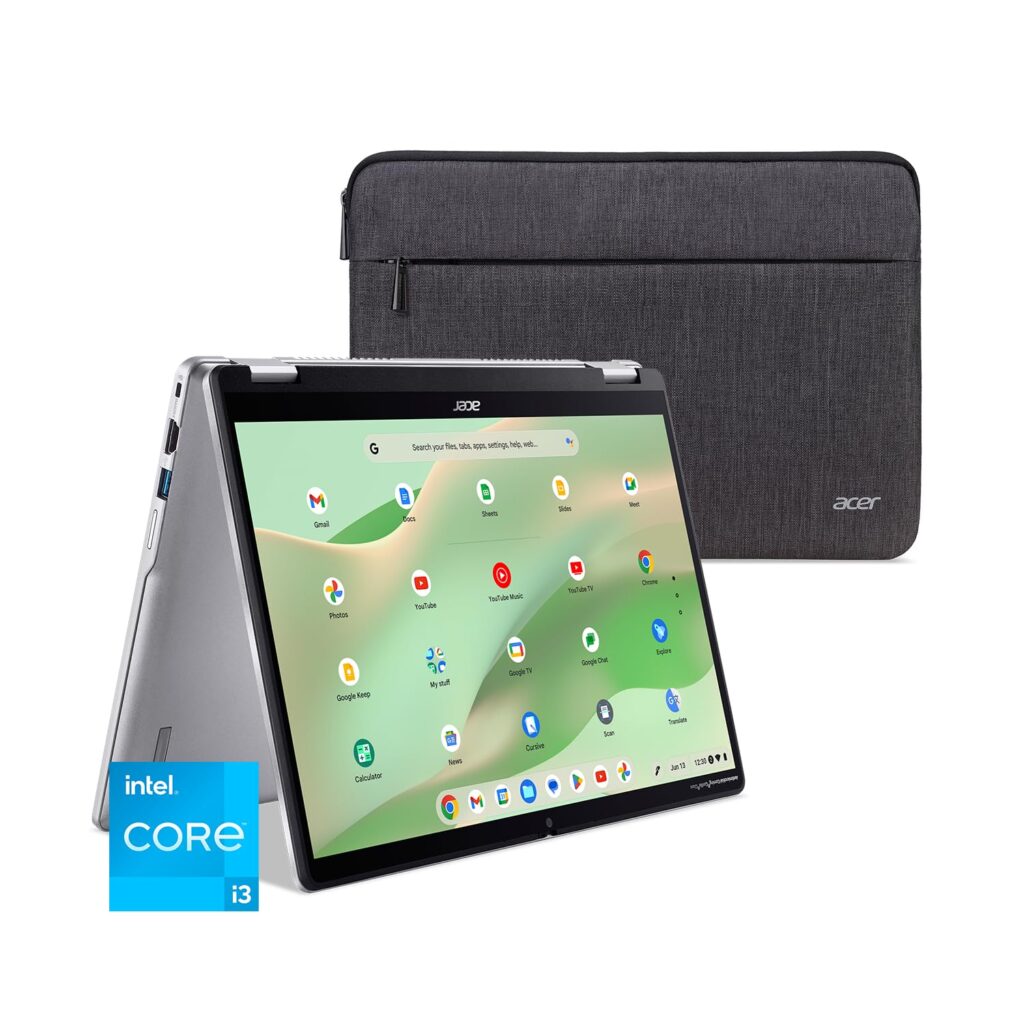
- 2-in-1 convertible design supports tablet mode for streaming and casual mobile gaming
- 14.0-inch 16:10 (1920 x 1200) IPS touchscreen adds practical vertical workspace
- Broad wired ports including 3x USB 3.0 / 3.1 Gen 1, HDMI, and 3.5mm audio alongside Wi-Fi 6
- Fast charging support and efficient 15W Intel Core i3-N305 / 8 GB DDR5 all-day platform
- Modest processor performance from the Alder Lake-N Intel Core i3-N305 limits heavy multitasking
- Budget-grade glossy display quality
Overview
Everyday ChromeOS machines live or die by practical ergonomics, and this 14-inch convertible leans directly into flexible daily use. Its 360-degree hinge flips cleanly into tablet mode for streaming or casual mobile gaming, while the 16:10 1920 x 1200 IPS touchscreen gives you extra vertical room for documents and web pages compared to cramped 16:9 panels. Measuring 12.59 x 9.05 x 0.86 in (319.9 x 229.9 x 21.9 mm) and weighing 3.46 lbs (1.57 kg), the chassis stays manageable in a backpack, though the glossy touchscreen reflects bright ambient light and sticks to budget-grade panel quality.
Under the hood, Intel’s 15W Core i3-N305 pairs eight Alder Lake-N cores boosting up to 3.8 GHz with 32-EU Intel UHD Graphics, 8 GB of DDR5 memory, and an M.2 PCIe storage interface. That architecture keeps power draw low enough to support fast charging and an all-day battery profile, making it well suited to browser tabs, video playback, and classroom or office suites. Heavy multitasking and demanding workloads quickly expose the modest ceiling of an entry-level chip, yet ChromeOS stays responsive within its intended lane and benefits from steady automatic updates.
Where this Spin 314 punches above typical entry-level convertibles is everyday connectivity. Instead of forcing you into a dongle habit, Acer includes three USB 3.0 / 3.1 Gen 1 ports, an HDMI output, and a 3.5mm audio jack alongside Wi-Fi 6 and Bluetooth 5.2 wireless networking. Backed by a chiclet keyboard, stereo speakers, and an integrated webcam, it covers daily essentials cleanly out of the box with no documented hardware recalls or recurring community reliability issues.
Technical Specifications
| Brand | Acer |
| Model | Chromebook Spin 314 CP314-2HN-30V1 |
| Form Factor | 2-in-1 Convertible |
| Processor | Intel Core i3-N305 (8 cores / 8 threads, up to 3.8 GHz, Alder Lake-N, 15W TDP) |
| Graphics | Intel UHD Graphics (32 EUs, Alder Lake) |
| Memory | 8 GB DDR5 |
| Storage Interface | M.2 PCIe |
| Display | 14.0-inch 16:10 IPS, 1920 x 1200 (162 PPI), 60 Hz, glossy capacitive touchscreen |
| Ports | 3x USB 3.0 / 3.1 Gen 1, 1x HDMI, 1x 3.5mm audio jack |
| Wireless | Wi-Fi 6 (802.11a/b/g/n/ac/ax), Bluetooth 5.2 |
| Audio | Stereo speakers |
| Keyboard | Chiclet |
| Webcam | Integrated |
| Battery | Lithium-Ion (fast charging support) |
| Operating System | Google ChromeOS |
| Dimensions | 12.59 x 9.05 x 0.86 in (319.9 x 229.9 x 21.9 mm) |
| Weight | 3.46 lbs (1.57 kg) |
Primary Sources & Audited Citations
Recommended Alternatives in Laptops
At a Glance
How reliable is the Acer Chromebook Spin 314 CP314-2HN-30V1 according to Mizex audits?
Buy this if you want an affordable 2-in-1 Chromebook with a tall touchscreen and hassle-free wired ports for school, travel, or streaming; look at a higher-tier Core i3 or Ryzen 3 Chromebook Plus model if you juggle heavy multitasking or want a brighter, higher-grade display.
What are the known quirks or drawbacks of the Acer Chromebook Spin 314 CP314-2HN-30V1?
Our reliability audit identified the following documented caveats:
- Modest processor performance from the Alder Lake-N Intel Core i3-N305 limits heavy multitasking
- Budget-grade glossy display quality
What are the key engineering highlights of the Acer Chromebook Spin 314 CP314-2HN-30V1?
The top strengths recorded in our evaluation include:
- 2-in-1 convertible design supports tablet mode for streaming and casual mobile gaming
- 14.0-inch 16:10 (1920 x 1200) IPS touchscreen adds practical vertical workspace
- Broad wired ports including 3x USB 3.0 / 3.1 Gen 1, HDMI, and 3.5mm audio alongside Wi-Fi 6
- Fast charging support and efficient 15W Intel Core i3-N305 / 8 GB DDR5 all-day platform