
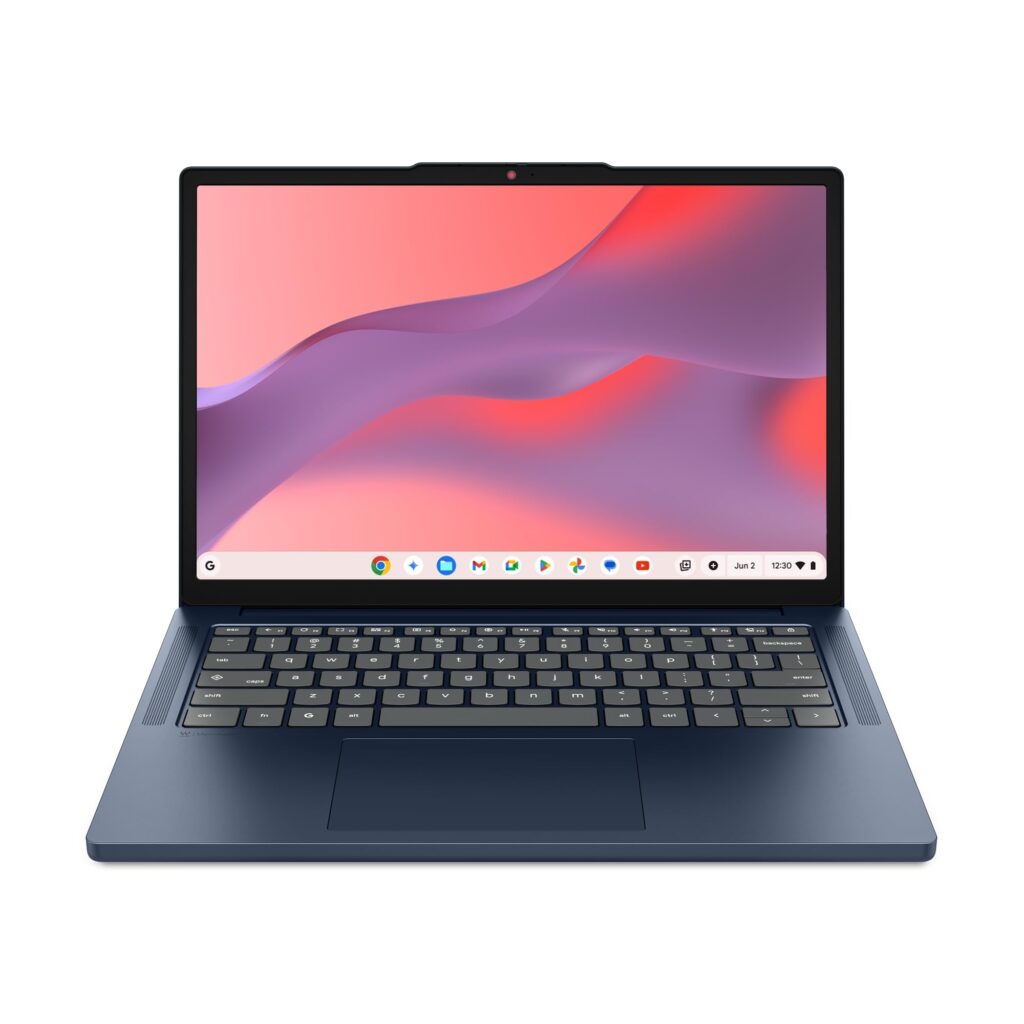
- 400-nit 14-inch 16:10 WUXGA (1920 x 1200) IPS display offers taller workspace and strong brightness for an entry-level Chromebook
- Silent, fanless MediaTek Kompanio 540 platform delivers 8 to 10 hours of real-world battery life from a 50Wh cell
- Dongle-free port layout includes two USB-C ports with DisplayPort and Power Delivery, two USB-A ports, full-size HDMI 1.4b, and a 3.5mm jack
- ChromeOS Auto Update Expiration support runs through June 2036 alongside a MIL-standard tested chassis and physical webcam shutter
- Soldered LPDDR5X memory cannot be upgraded, leaving 4GB base models tight on multitasking headroom
- Standard 64GB UFS storage lacks a microSD card reader for easy local expansion
- Non-backlit keyboard, no Chromebook Plus certification, and a thicker 0.78 in (19.81 mm) plastic body than its IdeaPad Slim 3 predecessor
Overview
Budget laptops usually force you to squint at dim, cramped 16:9 screens, which makes the 14.0-inch 1920 x 1200 IPS panel here a welcome exception. Reaching 400 nits in a taller 16:10 aspect ratio, it gives documents, spreadsheets, and split-screen browser tabs noticeable breathing room without washing out in bright classrooms or coffee shops. Select Luna Grey builds also add touch support, though stylus input is off the table across the lineup.
Inside, Lenovo swaps active cooling for an octa-core MediaTek Kompanio 540 processor running up to 2.60 GHz alongside ARM Mali-G57 MP2 graphics. Because the chip runs fanless, there is zero fan noise or dust intake to worry about, while the 50Wh Li-polymer battery stretches to 8 to 10 hours of real-world mixed use on a charge. You also skip the dongle tax: two USB-C ports with DisplayPort and Power Delivery sit alongside two 5 Gbps USB-A ports, a full-size HDMI 1.4b output, a 3.5mm audio jack, and a Kensington Nano Lock slot, backed by Wi-Fi 6E (or Wi-Fi 7 on select SKUs), Bluetooth 5.3, dual 2W Waves MaxxAudio speakers, and a 5.0MP webcam with a physical privacy shutter.
Practicality takes priority over thin-and-light flair in the chassis and upgrade department. Measuring 12.57 x 8.79 x 0.78 inches (319.28 x 223.27 x 19.81 mm) and weighing 2.99 lbs (1.36 kg), the MIL-standard tested plastic shell is noticeably chunkier than the IdeaPad Slim 3 Chromebook it replaces, and the keyboard omits backlighting. More importantly, soldered LPDDR5X memory leaves no room for later upgrades—making the 8GB configuration far safer than the 4GB base tier—and standard retail models rely on 64GB of UFS storage without a microSD slot, though higher-tier variants step up to a 128GB SSD. None of it earns Chromebook Plus certification, yet ChromeOS Auto Update Expiration support through June 2036 gives the hardware an unusually long service runway.
Technical Specifications
| Model | Lenovo Chromebook m 14 |
| Model Numbers | 14M8911, 83SX000VUS, 83SY0003US, 83SY0004US, 83SY0008US |
| Operating System | ChromeOS (Auto Update Expiration: June 2036) |
| Processor | MediaTek Kompanio 540 (Octa-core, 2.00 GHz base, up to 2.60 GHz) |
| Graphics | ARM Mali-G57 MP2 |
| Cooling | Fanless (passive) |
| Memory | 4GB or 8GB LPDDR5X (soldered, non-upgradeable) |
| Storage | 64GB UFS (up to 128GB SSD on higher series tiers) |
| Display | 14.0-inch 1920 x 1200 (WUXGA) 16:10 IPS, 400 nits (optional touch on select Luna Grey SKUs) |
| Ports | 2x USB-C (PD, DP; 5 Gbps / 10 Gbps by SKU), 2x USB-A (5 Gbps), 1x HDMI 1.4b, 3.5mm audio combo jack, Kensington Nano Lock |
| Wireless | Wi-Fi 6E (Wi-Fi 7 on select SKUs), Bluetooth 5.3 |
| Webcam & Audio | HD / 5.0MP fixed-focus with physical privacy shutter; dual 2W Waves MaxxAudio speakers, dual-microphone array |
| Keyboard | Non-backlit |
| Battery | 50Wh Li-polymer (up to 14 hours rated; 8 to 10 hours real-world) |
| Chassis | Plastic (Cosmic Blue or Luna Grey), MIL-standard tested |
| Dimensions | 12.57 x 8.79 x 0.78 in (319.28 x 223.27 x 19.81 mm) |
| Weight | 2.99 lbs (1.36 kg) |
Primary Sources & Audited Citations
Recommended Alternatives in Laptops
At a Glance
How reliable is the Lenovo Chromebook m 14 according to Mizex audits?
Buy the 8GB configuration if you want a quiet, long-lasting machine for docs and web apps through 2036; look at a Chromebook Plus model if you need keyboard backlighting, more than 64GB of storage, or heavier multitasking headroom.
What are the known quirks or drawbacks of the Lenovo Chromebook m 14?
Our reliability audit identified the following documented caveats:
- Soldered LPDDR5X memory cannot be upgraded, leaving 4GB base models tight on multitasking headroom
- Standard 64GB UFS storage lacks a microSD card reader for easy local expansion
- Non-backlit keyboard, no Chromebook Plus certification, and a thicker 0.78 in (19.81 mm) plastic body than its IdeaPad Slim 3 predecessor
What are the key engineering highlights of the Lenovo Chromebook m 14?
The top strengths recorded in our evaluation include:
- 400-nit 14-inch 16:10 WUXGA (1920 x 1200) IPS display offers taller workspace and strong brightness for an entry-level Chromebook
- Silent, fanless MediaTek Kompanio 540 platform delivers 8 to 10 hours of real-world battery life from a 50Wh cell
- Dongle-free port layout includes two USB-C ports with DisplayPort and Power Delivery, two USB-A ports, full-size HDMI 1.4b, and a 3.5mm jack
- ChromeOS Auto Update Expiration support runs through June 2036 alongside a MIL-standard tested chassis and physical webcam shutter