JetKVM vs Dell Pro Thunderbolt 4 Smart Dock SD25TB4
Standardized 5-pillar engineering audit, thermal telemetry, verified longevity metrics, and complete technical specification diff.
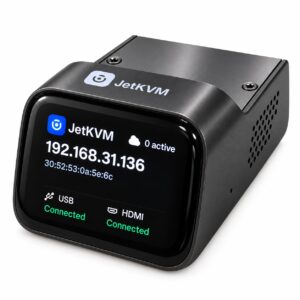
A highly capable open-source IP-KVM delivering 1080p60 encoding with sub-60ms latency in a rugged zinc chassis, offset by cramped I/O spacing and a persistent display backlight.
High-bandwidth enterprise Thunderbolt 4 dock delivering 2.5 GbE, dual downstream TB4 ports, and quad-display capabilities, balanced against a non-detachable host cable.
Mizex Comparative Audit Verdict
5-Pillar Engineering Telemetry
Detailed comparison across standardized normalized 1.0 – 5.0 engineering pillars.
JetKVM: Strengths & Caveats
- Hardware-accelerated 1080p @ 60 FPS capture with low 30–60 ms encoding latency
- Fully open-source Linux and Go-based software stack with public GitHub repository
- Rugged die-cast zinc alloy chassis with passive thermal dissipation
- RJ11 extension header enabling remote ATX power button and DC relay switching
- Less than 1 mm clearance between Mini-HDMI and RJ45 ports blocks bulky or booted Ethernet connectors
- Touchscreen backlight lacks a software sleep timer and remains permanently illuminated
- Unpowered host shutdowns drop connectivity unless paired with an external 5V power supply or USB standby port
Dell Pro Thunderbolt 4 Smart Dock SD25TB4: Strengths & Caveats
- Comprehensive display matrix supporting up to single 8K 60Hz or quad 4K 60Hz configurations
- Dual downstream Thunderbolt 4 ports paired with four 10 Gbps USB 3.2 Gen 2 Type-A interfaces
- Integrated 2.5 Gigabit Ethernet for high-bandwidth wired networking
- Enterprise fleet management suite including Kernel DMA protection, PXE boot, and remote firmware updates
- Integrated 0.83 m host cable is non-detachable, preventing cable replacement or length customization
- Host power delivery throttles from 130W on Dell systems to 96W on non-Dell systems
Technical Specification Comparison
Side-by-side spec alignment. Rows highlighted with subtle shading denote differing specifications.
| Specification | JetKVM | Dell Pro Thunderbolt 4 Smart Dock SD25TB4 |
|---|---|---|
| Brand DIFF | JetKVM | Dell |
| Model DIFF | JetKVM | Pro Thunderbolt 4 Smart Dock SD25TB4 |
| Processor (SoC) DIFF | Rockchip RV1106G3 (ARM Cortex-A7 @ 1.0 GHz) | — |
| Hardware Video Encoder DIFF | Hardware H.264 and H.265 VPU | — |
| System Memory DIFF | 256 MB on-chip DDR3L | — |
| Onboard Storage DIFF | 16 GB eMMC flash | — |
| Integrated Display DIFF | 1.69-inch IPS capacitive touchscreen (280 x 240 resolution) | — |
| Video Input Interface DIFF | Mini-HDMI (up to 1080p @ 60 FPS) | — |
| Encoding Latency DIFF | 30–60 ms | — |
| Network Interface DIFF | 100 Mbps Ethernet (RJ45) | — |
| USB Interface DIFF | USB 2.0 Type-C (480 Mbps) for power and HID emulation | — |
| Expansion Interface DIFF | RJ11 extension port (supports ATX and DC power control boards) | — |
| Power Input DIFF | 5V via USB Type-C or 5V via RJ11 extension port | — |
| Chassis Material DIFF | Die-cast zinc alloy | — |
| Dimensions DIFF | 2.36 x 1.69 x 1.22 in (60 x 43 x 31 mm) | — |
| Firmware Stack DIFF | Open-source Linux and Go-based application stack | — |
| Host Interface DIFF | — | Thunderbolt 4 |
| Integrated Cable Length DIFF | — | 0.83 m |
| Power Adapter Capacity DIFF | — | 180 W |
| Power Delivery Dell DIFF | — | 130 W |
| Power Delivery Non Dell DIFF | — | 96 W |
| Video Ports DIFF | — | 2 x DisplayPort 1.4, 1 x HDMI Type-A, 1 x USB-C (DisplayPort 1.4 alt mode), 2 x Thunderbolt 4 |
| Usb Ports DIFF | — | 4 x USB 3.2 Gen 2 Type-A, 1 x USB-C 3.2 Gen 2, 1 x USB-C 3.2 Gen 2 / DisplayPort 1.4, 2 x Thunderbolt 4 |
| Networking DIFF | — | 1 x 2.5 Gigabit Ethernet (RJ-45) |
| Data Link Protocols DIFF | — | Ethernet, Fast Ethernet, Gigabit Ethernet, 2.5 Gigabit Ethernet |
| Max Resolution Single Display DIFF | — | 8K at 60 Hz / 5K at 60 Hz |
| Max Resolution Dual Display DIFF | — | 6K at 60 Hz |
| Max Resolution Triple Display DIFF | — | 3440 x 1440 at 60 Hz |
| Max Resolution Quad Display DIFF | — | 4K at 60 Hz / 2560 x 1440 at 60 Hz |
| Management Features DIFF | — | Wake-on-LAN, Remote firmware updates, PXE boot support |
| Security Features DIFF | — | Kernel Direct Memory Access (DMA) protection |
| Dimensions DIFF | — | 20.5 cm x 9 cm x 3.525 cm |
| Weight DIFF | — | 579 g (20.4 oz) |
| Part Number DIFF | — | DELL-SD25TB4 / 210-BRFL |
Need to evaluate a different configuration?
🔍 Compare Other Hardware