Gigabyte TRX50 AERO D vs MSI MAG X870E Tomahawk MAX WiFi V1
Standardized 5-pillar engineering audit, thermal telemetry, verified longevity metrics, and complete technical specification diff.
A powerhouse E-ATX workstation motherboard delivering robust 16+8+4 phase power delivery, Marvell 10GbE, dual USB4, and forward-compatible sTR5 Threadripper support.
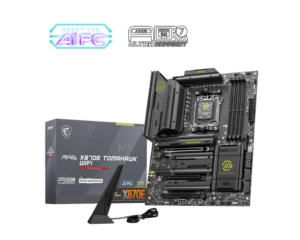
An exceptionally engineered AM5 platform pairing 80A MPS power stages and dedicated PCIe 5.0 x16 GPU wiring with an expanded 64MB BIOS Flash ROM for sustained generational upgradeability.
Mizex Comparative Audit Verdict
5-Pillar Engineering Telemetry
Detailed comparison across standardized normalized 1.0 – 5.0 engineering pillars.
Gigabyte TRX50 AERO D: Strengths & Caveats
- Robust 16+8+4 phase digital VRM design with dual 8-pin power connectors for heavy workstation workloads
- High-bandwidth I/O with dual USB4 Type-C ports, Marvell 10GbE LAN, and Wi-Fi 7
- Four M.2 slots with full thermal armor heatsinks, including three PCIe 5.0 x4 slots
- Forward platform compatibility with Ryzen Threadripper 7000 and 9000 Series via Q-Flash Plus BIOS updates
- Memory subsystem limited to quad-channel architecture rather than 8-channel WRX90 bandwidth
- E-ATX form factor demands a large chassis with extended motherboard tray clearance
MSI MAG X870E Tomahawk MAX WiFi V1: Strengths & Caveats
- Unbifurcated PCIe 5.0 x16 primary expansion slot maintains dedicated graphics bandwidth regardless of M.2 drive configuration.
- Robust 14+2+1 phase VRM with 80A MPS power stages operates at a cool 65°C under sustained 16-core load.
- Doubled 64MB BIOS Flash ROM and integrated external clock generator supply extensive future AGESA microcode and BCLK tuning headroom.
- Supplemental 8-pin PCIe power header supplies up to 252W of auxiliary 12V current to handle high-transient board loads.
- Secondary PCIe 5.0 M.2 slot shares bandwidth with rear USB4 ports, forcing lane downshifting to x2 or disabling USB4.
- Absence of an onboard segment alphanumeric diagnostic display limits direct pre-boot hardware troubleshooting.
Technical Specification Comparison
Side-by-side spec alignment. Rows highlighted with subtle shading denote differing specifications.
| Specification | Gigabyte TRX50 AERO D | MSI MAG X870E Tomahawk MAX WiFi V1 |
|---|---|---|
| Brand DIFF | Gigabyte | MSI |
| Model DIFF | TRX50 AERO D | MAG X870E Tomahawk MAX WiFi V1 |
| Form Factor DIFF | E-ATX | ATX (304.8 mm x 243.84 mm) |
| Cpu Socket DIFF | AMD Socket sTR5 (SP6) | — |
| Chipset DIFF | AMD TRX50 | AMD X870E (Dual Promontory 21) |
| Processor Support DIFF | AMD Ryzen Threadripper 7000 Series, AMD Ryzen Threadripper PRO 7000 WX-Series, AMD Ryzen Threadripper 9000 / PRO 9000 WX-Series (via BIOS update) | — |
| Power Phase Design DIFF | 16+8+4 digital VRM phases | — |
| Power Connectors DIFF | 1x 24-pin ATX, 2x 8-pin CPU power connectors | 1x 24-pin ATX, 2x 8-pin EPS 12V CPU, 1x 8-pin Supplemental PCIe Power (up to 252W) |
| Memory Type DIFF | DDR5 R-DIMM | — |
| Memory Slots DIFF | 4 | — |
| Memory Architecture DIFF | Quad-channel | — |
| Memory Speed Support DIFF | Up to DDR5-6400 | — |
| Memory Overclocking Profiles DIFF | AMD EXPO, Intel XMP | — |
| Pcie Expansion Slots DIFF | 3x PCIe x16 slots (PCIe 5.0 and PCIe 4.0) | 1x PCIe 5.0 x16 (CPU, Steel Armor II), 1x PCIe 4.0 x4 (Chipset), 1x PCIe 3.0 x1 (Chipset) |
| Storage M2 Slots DIFF | 4x M.2 slots (3x PCIe 5.0 x4, 1x PCIe 4.0 x4) | — |
| Storage Sata Ports DIFF | 8x SATA III 6Gb/s | — |
| Wired Networking DIFF | 1x Marvell 10GbE LAN, 1x secondary RJ45 LAN | — |
| Wireless Networking DIFF | Wi-Fi 7 (802.11be) | — |
| Usb Connectivity DIFF | 2x USB4 Type-C, 4x USB 3.2 Gen 2 Type-A, 4x USB 3.2 Gen 1 | — |
| Display Outputs DIFF | 1x DisplayPort | — |
| Cooling Features DIFF | VRM Thermal Armor, M.2 Thermal heatsinks on all 4 M.2 slots | — |
| Utility Buttons DIFF | 1x Q-Flash Plus button | — |
| Socket DIFF | — | AMD Socket AM5 |
| Cpu Support DIFF | — | AMD Ryzen 9000 / 8000 / 7000 Series |
| Power Delivery Vrm DIFF | — | 14+2+1 Duet Rail Power System |
| Power Stages DIFF | — | 80A Smart Power Stages (Monolithic Power Systems MP87670) |
| Pwm Controller DIFF | — | Richtek RT3672EE / Monolithic Power Systems MP2509 |
| Pcb Construction DIFF | — | 8-layer server-grade PCB with 2oz thickened copper |
| Memory Support DIFF | — | 4x DDR5 DIMM, Dual Channel, up to 256GB, DDR5-8400+ (OC) |
| M2 Storage Slots DIFF | — | 4x M.2 (2x PCIe 5.0 x4 from CPU, 2x PCIe 4.0 x4 from Chipset) |
| Sata Ports DIFF | — | 4x SATA 6Gb/s |
| Usb4 Controller DIFF | — | ASMedia ASM4242 (2x 40Gbps Type-C with DP Alt Mode) |
| Rear Usb Ports DIFF | — | 2x USB4 40Gbps Type-C, 3x USB 10Gbps Type-A, 1x USB 10Gbps Type-C, 4x USB 5Gbps Type-A |
| Front Usb Headers DIFF | — | 1x USB 20Gbps Type-C, 2x USB 5Gbps Type-A, 2x USB 2.0 |
| Networking Wired DIFF | — | Realtek RTL8126 5Gbps Ethernet |
| Networking Wireless DIFF | — | MediaTek MT7927 Wi-Fi 7 (802.11be, 320MHz) + Bluetooth 5.4 |
| Audio Codec DIFF | — | Realtek ALC4080 7.1-Channel HD Audio with isolated audio PCB |
| Cooling Heatsinks DIFF | — | Extended VRM aluminum heatsinks with 7 W/mK pads, EZ M.2 Shield Frozr II |
| Bios Rom Capacity DIFF | — | 64MB (512Mb) UEFI AMI Flash ROM |
| Diy Features DIFF | — | EZ PCIe Release, EZ M.2 Clip II, EZ Antenna, Flash BIOS Button, Clear CMOS Button |
Need to evaluate a different configuration?
🔍 Compare Other Hardware