ASUS ROG Rapture GT-BN98 vs IoTeikXgo ThinkNode G4 Wi-Fi HaLow Gateway
Standardized 5-pillar engineering audit, thermal telemetry, verified longevity metrics, and complete technical specification diff.
Formidable quad-band networking platform backed by dual 10 Gbps Ethernet and Wi-Fi 8 draft hardware, pending widespread client ecosystem availability.
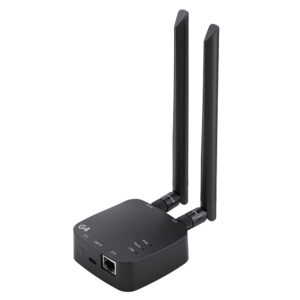
A capable sub-GHz 802.11ah bridge pairing Morse Micro silicon with OpenWrt routing in a compact, passively ventilated enclosure.
Mizex Comparative Audit Verdict
5-Pillar Engineering Telemetry
Detailed comparison across standardized normalized 1.0 – 5.0 engineering pillars.
ASUS ROG Rapture GT-BN98: Strengths & Caveats
- Quad-band Wi-Fi 8 architecture delivering up to 25 Gbps combined wireless throughput
- Exceptional wired I/O provisioned with dual 10 Gbps and four 2.5 Gbps Ethernet interfaces
- High-performance compute platform featuring a 2.6 GHz quad-core processor and 2 GB RAM
- Advanced traffic management and diagnostics via Adaptive QoE, GTNet, and WiFi Insight
- Operates on pre-ratification IEEE 802.11bn Draft 2.0 specifications
- Maximum wireless throughput requires client devices supporting the forthcoming Wi-Fi 8 standard
IoTeikXgo ThinkNode G4 Wi-Fi HaLow Gateway: Strengths & Caveats
- Dedicated sub-1 GHz IEEE 802.11ah radio provides kilometer-scale reach and high structural penetration
- OpenWrt firmware foundation with LuCI web UI supports AP, Station, and 802.11s mesh topologies
- Completely passive convection cooling operates stably across -20°C to +70°C (-4°F to 158°F) ambients
- Standard dual external SMA antenna interfaces facilitate custom high-gain RF installations
- Physical network backhaul is constrained by a single 10/100 Mbps Fast Ethernet port
- 128 MB RAM and 32 MB storage limit heavy edge computing packages or containerization
- Requires specialized vendor-maintained kernel forks for Wi-Fi HaLow driver updates
Technical Specification Comparison
Side-by-side spec alignment. Rows highlighted with subtle shading denote differing specifications.
| Specification | ASUS ROG Rapture GT-BN98 | IoTeikXgo ThinkNode G4 Wi-Fi HaLow Gateway |
|---|---|---|
| Brand DIFF | ASUS | IoTeikXgo |
| Model DIFF | ROG Rapture GT-BN98 | ThinkNode G4 Wi-Fi HaLow Gateway |
| Wireless Standard DIFF | Wi-Fi 8 (IEEE 802.11bn Draft 2.0) | — |
| Frequency Bands DIFF | Quad-band (2.4 GHz, dual 5 GHz, 6 GHz) | — |
| Antenna Configuration DIFF | 4x4 | — |
| Total Wireless Bandwidth DIFF | 25,000 Mbps | — |
| Bandwidth 2 4 Ghz DIFF | 1,376 Mbps | — |
| Bandwidth 5 Ghz DIFF | 2x 5,764 Mbps | — |
| Bandwidth 6 Ghz DIFF | 11,529 Mbps | — |
| Processor DIFF | 2.6 GHz quad-core | MediaTek MT7628N (MIPS24KEc @ 580 MHz) |
| Memory DIFF | 2 GB RAM | — |
| Ethernet Interfaces DIFF | 2x 10 Gbps, 4x 2.5 Gbps | — |
| Network Optimization DIFF | Adaptive QoE, AI Game Boost, ASUS GTNet | — |
| Monitoring And Diagnostics DIFF | WiFi Insight real-time band monitoring | — |
| Guest Network Capacity DIFF | Guest Network Pro up to 5 SSIDs | — |
| Wireless Halow Module DIFF | — | Quectel FGH100M (Morse Micro MM6108) |
| Wireless Protocols DIFF | — | IEEE 802.11ah (Wi-Fi HaLow), IEEE 802.11b/g/n (2.4 GHz) |
| Rf Frequency Bands DIFF | — | Sub-1 GHz (850–950 MHz) & 2.4 GHz (2412–2472 MHz) |
| Max Phy Data Rate DIFF | — | Up to 32 Mbps (802.11ah) / 300 Mbps (802.11n) |
| System Memory DIFF | — | 128 MB DDR2 RAM |
| Storage DIFF | — | 32 MB SPI NOR Flash |
| Ethernet Interface DIFF | — | 1x 10/100 Mbps RJ45 Fast Ethernet |
| Antenna Terminals DIFF | — | 2x External Detachable SMA/RP-SMA Antennas (1x Sub-GHz, 1x 2.4 GHz) |
| Operating Modes DIFF | — | Access Point (AP), Station (STA), 802.11s Mesh |
| Power Input DIFF | — | 5V DC via USB Type-C |
| Operating Temperature DIFF | — | -20°C to +70°C (-4°F to 158°F) |
| Dimensions DIFF | — | 2.95 x 2.95 x 1.18 in (75 x 75 x 30 mm) |
| Weight DIFF | — | 2.82 oz (80 g) |
| Chassis Construction DIFF | — | Injection-molded ABS/PC polymer with passive ventilation |
| Operating System DIFF | — | OpenWrt (Morse Micro kernel fork with LuCI Web UI) |
Need to evaluate a different configuration?
🔍 Compare Other Hardware