ASUS ROG PG32UCDM3 vs Samsung 34″ ViewFinity S5 (S55GH)
Standardized 5-pillar engineering audit, thermal telemetry, verified longevity metrics, and complete technical specification diff.
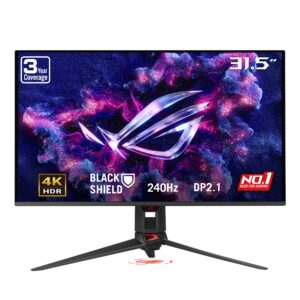
A benchmark 4K 240 Hz gaming monitor pairing 4th-generation Tandem QD-OLED visual fidelity with uncompressed 80 Gbps DisplayPort 2.1a connectivity and proactive hardware burn-in protection.
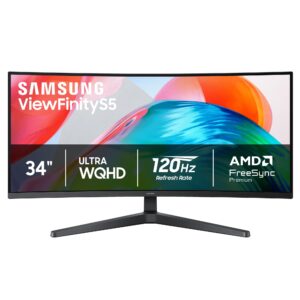
A well-balanced 34-inch (86 cm) Ultra WQHD productivity monitor delivering smooth 120Hz operation, stable passive thermals, and dependable everyday construction.
Mizex Comparative Audit Verdict
5-Pillar Engineering Telemetry
Detailed comparison across standardized normalized 1.0 – 5.0 engineering pillars.
ASUS ROG PG32UCDM3: Strengths & Caveats
- Samsung 4th Gen Tandem QD-OLED panel delivering 4K 240 Hz motion clarity with 0.03 ms response times
- Full-bandwidth DisplayPort 2.1a UHBR20 interface supporting uncompressed 80 Gbps display data throughput
- BlackShield semi-glossy film treatment offering 2.5X greater scratch resistance and deeper ambient contrast
- Hardware-level ASUS OLED Care Pro suite featuring an integrated Neo Proximity Sensor for proactive burn-in prevention
- Vertical height adjustment travel is limited to 80 mm (3.15 in) on the bundled stand
- Fixed 90W USB-C Power Delivery may not sustain high-performance workstation laptops under peak load
Samsung 34″ ViewFinity S5 (S55GH): Strengths & Caveats
- Expansive 34-inch (86 cm) Ultra WQHD ultrawide resolution provides extensive horizontal desktop workspace
- 120Hz refresh rate delivers noticeably smoother motion and reduced eye strain during prolonged multi-window productivity
- Solid-state display architecture ensures completely silent passive operation
- Substantial desktop footprint required to accommodate the 34-inch (86 cm) horizontal chassis span
- Requires modern display interface bandwidth to drive native Ultra WQHD resolution at full 120Hz
Technical Specification Comparison
Side-by-side spec alignment. Rows highlighted with subtle shading denote differing specifications.
| Specification | ASUS ROG PG32UCDM3 | Samsung 34″ ViewFinity S5 (S55GH) |
|---|---|---|
| Brand DIFF | ASUS | Samsung |
| Model DIFF | ROG PG32UCDM3 | 34" ViewFinity S5 (S55GH) |
| Panel Size DIFF | 31.5 in (80.0 cm) | — |
| Active Display Area DIFF | 27.54 x 15.54 in (699.48 x 394.73 mm) | — |
| Aspect Ratio DIFF | 16:9 | — |
| Panel Technology DIFF | Tandem QD-OLED (Samsung Display 4th Gen) | — |
| Native Resolution DIFF | 3840 x 2160 (4K UHD) | — |
| Pixel Pitch DIFF | 0.182 mm | — |
| Refresh Rate DIFF | 240 Hz | 120Hz |
| Response Time DIFF | 0.03 ms (GtG) | — |
| Peak HDR Brightness DIFF | 1000 cd/m² | — |
| Color Gamut DIFF | 99% DCI-P3 | — |
| Color Depth DIFF | 10-bit (True 10-bit) | — |
| Color Accuracy DIFF | Delta E < 2 | — |
| Viewing Angles DIFF | 178° Horizontal / 178° Vertical | — |
| Screen Coating DIFF | BlackShield Film (Semi-glossy) | — |
| HDR Certifications DIFF | VESA DisplayHDR 500 True Black, Dolby Vision | — |
| Variable Refresh Rate DIFF | G-SYNC Compatible, Adaptive-Sync | — |
| Motion Blur Reduction DIFF | Extreme Low Motion Blur (ELMB) | — |
| Burn In Mitigation DIFF | ASUS OLED Care Pro with Neo Proximity Sensor | — |
| Video Interfaces DIFF | 1x DisplayPort 2.1a UHBR20 (80 Gbps), 2x HDMI 2.1 (FRL), 1x USB-C (DisplayPort Alt Mode, 90W PD) | — |
| USB Hub Connectivity DIFF | 3x USB 3.2 Gen 1 Type-A | — |
| Audio Output DIFF | 1x 3.5 mm earphone jack | — |
| Ergonomic Adjustments DIFF | Tilt: -5° to +20°, Swivel: -15° to +15°, Height: 0 to 3.15 in (0 to 80 mm) | — |
| VESA Mount Compatibility DIFF | 100 x 100 mm | — |
| Dimensions With Stand DIFF | 28.3 x 20.9 x 10.9 in (71.8 x 53.1 x 27.6 cm) | — |
| Dimensions Without Stand DIFF | 28.3 x 16.3 x 2.6 in (71.8 x 41.3 x 6.7 cm) | — |
| Weight With Stand DIFF | 19.2 lbs (8.7 kg) | — |
| Weight Without Stand DIFF | 13.2 lbs (6.0 kg) | — |
| Screen Size DIFF | — | 34 in (86 cm) |
| Resolution DIFF | — | Ultra WQHD (UWQHD) |
| Model Codes DIFF | — | LS34H550GANXZA / LS34H550GAWXXL / LS34H550GAKXKR |
Need to evaluate a different configuration?
🔍 Compare Other Hardware