AOC 24G51F2 vs Corsair XENEON Edge
Standardized 5-pillar engineering audit, thermal telemetry, verified longevity metrics, and complete technical specification diff.
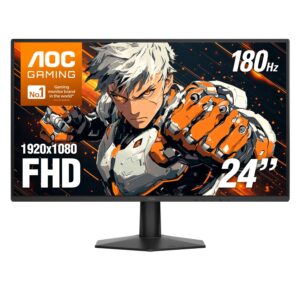
A high-refresh esports monitor pairing 180 Hz Fast IPS motion clarity with an efficient external power brick, offset by basic plastic chassis construction and tilt-only ergonomics.
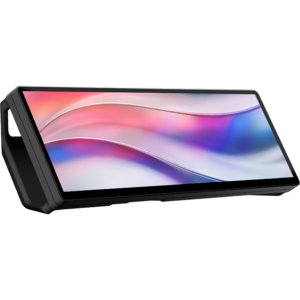
A purpose-built 32:9 secondary touch display delivering seamless PC chassis telemetry integration and silent passive operation, tempered by a 60 Hz limit and glossy screen glare.
Mizex Comparative Audit Verdict
5-Pillar Engineering Telemetry
Detailed comparison across standardized normalized 1.0 – 5.0 engineering pillars.
AOC 24G51F2: Strengths & Caveats
- Fluid 180 Hz refresh rate and low 0.5 ms MPRT response time on a responsive Fast IPS panel
- Certified NVIDIA G-SYNC Compatible and AMD FreeSync support for tear-free variable refresh rate gaming
- External DC power adapter isolates conversion heat from the panel and offers modular replacement
- Standard 100 x 100 mm VESA mount compatibility provides an upgrade path beyond the stock stand
- Ergonomics limited to basic vertical tilt with no height adjustment, swivel, or pivot capabilities
- Minimalist connectivity suite featuring a single DisplayPort and single HDMI port with no integrated USB hub
Corsair XENEON Edge: Strengths & Caveats
- Ultra-wide 32:9 aspect ratio optimized for system telemetry, widgets, and live stream monitoring
- Single-cable operation with USB-C DisplayPort Alt Mode carrying both video and bus power
- Versatile mounting options accommodating standard 360 mm case fan brackets and desktop stand placement
- Responsive 5-point capacitive multi-touch interface with virtual Elgato Stream Deck support
- Refresh rate is capped at standard 60 Hz
- Glossy screen coating is prone to reflections in high ambient lighting
- Lacks standard VESA mounting pattern support
Technical Specification Comparison
Side-by-side spec alignment. Rows highlighted with subtle shading denote differing specifications.
| Specification | AOC 24G51F2 | Corsair XENEON Edge |
|---|---|---|
| Brand DIFF | AOC | Corsair |
| Model DIFF | 24G51F2 | XENEON Edge |
| Screen Size DIFF | 23.8 in (60.45 cm) diagonal | 14.5 inches |
| Panel Type DIFF | Fast IPS (In-Plane Switching) | — |
| Native Resolution DIFF | 1920 x 1080 pixels (Full HD) | 2560x720 |
| Aspect Ratio DIFF | 16:9 | 32:9 |
| Refresh Rate DIFF | 180 Hz (overclocked) / 144 Hz (native) | 60 Hz |
| Response Time DIFF | 0.5 ms MPRT / 4 ms GtG | — |
| Static Contrast Ratio DIFF | 1500:1 | — |
| Peak Brightness DIFF | 300 cd/m² | 350 cd/m² |
| Viewing Angles | 178° horizontal / 178° vertical | 178° horizontal / 178° vertical |
| Color Gamut Support DIFF | 116% sRGB (CIE 1931) / 90% DCI-P3 (CIE 1976) | — |
| Variable Refresh Rate DIFF | NVIDIA G-SYNC Compatible, AMD FreeSync | — |
| Video Inputs DIFF | 1x DisplayPort 1.4, 1x HDMI 2.0 | 1x USB-C (DisplayPort Alt Mode), 1x HDMI |
| Audio Interface DIFF | 1x 3.5 mm audio output jack | — |
| Power Supply Type DIFF | External DC power adapter | — |
| Active Power Consumption DIFF | 20 W (typical) | — |
| Standby Power Consumption DIFF | 0.3 W | — |
| VESA Mount Interface DIFF | 100 x 100 mm | — |
| Tilt Adjustment Range DIFF | -5° to +23° | — |
| Dimensions With Stand DIFF | 21.42 x 16.46 x 6.99 in (544.0 x 418.1 x 177.6 mm) | — |
| Dimensions Without Stand DIFF | 21.42 x 12.54 x 1.42 in (544.0 x 318.5 x 36.1 mm) | — |
| Weight With Stand DIFF | 5.49 lbs (2.49 kg) | — |
| Weight Without Stand DIFF | 4.96 lbs (2.25 kg) | — |
| Pixel Density DIFF | — | 183.4 PPI |
| Panel Technology DIFF | — | AHVA (8-bit) |
| Touchscreen DIFF | — | 5-point capacitive multi-touch |
| Screen Coating DIFF | — | Glossy |
| Power Delivery DIFF | — | USB-C |
| Mounting Compatibility DIFF | — | Standard 360 mm PC case fan mounts, desktop stand |
| Dimensions DIFF | — | 372 x 120 x 20 mm (14.65 x 4.72 x 0.79 in) |
| Bundled Cables DIFF | — | 1x USB Type-C to USB Type-C (1.8 m / 6 ft) |
| Software Integration DIFF | — | Virtual Elgato Stream Deck support |
Need to evaluate a different configuration?
🔍 Compare Other Hardware