
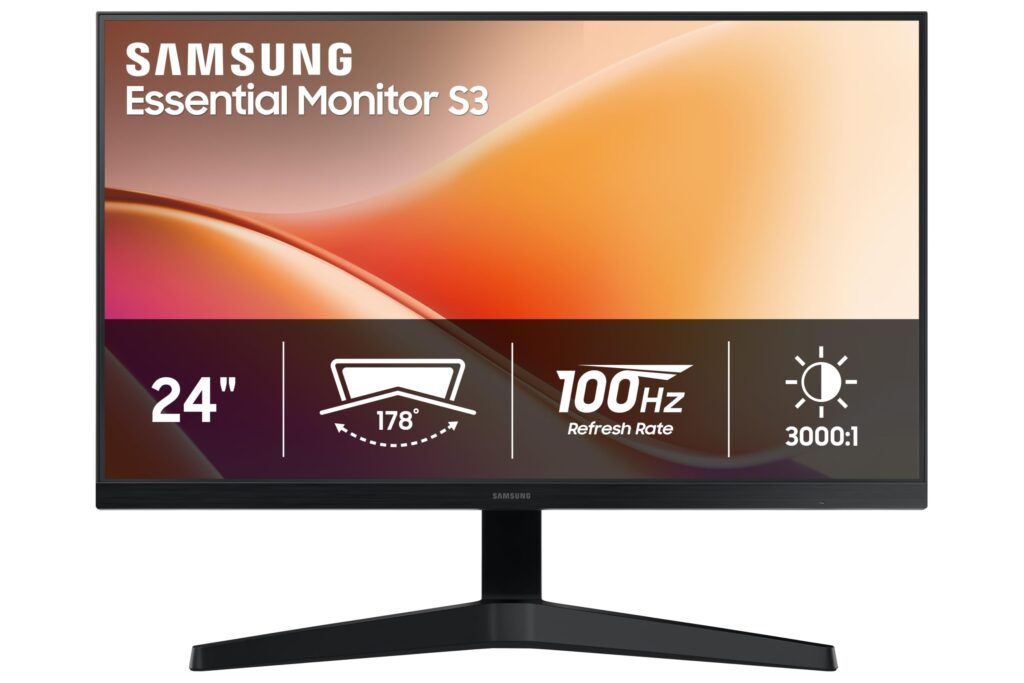
- Smooth 100Hz refresh rate enhances desktop motion clarity and cursor fluidity over standard 60Hz panels
- Deep 3000:1 static contrast ratio delivers strong black levels and text definition
- Low typical power consumption of 14.0W powered by an easily replaceable external AC adapter
- Standard 100 x 100 mm VESA mount pattern enables ergonomic aftermarket arm installation
- Stock stand exhibits noticeable wobble and restricts ergonomics to vertical tilt only
- Limited video connectivity with only HDMI 1.4 and legacy VGA, lacking DisplayPort or USB-C
- Susceptible to slow wake-from-sleep handshakes and 100Hz blanking with low-spec cables
Overview
Transitioning standard office workspaces away from jittery 60Hz displays, this 24-inch flat panel relies on a Vertical Alignment (VA) panel running at a fluid 100Hz refresh rate. The immediate real-world benefit is evident across everyday desktop tasks, where window dragging, browser scrolling, and basic animations display noticeable clarity without cursor stutter. Anchoring the visual experience is a deep 3000:1 static contrast ratio, rendering dense black levels and rich text definition that noticeably outpace entry-level IPS alternatives in dimly lit environments. With a typical luminance of 250 cd/m² and standard 72% NTSC color gamut coverage, the display is tailored specifically for document processing, administrative productivity, and casual media consumption rather than color-critical editing.
From an architectural and physical standpoint, the enclosure prioritizes functional utility while incorporating 20 percent post-consumer recycled plastic across its lightweight frame. At 5.29 lbs (2.4 kg) without the stand, the chassis is remarkably easy to handle, though the bundled pedestal stand is limited strictly to vertical tilt from -2.0° to +20.0° and exhibits mechanical wobble under heavy typing. Video inputs are kept to the essentials with a single HDMI 1.4 port alongside a legacy analog D-Sub VGA connection, omitting DisplayPort, USB-C, and integrated audio output. Fortunately, an industry-standard 100 x 100 mm VESA mounting pattern on the rear panel allows users to easily bypass the unstable stock base in favor of an aftermarket monitor arm.
Thermal regulation is completely passive, relying on natural convection currents around internal circuitry without any mechanical fan noise. Samsung offloads high-voltage regulation to an external AC adapter, which caps typical power consumption at a lean 14.0W and restricts standby draw to 0.5W. In daily field deployments, firmware behavior is generally stable, though users frequently encounter slow wake handshakes and intermittent “No Signal” prompts when waking hosts through USB-C docks. Resolving these handshake delays requires disabling aggressive sleep features like Eco Saving Plus in the on-screen display menu and ensuring high-bandwidth cabling to prevent signal dropouts at 100Hz.
Technical Specifications
| Brand | Samsung |
| Model | 24" Essential Monitor S3 (S33GF) (LS24F330EANXZA) |
| Screen Size | 24.0 in (609.6 mm) diagonal (20.75 x 11.67 in / 527.04 x 296.46 mm active area) |
| Panel Technology | VA (Vertical Alignment) |
| Curvature | Flat |
| Native Resolution | 1920 x 1080 (Full HD) |
| Refresh Rate | 100 Hz |
| Aspect Ratio | 16:9 |
| Response Time | 5 ms (GtG) |
| Static Contrast Ratio | 3000:1 |
| Dynamic Contrast Ratio | Mega |
| Luminance | 250 cd/m² (typical), 200 cd/m² (minimum) |
| Viewing Angles | 178° horizontal / 178° vertical |
| Color Support | 16.7 Million Colors |
| Color Gamut | 72% NTSC (CIE 1931) |
| Video Inputs | 1x HDMI 1.4 (HDCP 1.4), 1x D-Sub (VGA) |
| Integrated Audio | None (no internal speakers or 3.5 mm audio jack) |
| Stand Tilt Range | -2.0° to +20.0° |
| VESA Mount Compatibility | 100 x 100 mm (3.94 x 3.94 in) |
| Power Supply Type | External AC adapter (AC 100-240V, 50/60 Hz) |
| Power Consumption | 14.0W typical, 25.0W maximum, 0.5W standby, 0.3W off mode |
| Operating Temperature | 50°F to 104°F (10°C to 40°C) |
| Operating Humidity | 10% to 80% non-condensing |
| Dimensions With Stand | 21.24 x 16.65 x 8.56 in (539.5 x 422.8 x 217.4 mm) |
| Dimensions Without Stand | 21.24 x 12.71 x 1.62 in (539.5 x 322.8 x 41.2 mm) |
| Weight With Stand | 6.17 lbs (2.8 kg) |
| Weight Without Stand | 5.29 lbs (2.4 kg) |
| Chassis Sustainability | 20% post-consumer recycled plastic |
| Eye Care Certification | Eye Saver Mode, Flicker Free |
Primary Sources & Audited Citations
- Samsung Official Specifications - 24" Essential Monitor S3 (S33GF) LS24F330EANXZA
- Samsung Official Technical Support & Documentation Portal - LS24F330EANXZA
- Samsung Official Repair Guide & Technical Disassembly - S24F330EAN (S33UF/S33GF)
- Samsung Official User Guide & Technical Manual - S33GF Series (S24F330EAN)
- Samsung Global Technical Specifications - 24" Essential Monitor S3 (S33GF) LS24F330EAUXEN
Recommended Alternatives in Monitors & Displays
At a Glance
How reliable is the Samsung 24″ Essential Monitor S3 (S33GF) (LS24F330EANXZA) according to Mizex audits?
A solid, high-contrast 100Hz office monitor for everyday computing, provided you pair it with a VESA desk arm to overcome the wobbly stock stand.
What are the known quirks or drawbacks of the Samsung 24″ Essential Monitor S3 (S33GF) (LS24F330EANXZA)?
Our reliability audit identified the following documented caveats:
- Stock stand exhibits noticeable wobble and restricts ergonomics to vertical tilt only
- Limited video connectivity with only HDMI 1.4 and legacy VGA, lacking DisplayPort or USB-C
- Susceptible to slow wake-from-sleep handshakes and 100Hz blanking with low-spec cables
What are the key engineering highlights of the Samsung 24″ Essential Monitor S3 (S33GF) (LS24F330EANXZA)?
The top strengths recorded in our evaluation include:
- Smooth 100Hz refresh rate enhances desktop motion clarity and cursor fluidity over standard 60Hz panels
- Deep 3000:1 static contrast ratio delivers strong black levels and text definition
- Low typical power consumption of 14.0W powered by an easily replaceable external AC adapter
- Standard 100 x 100 mm VESA mount pattern enables ergonomic aftermarket arm installation