
- Integrated Thunderbolt 4 hub provides 40 Gbps data throughput, 90 W host power delivery, and daisy-chain expansion over a single cable.
- LG IPS Black panel achieves a verified 2000:1 static contrast ratio alongside smooth 120 Hz motion and 98% Display P3 coverage.
- Built-in 2.5 GbE Ethernet controller and Auto-KVM switch streamline seamless dual-system desktop operation.
- Integrated ambient light sensor automatically balances screen luminance and color temperature according to ambient room lighting.
- Peak power draw approaches 215 W when simultaneously driving the 120 Hz panel and maximizing Thunderbolt downstream power delivery rails.
- Lacks integrated speakers, requiring external desktop monitors or 3.5 mm analog audio passthrough.
Overview
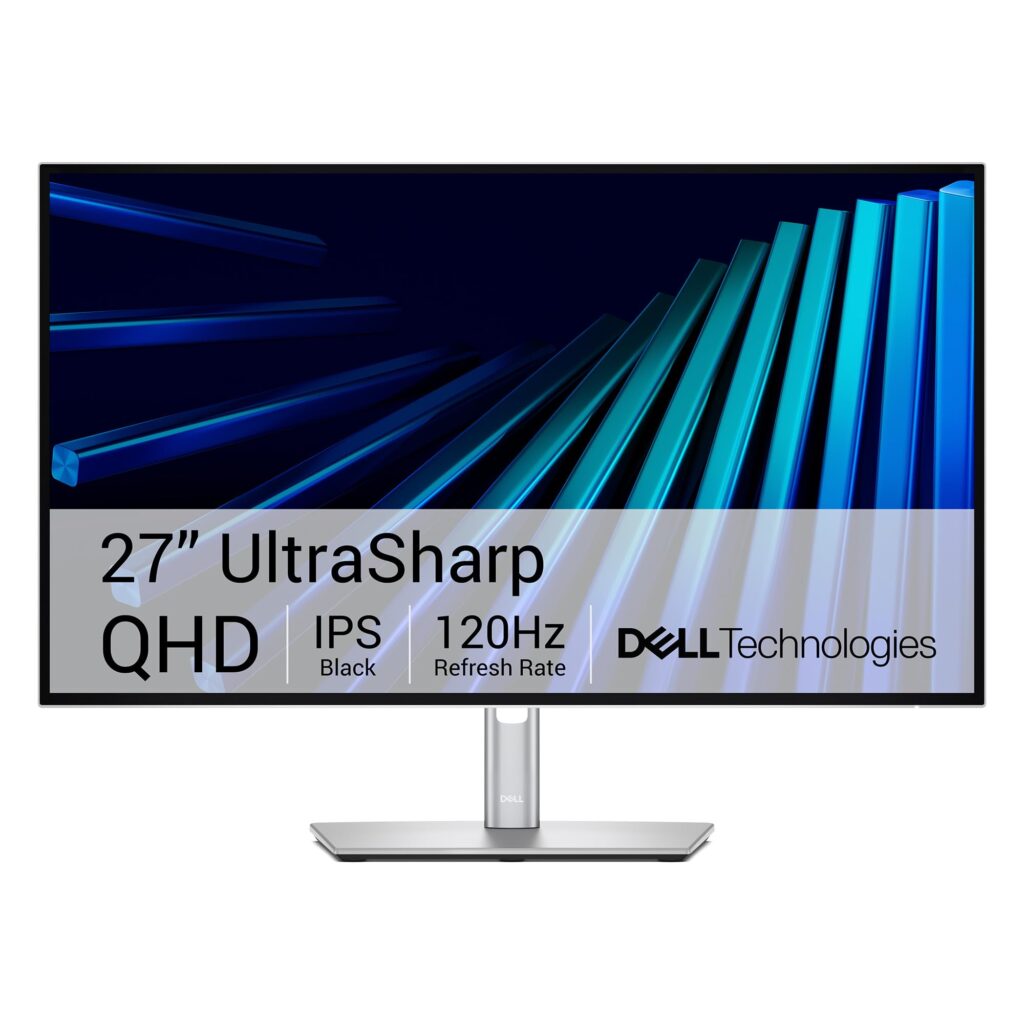
Combining high-throughput 40 Gbps Thunderbolt 4 routing with a 120 Hz IPS Black panel, Dell’s U2726DER consolidates display signaling, multi-gigabit networking, and 90-watt power delivery into a single interconnect rail. The architecture is anchored by an intelligent controller matrix that bridges DisplayPort 1.4 video streams alongside a dedicated Realtek 2.5 GbE Ethernet interface and high-speed USB 3.2 Gen 2 downstream channels. A secondary Thunderbolt 4 downstream port delivers 15 watts of auxiliary power and 40 Gbps data bandwidth, facilitating native multi-stream transport (MST) daisy-chaining to additional displays without saturating the primary workstation bus. With integrated Auto-KVM switching logic and hardware-level Picture-by-Picture (PbP) processing, dual-host environments can toggle peripheral control seamlessly while negotiating power states across distinct hardware profiles.
Structural execution centers on an InfinityEdge four-sided borderless aesthetic built over an internal metal sub-chassis, encased in a durable silver-toned polymer housing. The robust counterbalanced stand mechanism affords 150 mm (5.91 in) of smooth vertical travel, -5° to +21° tilt, -30° to +30° swivel, and full 90-degree bi-directional pivot for vertical coding workflows. Internally, power delivery relies on a universal AC power converter that eliminates external adapter clutter while routing up to 90 watts of USB-C Power Delivery directly through the upstream port. Thermal management operates purely via natural convection through top-mounted chassis perimeter vents; the fanless layout quietly dissipates internal power stage heat while keeping panel surface operating temperatures within normal operating parameters under heavy dock loads.
Panel behavior is driven by an IPS Black liquid crystal matrix achieving a 2000:1 static contrast ratio, resolving shadow gradient degradation typical of conventional in-plane switching panels. Operating at a native 2560 x 1440 resolution at 120 Hz, the display provides factory-calibrated color profiles reaching 98% Display P3 and 100% sRGB with Delta E < 2 color accuracy. An integrated ambient light sensor dynamically balances luminance and color temperature to match fluctuating office lighting, supported by hardware-level low blue light filtering certified to TÜV Rheinland 4-star eye comfort standards. Dell Display and Peripheral Manager firmware provides responsive multi-OS configuration, hotkey assignment, and automated input switching, solidifying the monitor as an uncompromising hub for demanding professional desktop environments.
Technical Specifications
| Brand | Dell |
| Model | UltraSharp 27 Thunderbolt Hub Monitor - U2726DER |
| Display Size | 27.0 in (685.8 mm) diagonal |
| Panel Technology | IPS Black (In-Plane Switching) |
| Native Resolution | 2560 x 1440 (QHD) at 120 Hz |
| Pixel Density | 108.79 PPI (0.2331 x 0.2331 mm pixel pitch) |
| Contrast Ratio | 2000:1 (static typical) |
| Peak Brightness | 350 cd/m² |
| Response Time | 5 ms (GtG Fast), 8 ms (GtG Normal) |
| Color Gamut Coverage | 100% sRGB, 100% BT.709, 98% Display P3 / DCI-P3 |
| Color Support | 1.07 billion colors (10-bit / 8-bit + A-FRC) |
| Host Interconnect | 1x Thunderbolt 4 upstream (40 Gbps, DP 1.4, up to 90 W Power Delivery) |
| Downstream Expansion | 1x Thunderbolt 4 downstream (40 Gbps, 15 W), 1x USB-C 3.2 Gen 2 (10 Gbps, 15 W), 4x USB-A 3.2 Gen 2 (10 Gbps, 1x BC 1.2 2A) |
| Video Inputs | 1x DisplayPort 1.4, 1x DisplayPort 1.4 out (MST daisy chain), 1x HDMI 2.1 |
| Network Controller | 1x RJ-45 (2.5 GbE Ethernet with PXE, WOL, MAC pass-through) |
| Audio Interface | 1x 3.5 mm audio line-out |
| Power Supply Architecture | Integrated internal 100-240V AC (50/60 Hz) |
| Operational Power Consumption | 24.4 W (typical operational SDR), 215 W (maximum with 90 W host charging), 0.3 W (off mode) |
| Thermal Management | Passive convection heatsink ventilation (fanless 0 dBA acoustic profile) |
| Ergonomic Adjustability | Height 5.91 in (150 mm), Tilt -5° to +21°, Swivel -30° to +30°, Pivot -90° to +90° |
| VESA Mounting Standard | 100 x 100 mm |
| Dimensions With Stand (Extended) | 24.10 x 21.09 x 7.57 in (612.24 x 535.58 x 192.28 mm) |
| Dimensions With Stand (Compressed) | 24.10 x 15.18 x 7.57 in (612.24 x 385.58 x 192.28 mm) |
| Dimensions Panel Only | 24.10 x 13.88 x 1.97 in (612.24 x 352.51 x 50.12 mm) |
| Weight Panel Only | 11.53 lbs (5.23 kg) |
| Weight With Stand Assembly | 16.25 lbs (7.37 kg) |
Primary Sources & Audited Citations
Recommended Alternatives in Monitors & Displays
At a Glance
How reliable is the Dell UltraSharp 27 Thunderbolt Hub Monitor – U2726DER Review: High-Bandwidth Docking Meets IPS Black according to Mizex audits?
An ideal single-cable desktop centerpiece for creative professionals and multi-system power users who require high contrast, 120 Hz smoothness, and full Thunderbolt 4 docking without standalone hub clutter.
What are the known quirks or drawbacks of the Dell UltraSharp 27 Thunderbolt Hub Monitor – U2726DER Review: High-Bandwidth Docking Meets IPS Black?
Our reliability audit identified the following documented caveats:
- Peak power draw approaches 215 W when simultaneously driving the 120 Hz panel and maximizing Thunderbolt downstream power delivery rails.
- Lacks integrated speakers, requiring external desktop monitors or 3.5 mm analog audio passthrough.
What are the key engineering highlights of the Dell UltraSharp 27 Thunderbolt Hub Monitor – U2726DER Review: High-Bandwidth Docking Meets IPS Black?
The top strengths recorded in our evaluation include:
- Integrated Thunderbolt 4 hub provides 40 Gbps data throughput, 90 W host power delivery, and daisy-chain expansion over a single cable.
- LG IPS Black panel achieves a verified 2000:1 static contrast ratio alongside smooth 120 Hz motion and 98% Display P3 coverage.
- Built-in 2.5 GbE Ethernet controller and Auto-KVM switch streamline seamless dual-system desktop operation.
- Integrated ambient light sensor automatically balances screen luminance and color temperature according to ambient room lighting.