
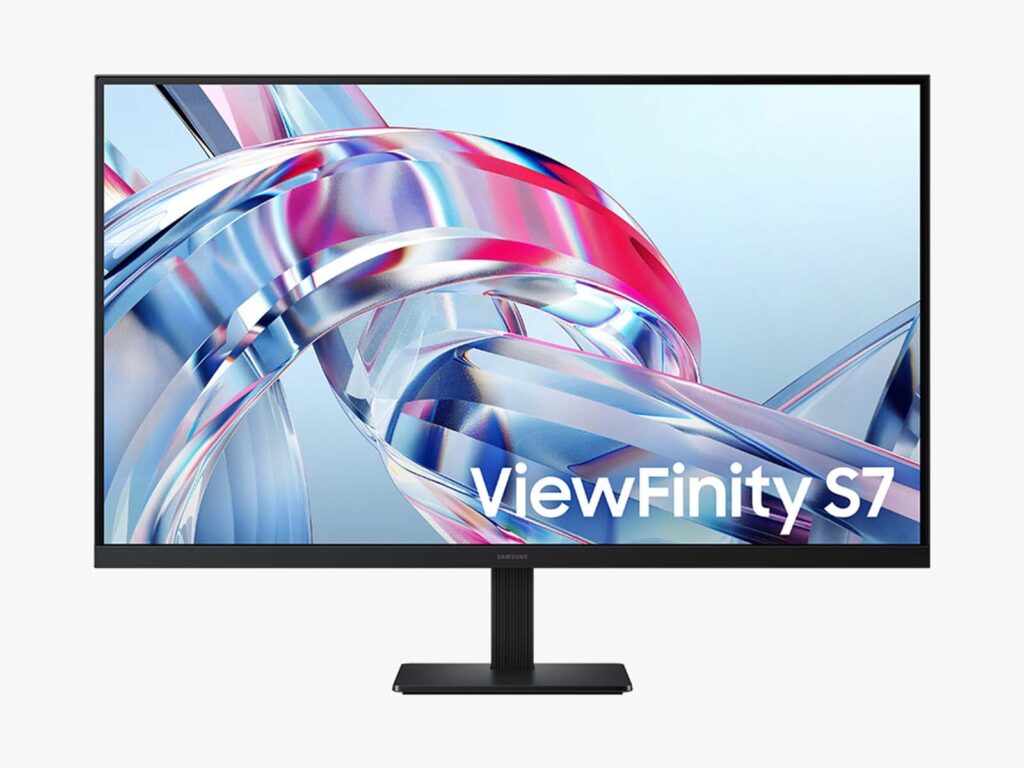
- Expansive 32 in (81.3 cm) 4K UHD IPS panel delivering sharp text definition and 178° viewing angles
- Comprehensive color fidelity with 99% sRGB gamut coverage and 1.07 billion colors (10-bit depth)
- Versatile multi-source connectivity featuring USB-C, DisplayPort, and HDMI inputs
- Integrated hardware Picture-by-Picture (PBP) and Picture-in-Picture (PIP) for multi-system workflows
- Standard 60 Hz refresh rate and 5 ms response time limit suitability for competitive gaming
Overview
Driving a 3840 x 2160 pixel matrix across a 32 in (81.3 cm) canvas requires precise signal synchronization and flexible input switching. Samsung structures the ViewFinity S7 (S70H) around an in-plane switching (IPS) panel architecture operating at a native 60 Hz refresh rate with a 5 ms response time. The display pipeline processes 10-bit color depth to render 1.07 billion colors while covering 99% of the sRGB color space, supported by HDR10 tone mapping. Digital video ingest is routed through a versatile triad of interfaces comprising USB-C, DisplayPort, and HDMI, allowing direct integration across modern laptops, dedicated desktop workstations, and secondary digital sources.
Internal scalar logic incorporates hardware-level Picture-by-Picture (PBP) and Picture-in-Picture (PIP) processing, enabling simultaneous dual-source display without host-level virtualization overhead. The structural chassis employs a minimalist, slim-bezel enclosure engineered to maximize panel surface area while maintaining solid desktop stability. Thermal dissipation operates entirely passively through convective airflow across internal heat spreaders, maintaining operational stability behind the 350-nit backlight without introducing fan noise or high-frequency coil acoustics.
For continuous daily desktop use, the internal power circuitry integrates a Flicker Free constant-current backlight driver alongside a dedicated Eye Saver Mode to mitigate optical fatigue. While the 60 Hz refresh ceiling and 5 ms grey-to-grey transition time intentionally delineate this monitor from high-frame-rate gaming displays, its wide 178° horizontal and vertical viewing angles ensure consistent chromatic fidelity across large viewing distances. The result is an engineered, distraction-free productivity hub designed for longevity, high text density, and multi-device workstation environments.
Technical Specifications
| Brand | Samsung |
| Model | ViewFinity S7 (S70H) |
| Display Size | 32 in (81.3 cm) |
| Resolution | 3840 x 2160 (4K UHD) |
| Panel Type | IPS |
| Refresh Rate | 60 Hz |
| Response Time | 5 ms |
| Brightness | 350 nits |
| Viewing Angle | 178° Horizontal / 178° Vertical |
| Color Depth | 10-bit (1.07 billion colors) |
| Color Gamut | 99% sRGB |
| High Dynamic Range | HDR10 |
| Video Inputs | USB-C, DisplayPort, HDMI |
| Multitasking Support | Picture-by-Picture (PBP), Picture-in-Picture (PIP) |
| Eye Care Technologies | Flicker Free, Eye Saver Mode |
Primary Sources & Audited Citations
Recommended Alternatives in Monitors & Displays

At a Glance
How reliable is the Samsung 32″ ViewFinity S7 (S70H) Review: High-Density 4K IPS Multitasking according to Mizex audits?
An ideal 32-inch 4K workstation display for professionals seeking sharp text and flexible multi-device multitasking, provided competitive high-refresh gaming is not a requirement.
What are the known quirks or drawbacks of the Samsung 32″ ViewFinity S7 (S70H) Review: High-Density 4K IPS Multitasking?
Our reliability audit identified the following documented caveats:
- Standard 60 Hz refresh rate and 5 ms response time limit suitability for competitive gaming
What are the key engineering highlights of the Samsung 32″ ViewFinity S7 (S70H) Review: High-Density 4K IPS Multitasking?
The top strengths recorded in our evaluation include:
- Expansive 32 in (81.3 cm) 4K UHD IPS panel delivering sharp text definition and 178° viewing angles
- Comprehensive color fidelity with 99% sRGB gamut coverage and 1.07 billion colors (10-bit depth)
- Versatile multi-source connectivity featuring USB-C, DisplayPort, and HDMI inputs
- Integrated hardware Picture-by-Picture (PBP) and Picture-in-Picture (PIP) for multi-system workflows