
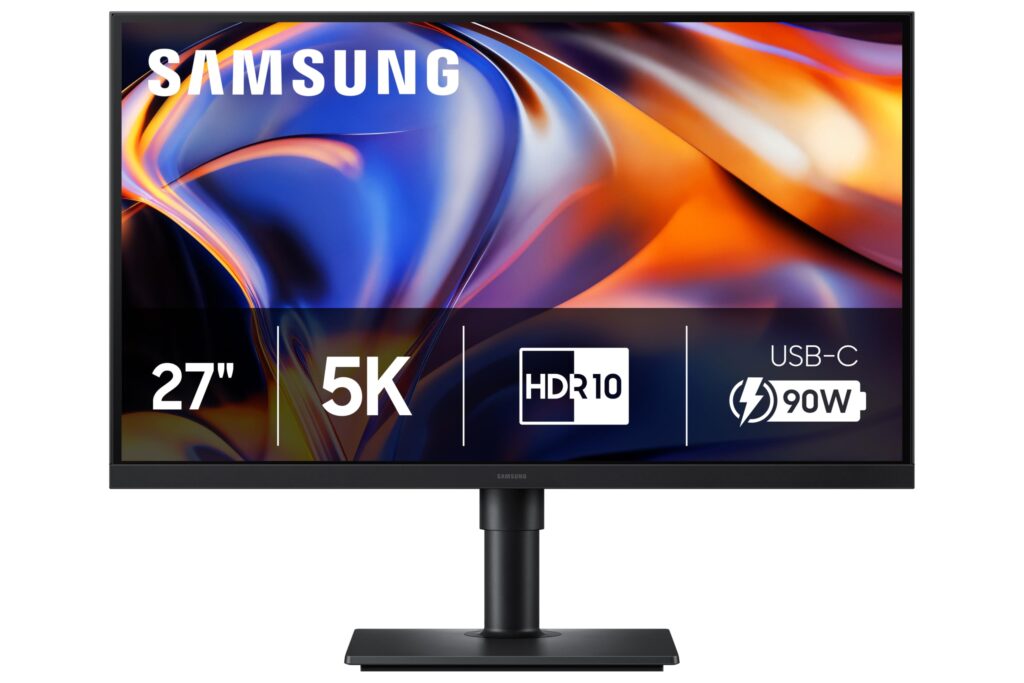
- 27-inch 5K (5120 x 2880) IPS panel delivers crisp 218 PPI clarity and 10-bit color depth
- USB-C hub provides 90W laptop charging, RJ45 Ethernet, and USB-A/B expansion
- Built-in KVM switch, Auto Switch+, and PiP/PbP simplify multi-host desk setups
- Full four-way ergonomic stand supports tilt, height, swivel, and rotation
- Refresh rate is capped at 60 Hz with a 5 ms (G2G) response time
- HDR10 support lacks local dimming and tops out at 350 nits brightness
Overview
Getting genuine 218 PPI sharpness on a multi-OS desk without giving up single-cable docking is what defines the 27-inch Samsung ViewFinity S80HF. Built around a flat 5120 x 2880 IPS panel, it packs four times the pixels of a 1440p screen into a familiar desktop footprint, making small fonts, code editors, and dense spreadsheets look crisp from any seat within its 178-degree viewing angles. The panel supports 10-bit color depth and 99% sRGB coverage, prioritizing clean everyday accuracy and flicker-free comfort over flashy wide-gamut saturation.
Connectivity is where Samsung clearly engineered this monitor to replace a standalone desk dock. Alongside DisplayPort 1.4 and HDMI 2.1, the USB Type-C port handles video over DP Alt Mode while delivering up to 90W of power to a laptop, paired with USB Type-A and Type-B ports, a headphone jack, and a built-in RJ45 Ethernet jack. A hardware KVM switch, Picture-in-Picture, Picture-by-Picture, Auto Switch+, and Samsung Display Manager software tie everything together so two machines can share one keyboard, mouse, and wired network connection without cable swapping. The included stand covers tilt, height, swivel, and rotation adjustments for portrait coding or document review.
Running a 350-nit SDR panel at a fixed 60 Hz ceiling keeps the electrical and thermal demands modest, avoiding the aggressive heat output of high-luminance HDR monitors. That restraint also marks the display’s clearest boundary: with a 1000:1 static contrast ratio, 5 ms gray-to-gray response time, and edge-lit HDR10 lacking local dimming, high-speed gaming and critical HDR grading sit outside its wheelhouse. As a quiet, ergonomic 5K command center for text-heavy and multi-device work, however, the hardware balance hits right on target.
Technical Specifications
| Brand | Samsung |
| Model | 27" ViewFinity S8 (S80HF) |
| Screen Size | 27 inches (68.6 cm) |
| Panel Type | Flat IPS LCD |
| Resolution | 5120 x 2880 (5K) |
| Pixel Density | 218 PPI |
| Refresh Rate | 60 Hz |
| Response Time | 5 ms (G2G) |
| Contrast Ratio | 1000:1 |
| Brightness (SDR) | 350 nits |
| Viewing Angles | 178° / 178° |
| Color Depth & Gamut | 10-bit (1.07 billion colors), 99% sRGB |
| HDR Support | HDR10 (no local dimming) |
| Video Inputs | 1x DisplayPort 1.4, 1x HDMI 2.1, USB Type-C (DP Alt Mode) |
| USB Power Delivery | 90 W |
| USB & Audio Ports | USB Type-A, USB Type-B, USB Type-C, Headphone jack |
| Network Port | RJ45 Ethernet |
| Stand Ergonomics | Tilt, Height, Swivel, Rotate |
| Productivity Features | Built-in KVM switch, PiP/PbP, Auto Switch+, Eye Saver Mode, Flicker-free, Samsung Display Manager |
Primary Sources & Audited Citations
Recommended Alternatives in Monitors & Displays
At a Glance
How reliable is the Samsung 27″ ViewFinity S8 (S80HF) according to Mizex audits?
Buy this if your daily workflow revolves around sharp text, coding, or multi-PC productivity over a single USB-C cable; look at a 120Hz+ or Mini-LED display if you care about fluid gaming motion or true HDR contrast.
What are the known quirks or drawbacks of the Samsung 27″ ViewFinity S8 (S80HF)?
Our reliability audit identified the following documented caveats:
- Refresh rate is capped at 60 Hz with a 5 ms (G2G) response time
- HDR10 support lacks local dimming and tops out at 350 nits brightness
What are the key engineering highlights of the Samsung 27″ ViewFinity S8 (S80HF)?
The top strengths recorded in our evaluation include:
- 27-inch 5K (5120 x 2880) IPS panel delivers crisp 218 PPI clarity and 10-bit color depth
- USB-C hub provides 90W laptop charging, RJ45 Ethernet, and USB-A/B expansion
- Built-in KVM switch, Auto Switch+, and PiP/PbP simplify multi-host desk setups
- Full four-way ergonomic stand supports tilt, height, swivel, and rotation