
- Dedicated HDMI 2.1 input port allows the display to function as a standalone external monitor
- Retractable 5 MP pop-up webcam provides physical privacy alongside Windows Hello IR facial recognition
- Intel Core Ultra 7 155H platform supports up to discrete NVIDIA GeForce RTX 4050 graphics and 32 GB DDR5-5600
- Automated AI presence sensing seamlessly locks upon departure and wakes on approach
- External display output is restricted to legacy HDMI 1.4 specification
- Mobile BGA processor and graphics architecture limits modular component upgradeability
- Base display configuration offers 1080p resolution rather than standard 4K on a 27 in (68.6 cm) canvas
Overview
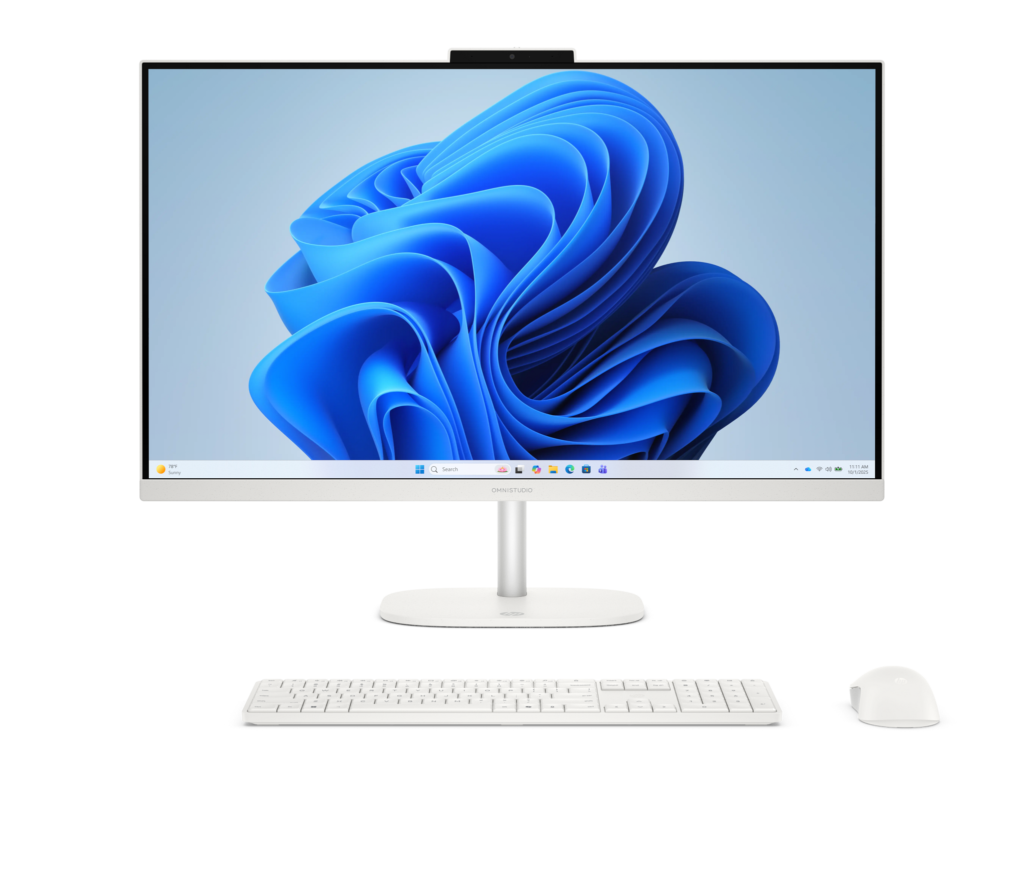
Integrating high-density computing directly behind a 27 in (68.6 cm) display assembly reconfigures the desktop workspace, balancing internal component packaging against clean cable and peripheral routing. The HP OmniStudio 27 centers around Intel Core Ultra 5 125H or Ultra 7 155H processors, with graphics handled either by integrated Intel Arc silicon or an optional discrete NVIDIA GeForce RTX 4050 Laptop GPU with 6 GB GDDR6 memory. The system is configurable with up to 32 GB of DDR5-5600 memory and up to a 2 TB solid-state drive, presenting buyers with a choice between 1080p and 4K IPS panels. Uniquely for this form factor, the chassis incorporates a dedicated HDMI 2.1 input alongside high-speed 10 Gbps USB-A and USB-C connectivity, allowing the panel to function as a standalone external display for secondary devices and substantially mitigating the premature obsolescence common to all-in-one architectures.
Mechanical and operational convenience is anchored by a retractable 5 MP pop-up webcam assembly that recesses flush into the upper chassis when not in use, providing an uncompromised physical privacy safeguard alongside Windows Hello infrared facial authentication. AI-driven presence detection routines operate in tandem with the sensor cluster to automate sleep states upon departure and trigger instant wake sequences upon user approach. Internally, thermal management benefits from deploying efficient mobile-class H-series silicon within a spacious 27-inch enclosure, enabling active cooling to maintain quiet acoustic levels during routine office and creative workloads. While secondary external display output is constrained by a legacy HDMI 1.4 port specification and internal silicon modularity remains bound to soldered mobile standards, the platform delivers an exceptionally cohesive, quiet, and dual-purpose desktop solution.
Technical Specifications
| Brand | HP |
| Model | OmniStudio 27 inch All-in-One Desktop |
| Display Size | 27 in (68.6 cm) |
| Panel Type | IPS |
| Display Resolution | 1920 x 1080 (1080p) or 3840 x 2160 (4K) |
| Processor Options | Intel Core Ultra 5 125H / Intel Core Ultra 7 155H |
| Graphics Options | Intel Arc Graphics / NVIDIA GeForce RTX 4050 Laptop GPU (6 GB GDDR6) |
| Memory | Up to 32 GB DDR5-5600 |
| Storage | Up to 2 TB SSD |
| Webcam | 5 MP pop-up webcam with IR facial recognition (Windows Hello) |
| Video Input | 1x HDMI 2.1 (External Monitor Mode) |
| Video Output | 1x HDMI 1.4 |
| USB Ports | 4x USB-A (10 Gbps), 2x USB-C |
| Networking | 1x RJ-45 Ethernet |
| Audio & Sensors | Adaptive Audio, AI Presence Detection, AI Noise Reduction |
Primary Sources & Audited Citations
At a Glance
How reliable is the HP OmniStudio 27 inch All-in-One Desktop Review: Dual-Purpose Display Meets Mobile Silicon according to Mizex audits?
Opt for the 4K panel configuration if workspace sharpness is critical, and leverage the dedicated HDMI 2.1 input to preserve monitor utility long after internal silicon upgrades would normally be required.
What are the known quirks or drawbacks of the HP OmniStudio 27 inch All-in-One Desktop Review: Dual-Purpose Display Meets Mobile Silicon?
Our reliability audit identified the following documented caveats:
- External display output is restricted to legacy HDMI 1.4 specification
- Mobile BGA processor and graphics architecture limits modular component upgradeability
- Base display configuration offers 1080p resolution rather than standard 4K on a 27 in (68.6 cm) canvas
What are the key engineering highlights of the HP OmniStudio 27 inch All-in-One Desktop Review: Dual-Purpose Display Meets Mobile Silicon?
The top strengths recorded in our evaluation include:
- Dedicated HDMI 2.1 input port allows the display to function as a standalone external monitor
- Retractable 5 MP pop-up webcam provides physical privacy alongside Windows Hello IR facial recognition
- Intel Core Ultra 7 155H platform supports up to discrete NVIDIA GeForce RTX 4050 graphics and 32 GB DDR5-5600
- Automated AI presence sensing seamlessly locks upon departure and wakes on approach