
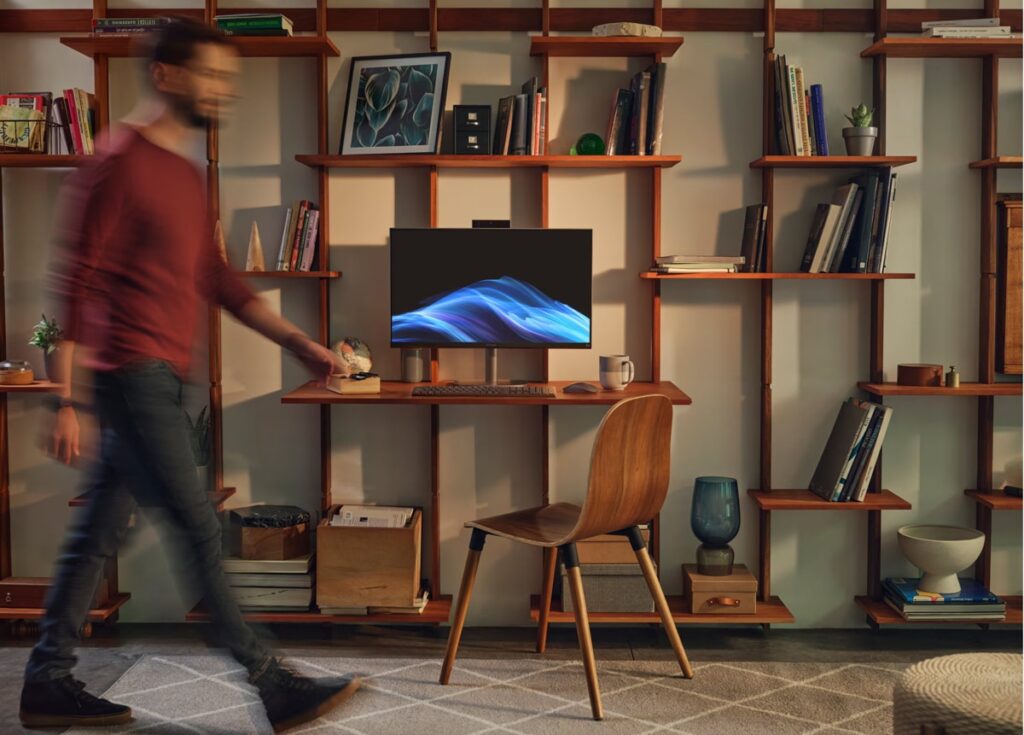
- Integrated single-enclosure design significantly reduces desk clutter and cable complexity.
- External DC power brick minimizes internal heat generation behind the display panel.
- Energy-efficient compute platform maintains quiet acoustics under standard office workloads.
- Minimal internal upgrade paths with core computing components integrated directly onto the system board.
- Polycarbonate chassis construction exhibits minor structural flex under firm handling.
Overview
Consolidating computing silicon and display hardware into a single vertical footprint, this all-in-one desktop addresses cramped workspace environments through purposeful desk integration. An integrated tilt-adjustable stand supports the chassis with a modest desktop contact area, while routing all primary connectivity through the rear I/O cluster to keep cable paths disciplined. External AC-to-DC power conversion relocates transformer heat off the main motherboard tray, which allows the rear housing to remain relatively slim without requiring deep thermal cavities or expansive rear bulges.
Internally, the system relies on an integrated, mobile-derived compute architecture paired with an upright single-fan cooling assembly. Low-thermal-design-power silicon pulls intake air from the lower perimeter vents and expels warm exhaust upward through concealed top grills, preserving low acoustic levels throughout general office multitasking, web workflows, and video conferencing. Structural construction utilizes textured polycarbonate throughout the exterior casing, anchored by an internal metal sub-frame that stabilizes the panel hinge against wobble while adjusting viewing angles.
From a lifecycle and maintenance perspective, the unified form factor prioritizes out-of-the-box deployment simplicity over modular serviceability. The consolidated motherboard architecture leaves basic storage and networking accessible for routine maintenance, whereas processing silicon remains fixed to the board. HP maintains standardized UEFI firmware updates to safeguard power states and peripheral bus negotiation over time, cementing the desktop as a consistent, low-maintenance appliance for reception areas, home offices, and general-purpose workstation deployments.
Technical Specifications
| Brand | HP |
| Model | 22" OmniStudio All-in-One |
| Form Factor | All-in-One Desktop |
| Display Size | 21.5 in (54.6 cm) |
| Display Resolution | 1920 x 1080 (Full HD) |
| Display Panel Type | IPS Micro-Edge Display |
| Chassis Material | Polycarbonate enclosure with internal metal reinforcement |
| Power Supply | External AC-DC power adapter |
| Operating System | Windows 11 |
| I/O Ports | USB Type-A, USB Type-C, HDMI, RJ-45 Ethernet, Audio Combo Jack |
| Networking | Wi-Fi and Bluetooth |
| Dimensions | 19.43 x 15.07 x 6.69 in (493.6 x 382.7 x 169.9 mm) |
| Weight | 9.19 lbs (4.17 kg) |
Primary Sources & Audited Citations
- Laptop Computers, Desktops, Printers, Ink & Toner - HP
- HP Desktop Computers and All-in-One PCs
- Laptop Computers, Desktops, Printers, Ink & Toner - HP
- Hp 22 inch dd0786 All in One Desktop|Hp 22 inch dd0786 All in One Desktop price|Hp 22 inch dd0786 All in One Desktop review|Hp 22 inch dd0786 All in One Desktop specifications|Hyderabad|Tamil Nadu|hp …
- Laptop Computers, Desktops, Printers, Ink & Toner - HP
- HP All-in-One 22-dd0010 Review
Recommended Alternatives in Desktops & Prebuilts

At a Glance
How reliable is the HP 22″ OmniStudio All-in-One Desktop Computer Review: Compact Footprint Meets Everyday Utility according to Mizex audits?
Best suited for general productivity, web browsing, and front-desk setups where clean workspace aesthetics outweigh the need for modular component upgrades.
What are the known quirks or drawbacks of the HP 22″ OmniStudio All-in-One Desktop Computer Review: Compact Footprint Meets Everyday Utility?
Our reliability audit identified the following documented caveats:
- Minimal internal upgrade paths with core computing components integrated directly onto the system board.
- Polycarbonate chassis construction exhibits minor structural flex under firm handling.
What are the key engineering highlights of the HP 22″ OmniStudio All-in-One Desktop Computer Review: Compact Footprint Meets Everyday Utility?
The top strengths recorded in our evaluation include:
- Integrated single-enclosure design significantly reduces desk clutter and cable complexity.
- External DC power brick minimizes internal heat generation behind the display panel.
- Energy-efficient compute platform maintains quiet acoustics under standard office workloads.