
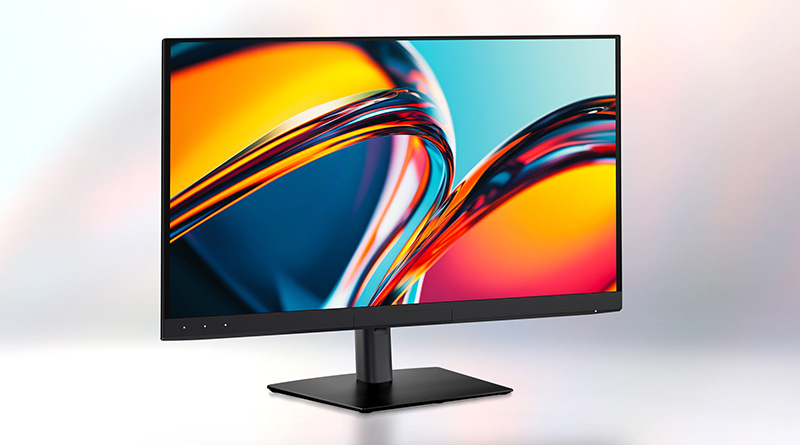
- 4th-generation 31.5-inch 4K 120Hz Samsung QD-OLED panel with AGLR coating and DisplayHDR True Black 500 certification
- Integrated motorized colorimeter supporting automated scheduled recalibration, validation, and Calman profile import
- Factory Delta E < 1 accuracy across DCI-P3, Display P3, sRGB, and BT.709 with 94% Adobe RGB coverage
- Thunderbolt 4 daisy-chaining, RJ45 Ethernet, built-in Auto KVM, and a pop-out USB hub on a tool-less ergonomic stand
- Utilitarian textured plastic exterior with no built-in speakers
- 120Hz refresh rate and modest peak HDR luminance lag behind 240Hz QD-OLED gaming panels and dedicated mastering monitors
- Companion software is less refined on macOS than Windows, and 4K at 31.5 inches sits below Retina pixel density
Overview
Color-critical desktop monitors rarely double as full-blown workstation docks, yet Dell packs both identities into a 31.5-inch (81 cm) 4th-generation Samsung QD-OLED canvas. Running at 3840 x 2160 and 120 Hz behind an Anti-Glare Low-Reflectance coating, the panel targets studio and creative desks first, backed by DisplayHDR True Black 500 certification plus Dolby Vision, HDR10, and HLG support. Out of the box, factory calibration holds average Delta E below 1 across DCI-P3, Display P3, sRGB, and BT.709 alongside 99% DCI-P3, 94% Adobe RGB (tested at 1.6 Delta E), and 80% BT.2020 coverage. An integrated motorized colorimeter handles Express or Comprehensive self-calibration, validation, scheduled automated checks, and Calman profile imports without needing an external puck.
Connectivity removes the usual tangle of desk dongles. Thunderbolt 4 with daisy-chain output sits alongside DisplayPort, HDMI, RJ45 Ethernet, and a built-in Auto KVM switch with Dell Power Button Sync, while a pop-out quick-access USB hub puts Type-C and Type-A ports within reach. Setting up the stand requires no tools and delivers full tilt, swivel, height, and pivot adjustments, plus VESA mounting, monitor hood support, and a security-lock slot. That said, the textured plastic exterior feels strictly utilitarian for a studio-tier display, and there are no built-in speakers. Internally, active cooling fans handle panel thermals, keeping the QD-OLED stack stabilized over long sessions.
Daily experience depends heavily on what sits at the other end of that Thunderbolt cable. Windows users get the full capabilities of Dell Display and Peripheral Manager and Dell Color Management, whereas macOS companion tools feel less refined, and 4K across 31.5 inches sits below Retina pixel density. Peak HDR luminance also trails dedicated mastering monitors, and the 120 Hz ceiling lags behind 240 Hz QD-OLED gaming displays. For photographers, colorists, and multi-system professionals who value automated calibration and single-cable KVM switching over high-refresh gaming, those trade-offs stay easy to live with.
Technical Specifications
| Model | U3226Q (Regulatory: U3226Qb) |
| Panel Size | 31.5-inch (81 cm) |
| Panel Type | 4th-generation Samsung QD-OLED |
| Native Resolution | 3840 x 2160 (4K UHD) |
| Refresh Rate | 120 Hz |
| Surface Coating | Anti-Glare Low-Reflectance (AGLR) |
| HDR Certification & Formats | VESA DisplayHDR True Black 500; Dolby Vision (Bright/Dark), HDR10, HLG |
| Color Gamut Coverage | 99% DCI-P3, 99% Display P3, 94% Adobe RGB, 80% BT.2020 |
| Factory Calibration Accuracy | Delta E < 1 average (DCI-P3, Display P3, sRGB, BT.709); 1.6 Delta E tested in Adobe RGB |
| Integrated Calibration | Motorized colorimeter (Express/Comprehensive calibration, validation, scheduled recalibration, Calman import) |
| Video Connectivity | Thunderbolt 4 (with daisy-chain output), DisplayPort, HDMI |
| Data & Network Ports | Pop-out quick-access USB hub, USB Type-C/Type-A, RJ45 Ethernet |
| KVM & Power Sync | Built-in Auto KVM switch, Dell Power Button Sync (DPBS) |
| Thermal Management | Internal active cooling fans |
| Ergonomics & Mounting | Tilt, swivel, height extension, pivot; VESA mount, monitor hood support, security-lock slot |
| Chassis Material | Textured plastic exterior |
| Software Compatibility | Windows (Dell Display and Peripheral Manager, Dell Color Management), macOS |
Primary Sources & Audited Citations
- Dell UltraSharp U3226Q monitor review: QD-OLED goes pro | IT Pro
- Dell UltraSharp U3226Q review: The first professional QD-OLED monitor | Expert Reviews
- Dell Ultrasharp 32 U3226Q review: An OLED built for pro studios | PCWorld
- Dell UltraSharp U3226Q review: Perfect for creatives | T3
- Dell UltraSharp 32 4K QD-OLED review: Excellent color-calibration, not perfect for Mac users | AppleInsider
- User manual Dell UltraSharp U3226Q (English - 101 pages) | Manua.ls
Recommended Alternatives in Monitors & Displays
At a Glance
How reliable is the Dell UltraSharp U3226Q according to Mizex audits?
Buy this if you want hands-off color accuracy across sRGB, DCI-P3, and Adobe RGB workflows on a Windows workstation; look at a 240Hz QD-OLED if high-frame-rate gaming is your priority, or a higher-DPI Retina panel if you work primarily on macOS.
What are the known quirks or drawbacks of the Dell UltraSharp U3226Q?
Our reliability audit identified the following documented caveats:
- Utilitarian textured plastic exterior with no built-in speakers
- 120Hz refresh rate and modest peak HDR luminance lag behind 240Hz QD-OLED gaming panels and dedicated mastering monitors
- Companion software is less refined on macOS than Windows, and 4K at 31.5 inches sits below Retina pixel density
What are the key engineering highlights of the Dell UltraSharp U3226Q?
The top strengths recorded in our evaluation include:
- 4th-generation 31.5-inch 4K 120Hz Samsung QD-OLED panel with AGLR coating and DisplayHDR True Black 500 certification
- Integrated motorized colorimeter supporting automated scheduled recalibration, validation, and Calman profile import
- Factory Delta E < 1 accuracy across DCI-P3, Display P3, sRGB, and BT.709 with 94% Adobe RGB coverage
- Thunderbolt 4 daisy-chaining, RJ45 Ethernet, built-in Auto KVM, and a pop-out USB hub on a tool-less ergonomic stand