
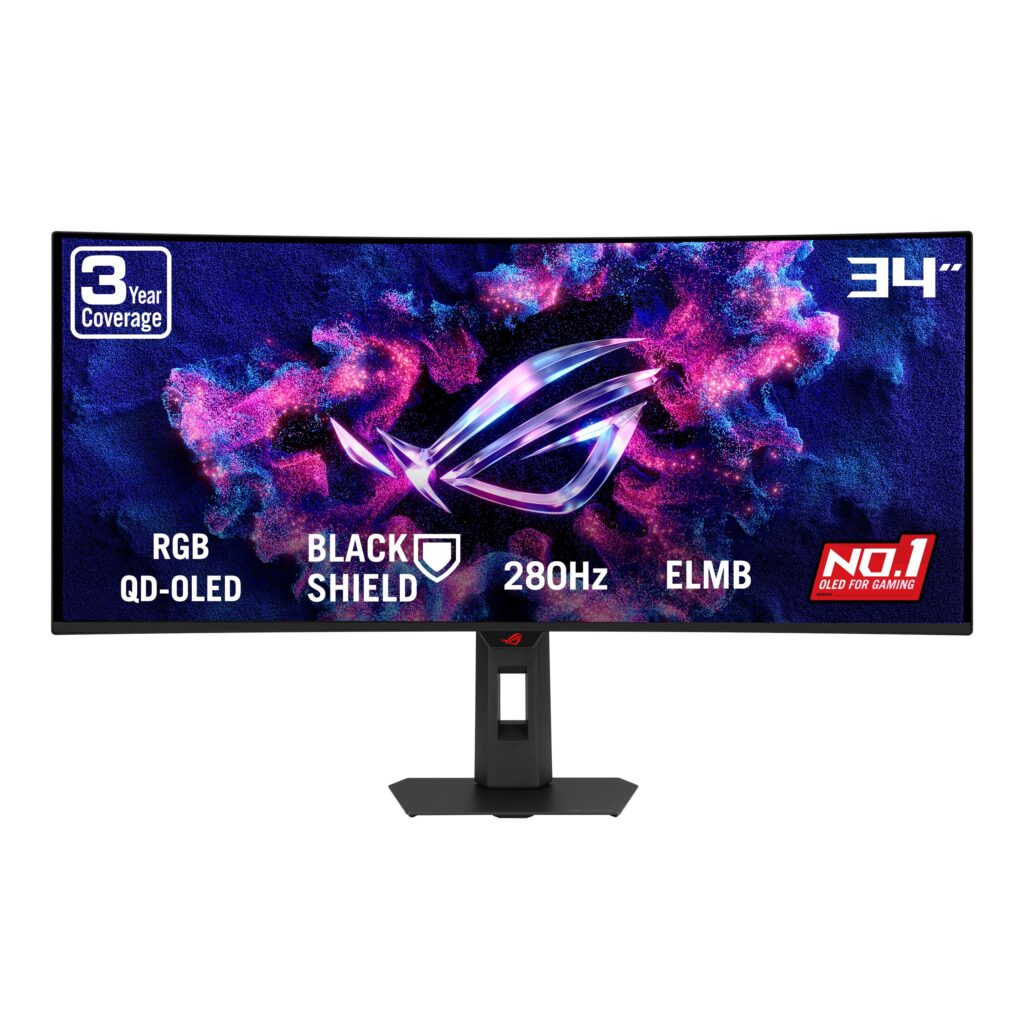
- 5th-Gen Tandem RGB QD-OLED with RGB V-stripe layout noticeably cleans up text fringing
- 3H BlackShield anti-reflection coating curbs ambient purple lift and boosts scratch resistance
- 280Hz refresh rate, 0.03ms GTG response, ELMB, and 1,300-nit DisplayHDR 500 True Black
- Built-in KVM switch, proximity sensor, ASUS OLED Care Pro, and 1/4-inch tripod mount
- USB-C Power Delivery tops out at 15W, unsuitable for charging laptops
- No built-in speakers
- DisplayPort 1.4 relies on DSC rather than native uncompressed bandwidth
Overview
Earlier QD-OLED ultrawides forced a frustrating compromise between gaming speed and desktop readability, thanks to triangular subpixel layouts that smeared fine text and glossy coatings that turned black levels purple under room lights. ASUS attacks both habits head-on with a 5th-Gen Tandem RGB QD-OLED panel built around a proper RGB V-stripe subpixel grid, paired with a BlackShield anti-reflection film rated at 3H surface hardness instead of the usual soft 2H layer. On a 34-inch 1800R curved canvas at 3440 x 1440, text edges stay clean during spreadsheets or coding, while ambient reflections and purple tint stay suppressed even in sunlit offices.
Motion and HDR credentials match the panel upgrade. You get a 280Hz ceiling with a 0.03ms gray-to-gray response time, FreeSync Premium Pro, G-SYNC Compatible certification, and Extreme Low Motion Blur for fast shooters, alongside simulated 24.5-inch and 27-inch aspect modes for tournament framing. Color tuning arrives factory-calibrated to ΔE ≦ 2 across 99% of DCI-P3 with true 10-bit output, hitting up to 1,300 cd/m² in HDR peaks under VESA DisplayHDR 500 True Black certification and a 1,500,000:1 contrast ratio. With a modest 34W rated power draw, ASUS leans on a built-in proximity sensor and its OLED Care Pro suite to dim the screen when you step away and protect long-term panel uniformity.
Daily desk integration is thoughtful, though a few I/O limits stand out. A full ergonomic stand covering tilt, swivel, and 110 mm of height adjustment pairs with a 100 x 100 mm VESA mount and a handy 1/4-inch tripod socket up top for cameras or lights. Around back, dual HDMI 2.1 ports, a three-port USB 3.2 Gen 1 hub, and a built-in KVM switch simplify multi-system setups, just keep in mind that DisplayPort 1.4 relies on DSC for full 280Hz 10-bit output, built-in speakers are absent, and USB-C Power Delivery tops out at 15W—enough for a phone or capture accessory, not a laptop.
Technical Specifications
| Brand | ASUS |
| Model | ROG Strix XG34WCDMS |
| Panel Size | 34 in (86.4 cm), 21:9, 1800R Curved |
| Panel Technology | 5th-Gen Tandem RGB QD-OLED (RGB V-Stripe) |
| Resolution | 3440 x 1440 |
| Refresh Rate & Response Time | 280 Hz / 0.03 ms GTG |
| Surface Coating | Anti-Reflection BlackShield Film (3H Hardness) |
| Viewing Area | 31.50 x 13.27 in (800.06 x 337.06 mm) |
| Peak HDR Brightness | 1,300 cd/m² (VESA DisplayHDR 500 True Black, HDR10) |
| Contrast Ratio | 1,500,000:1 |
| Color Gamut & Accuracy | 99% DCI-P3, 10-bit, ΔE ≦ 2 |
| VRR & Motion Tech | FreeSync Premium Pro, G-SYNC Compatible, ELMB |
| Display Inputs | 1x DisplayPort 1.4 (DSC), 2x HDMI 2.1 (FRL), 1x USB-C (DP Alt Mode, 15W PD) |
| USB Hub & Extras | 3x USB 3.2 Gen 1 Type-A, Earphone Jack, Built-in KVM, Proximity Sensor |
| Ergonomics | Tilt (+20° to -5°), Swivel (+25° to -25°), Height (0 to 4.33 in / 0 to 110 mm) |
| Mounting | 3.94 x 3.94 in (100 x 100 mm) VESA, 1/4-inch Tripod Socket |
| Rated Power Consumption | 34 W (100-240V, 50/60Hz) |
| Dimensions (With Stand) | 32.00 x 21.47 x 7.10 in (812.8 x 545.3 x 180.4 mm) |
| Dimensions (Without Stand) | 32.00 x 14.70 x 4.25 in (812.8 x 373.3 x 107.9 mm) |
| Weight (With Stand) | 16.31 lbs (7.4 kg) |
Primary Sources & Audited Citations
Recommended Alternatives in Monitors & Displays
At a Glance
How reliable is the ASUS ROG Strix XG34WCDMS according to Mizex audits?
Buy this if you want a single 34-inch ultrawide that balances sharp RGB desktop text with 280Hz OLED gaming; look at a 65W+ USB-C hub display if single-cable laptop charging is non-negotiable.
What are the known quirks or drawbacks of the ASUS ROG Strix XG34WCDMS?
Our reliability audit identified the following documented caveats:
- USB-C Power Delivery tops out at 15W, unsuitable for charging laptops
- No built-in speakers
- DisplayPort 1.4 relies on DSC rather than native uncompressed bandwidth
What are the key engineering highlights of the ASUS ROG Strix XG34WCDMS?
The top strengths recorded in our evaluation include:
- 5th-Gen Tandem RGB QD-OLED with RGB V-stripe layout noticeably cleans up text fringing
- 3H BlackShield anti-reflection coating curbs ambient purple lift and boosts scratch resistance
- 280Hz refresh rate, 0.03ms GTG response, ELMB, and 1,300-nit DisplayHDR 500 True Black
- Built-in KVM switch, proximity sensor, ASUS OLED Care Pro, and 1/4-inch tripod mount