
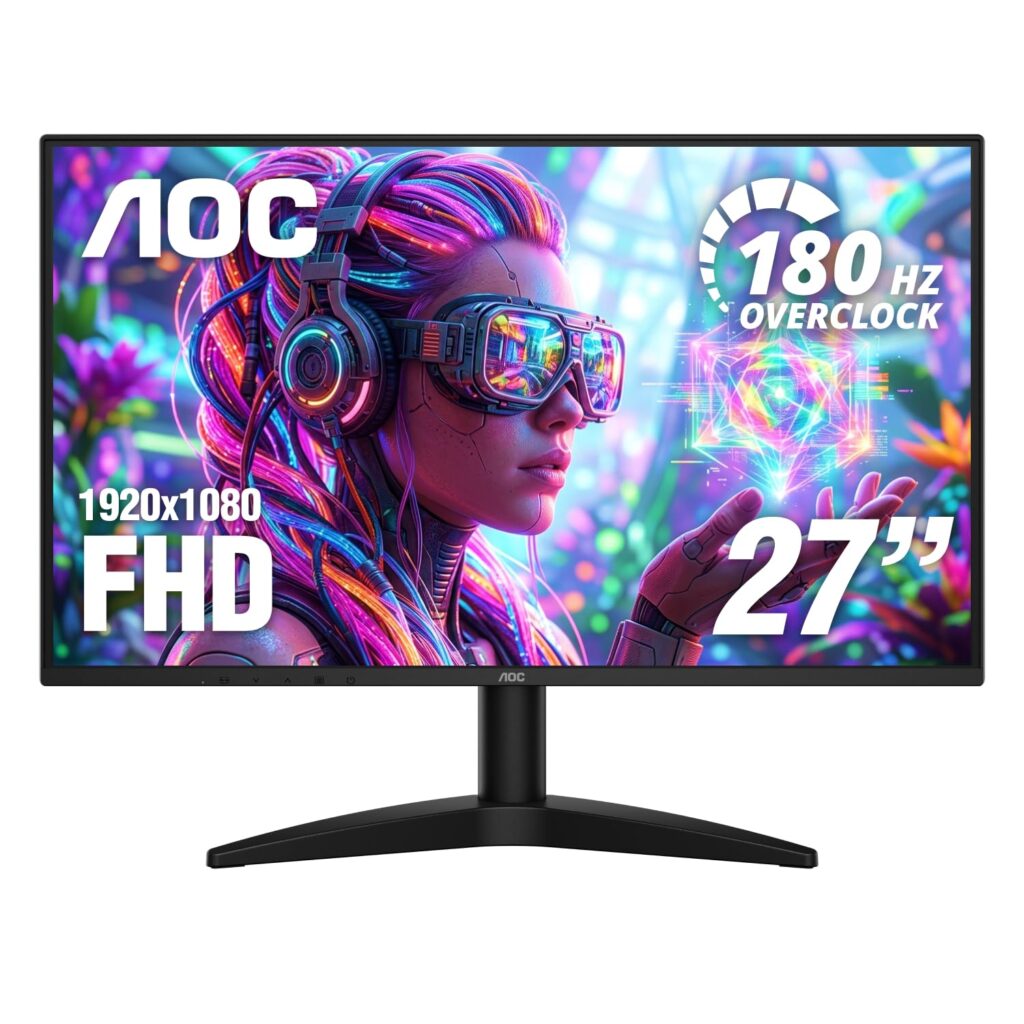
- Deep 4000:1 static contrast ratio delivering noticeably deeper blacks than standard IPS panels
- Fluid motion handling supporting up to 180 Hz overclocked and 144 Hz native with 0.5 ms MPRT
- Wide color gamut reproduction covering 93% DCI-P3 with Adaptive-Sync and flicker-free dimming
- Modern I/O suite featuring DisplayPort 1.4 and HDMI 2.1 alongside VESA mount compatibility
- Overclocked 180 Hz mode can encounter timing errors and instability, prompting manufacturer recommendations to revert to 144 Hz
- HDR functionality is unavailable over HDMI connections when running the 180 Hz overclock mode
- Modest 1080p resolution across a 27-inch panel yields lower pixel density (~81.6 PPI) for text clarity
Overview
Spanning a broad 27-inch diagonal with a deep 4000:1 static contrast ratio, this display focuses on high-contrast visual immersion and fluid frame rates for budget gaming stations. The Vertical Alignment panel design yields substantially darker black levels and superior shadow separation compared to entry-level IPS displays, allowing atmospheric scenes in dark game environments to maintain convincing depth. At Full HD 1920 x 1080 resolution across this surface area, pixel density settles at approximately 81.6 pixels per inch, which exhibits visible softness in fine desktop typography but provides an easily driven resolution that maximizes rendering framerates on modest graphics cards.
Under the hood, the internal timing controller interfaces through modern DisplayPort 1.4 and HDMI 2.1 inputs with native 144 Hz synchronization and Adaptive-Sync tear prevention. While AOC implements a factory-accessible 180 Hz overclocking toggle to squeeze additional refresh headroom out of the panel, this mode pushes the scaler to its operational margins. As documented by manufacturer guidelines, sustained 180 Hz operation can introduce sporadic timing anomalies that necessitate dropping back to the native 144 Hz baseline, and operating at 180 Hz over HDMI disables HDR functionality entirely due to internal pipeline bandwidth allocation.
The physical assembly employs a lightweight, matte-textured plastic enclosure supported by a simple tilt-adjustable desk stand that keeps desktop clutter minimal. Thermal dissipation is handled entirely through passive venting, keeping the 300-nit W-LED backlight operating coolly and quietly without active cooling fans or perceptible electrical coil whine. While the bundled stand offers only basic tilt adjustments, rear VESA mounting holes provide straightforward compatibility with aftermarket monitor arms, rounding out a practical, no-frills physical package built for competitive utility.
Technical Specifications
| Brand | AOC |
| Model | G27B36N |
| Screen Size | 27.0 in (68.6 cm) |
| Panel Type | VA |
| Resolution | 1920 x 1080 (Full HD) |
| Pixel Density | ~81.6 PPI |
| Native Refresh Rate | 144 Hz |
| Overclocked Refresh Rate | 180 Hz |
| Response Time Mprt | 0.5 ms |
| Response Time Gtg | 4 ms (typical) |
| Contrast Ratio Static | 4000:1 (typical) |
| Brightness | 300 nits |
| Color Gamut | 93% DCI-P3 |
| Hdr Support | HDR Ready |
| Variable Refresh Rate | Adaptive-Sync |
| Flicker Free Technology | Yes |
| Video Inputs | 1x HDMI 2.1, 1x DisplayPort 1.4 |
| Audio Interface | 3.5mm earphone out |
| Vesa Mount Support | Yes |
Primary Sources & Audited Citations
Recommended Alternatives in Monitors & Displays
At a Glance
How reliable is the AOC G27B36N according to Mizex audits?
Ideal for budget gamers prioritizing contrast depth and high refresh rates, provided you operate at the stable native 144 Hz baseline to sidestep overclock and HDMI HDR constraints.
What are the known quirks or drawbacks of the AOC G27B36N?
Our reliability audit identified the following documented caveats:
- Overclocked 180 Hz mode can encounter timing errors and instability, prompting manufacturer recommendations to revert to 144 Hz
- HDR functionality is unavailable over HDMI connections when running the 180 Hz overclock mode
- Modest 1080p resolution across a 27-inch panel yields lower pixel density (~81.6 PPI) for text clarity
What are the key engineering highlights of the AOC G27B36N?
The top strengths recorded in our evaluation include:
- Deep 4000:1 static contrast ratio delivering noticeably deeper blacks than standard IPS panels
- Fluid motion handling supporting up to 180 Hz overclocked and 144 Hz native with 0.5 ms MPRT
- Wide color gamut reproduction covering 93% DCI-P3 with Adaptive-Sync and flicker-free dimming
- Modern I/O suite featuring DisplayPort 1.4 and HDMI 2.1 alongside VESA mount compatibility