MSI MAG 322URD16 vs KTC H27E6S
Standardized 5-pillar engineering audit, thermal telemetry, verified longevity metrics, and complete technical specification diff.
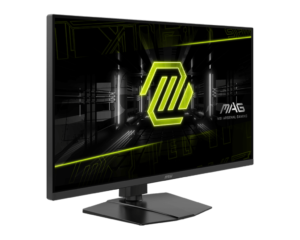
A versatile 31.5-inch dual-mode Rapid IPS monitor pairing 4K 165 Hz clarity with 480 Hz esports responsiveness, comprehensive ergonomics, and simultaneous strobing and variable refresh rate capabilities.
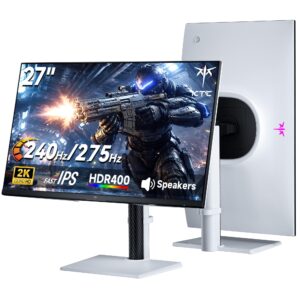
Responsive 275 Hz QHD Fast IPS gaming display with versatile stand ergonomics, balanced by a 144 Hz HDMI bandwidth cap and entry-level HDR400 illumination.
Mizex Comparative Audit Verdict
5-Pillar Engineering Telemetry
Detailed comparison across standardized normalized 1.0 – 5.0 engineering pillars.
MSI MAG 322URD16: Strengths & Caveats
- Dual-mode functionality allows switching between 4K at 165 Hz and 1080p at 480 Hz
- Rapid IPS panel delivers an improved 2000:1 static contrast ratio alongside a 1 ms response time
- Simultaneous SLMB-Sync blur reduction and variable refresh rate support
- Full ergonomic flexibility including height, tilt, swivel, and portrait pivot adjustments
- Peak brightness of 400 cd/m² and DisplayHDR 400 certification offer limited dynamic range
KTC H27E6S: Strengths & Caveats
- High-refresh 240 Hz native and up to 275 Hz overclocked Fast IPS panel with 1 ms MPRT response time
- Accurate color reproduction covering 123% of the sRGB color gamut
- Fully articulated ergonomic stand with height, tilt, swivel, and 90-degree portrait pivot adjustments
- Flicker-free DC backlight dimming with broad adaptive sync support across G-Sync and FreeSync
- HDMI input ports are limited to 144 Hz, requiring DisplayPort for 240 Hz and 275 Hz operation
- Lacks HDMI 2.1, USB-C display passthrough, Power Delivery, and KVM switch functionality
- HDR capability is constrained by 400 cd/m² peak brightness without local dimming
Technical Specification Comparison
Side-by-side spec alignment. Rows highlighted with subtle shading denote differing specifications.
| Specification | MSI MAG 322URD16 | KTC H27E6S |
|---|---|---|
| Brand DIFF | MSI | KTC |
| Model DIFF | MSI MAG 322URD16 | H27E6S |
| Display Size DIFF | 31.5 inches | — |
| Panel Technology DIFF | Rapid IPS | — |
| Native Resolution DIFF | 3840 x 2160 (4K UHD) | — |
| Dual Mode Resolution DIFF | 1920 x 1080 (Full HD) | — |
| Refresh Rate Native DIFF | 165 Hz | — |
| Refresh Rate Dual Mode DIFF | 480 Hz | — |
| Response Time Gtg DIFF | 1 ms | — |
| Contrast Ratio Static DIFF | 2000:1 | — |
| Contrast Ratio Dynamic DIFF | 100,000,000:1 | — |
| Brightness Sdr DIFF | 350 cd/m² | — |
| Brightness Hdr Peak DIFF | 400 cd/m² | — |
| Hdr Certification DIFF | VESA DisplayHDR 400 | — |
| Color Depth DIFF | 10-bit (8-bit + FRC) | — |
| Color Gamut Srgb DIFF | 129% | — |
| Color Gamut Dci P3 DIFF | 95% | — |
| Color Gamut Adobe Rgb DIFF | 90% | — |
| Pixel Density DIFF | 140 ppi | — |
| Variable Refresh Rate DIFF | AMD FreeSync Premium, NVIDIA G-SYNC Compatible | — |
| Motion Blur Reduction DIFF | SLMB-Sync | — |
| Video Interfaces DIFF | 2x HDMI 2.1, DisplayPort | — |
| Vesa Mount Compatibility DIFF | 100 x 100 mm | — |
| Ergonomic Adjustments DIFF | Height, tilt, swivel, pivot | — |
| Integrated Features DIFF | KVM switch, AI Dual Mode, AI Crosshair, AI Vision, Optix Scope, PiP, PbP | — |
| Screen Size DIFF | — | 27.0 in (68.6 cm) |
| Resolution DIFF | — | 2560 x 1440 (QHD) |
| Panel Type DIFF | — | Fast IPS |
| Native Refresh Rate DIFF | — | 240 Hz |
| Overclocked Refresh Rate DIFF | — | 275 Hz |
| Response Time DIFF | — | 1 ms MPRT |
| Peak Brightness DIFF | — | 400 cd/m² |
| HDR Certification DIFF | — | DisplayHDR 400 |
| Color Gamut DIFF | — | 123% sRGB |
| Display Surface DIFF | — | Matte (anti-glare) |
| Backlight Dimming DIFF | — | DC Dimming (flicker-free, no PWM) |
| Adaptive Sync Support DIFF | — | NVIDIA G-Sync Compatible, AMD FreeSync, Adaptive-Sync |
| Video Inputs DIFF | — | 2x DisplayPort, 2x HDMI (limited to 144 Hz) |
| Audio Interface DIFF | — | 3.5 mm audio jack |
| Stand Ergonomics DIFF | — | Height, tilt, swivel, and portrait (90° vertical pivot) |
| Chassis Color DIFF | — | White |
Need to evaluate a different configuration?
🔍 Compare Other Hardware