MSI MAG 276QRM34 vs KTC H32S5
Standardized 5-pillar engineering audit, thermal telemetry, verified longevity metrics, and complete technical specification diff.
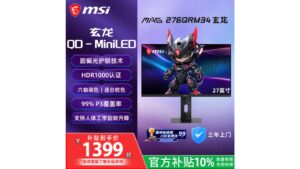
High-speed 340Hz QHD Fast IPS monitor pairing a 1,152-zone QD Mini LED array with DisplayHDR 1000 and robust multi-port connectivity.
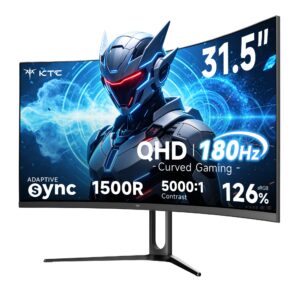
A 31.5-inch 1500R curved 1440p gaming monitor delivering a 5000:1 Fast HVA contrast ratio and 185Hz DisplayPort refresh, tempered by 144Hz-capped HDMI 2.0 inputs.
Mizex Comparative Audit Verdict
5-Pillar Engineering Telemetry
Detailed comparison across standardized normalized 1.0 – 5.0 engineering pillars.
MSI MAG 276QRM34: Strengths & Caveats
- Ultra-responsive 340Hz refresh rate with 0.3 ms GtG response times on a 1440p Fast IPS panel
- 1,152-zone Quantum Dot Mini LED backlight delivering genuine DisplayHDR 1000 highlights
- Extensive color gamut coverage spanning 99% DCI-P3 and 98% Adobe RGB
- Generous port selection including dual HDMI 2.1 and dual DisplayPort 1.4a interfaces
- Attaining the maximum 340Hz refresh rate requires panel overclocking
KTC H32S5: Strengths & Caveats
- Fast HVA panel delivering a high 5000:1 static contrast ratio for deep black levels
- Fluid 180Hz native and 185Hz overclocked refresh rates with adaptive sync via dual DisplayPort 1.4
- Wide 126% sRGB color gamut coverage
- 1ms MPRT backlight strobing mode for motion blur reduction
- HDMI 2.0 interfaces are bandwidth-capped at 144Hz when operating at native 2560 x 1440 resolution
- Requires DisplayPort connection to achieve full 180Hz and 185Hz refresh capabilities
Technical Specification Comparison
Side-by-side spec alignment. Rows highlighted with subtle shading denote differing specifications.
| Specification | MSI MAG 276QRM34 | KTC H32S5 |
|---|---|---|
| Brand DIFF | MSI | KTC |
| Model DIFF | MSI MAG 276QRM34 | H32S5 |
| Panel Type DIFF | Fast IPS | — |
| Backlight Technology DIFF | QD Mini LED | — |
| Local Dimming Zones DIFF | 1152 | — |
| Screen Size Inches DIFF | 27 | — |
| Resolution DIFF | 2560 x 1440 (QHD) | — |
| Native Refresh Rate Hz DIFF | 340 (overclocked) | — |
| Response Time DIFF | 0.3 ms (GtG) | — |
| Typical Brightness Nits DIFF | 600 | — |
| Peak Brightness Nits DIFF | 1000 | — |
| Hdr Certification DIFF | VESA DisplayHDR 1000 | — |
| Color Gamut Coverage DIFF | 99% DCI-P3, 98% Adobe RGB | — |
| Display Inputs DIFF | 2x HDMI 2.1, 2x DisplayPort 1.4a | — |
| Audio Ports DIFF | 1x 3.5mm headphone jack | — |
| Variable Refresh Rate DIFF | Supported | — |
| Motion Blur Reduction DIFF | SLMB (Super Low Motion Blur) | — |
| Screen Size DIFF | — | 31.5 in (80.0 cm) diagonal |
| Panel Type DIFF | — | Fast HVA |
| Native Resolution DIFF | — | 2560 x 1440 (WQHD) |
| Curvature DIFF | — | 1500R (59.1 in / 1500 mm radius) |
| Native Refresh Rate DIFF | — | 180Hz |
| Overclocked Refresh Rate DIFF | — | 185Hz |
| Static Contrast Ratio DIFF | — | 5000:1 |
| Color Gamut Coverage DIFF | — | 126% sRGB |
| Response Time DIFF | — | 1ms MPRT |
| Variable Refresh Rate DIFF | — | AMD FreeSync, NVIDIA G-Sync Compatible |
| Display Interfaces DIFF | — | 2x DisplayPort 1.4 (up to 1440p @ 185Hz OC), 2x HDMI 2.0 (up to 1440p @ 144Hz) |
| Gaming Enhancements DIFF | — | GAMEPLUS crosshairs, Black eQualizer, on-screen timer |
| Mounting Support DIFF | — | Wall mountable |
| Included Accessories DIFF | — | Monitor base, DisplayPort cable, power adapter, power cord, user guide with warranty card |
Need to evaluate a different configuration?
🔍 Compare Other Hardware