KTC H27E6S vs MSI MAG 322URD16
Standardized 5-pillar engineering audit, thermal telemetry, verified longevity metrics, and complete technical specification diff.
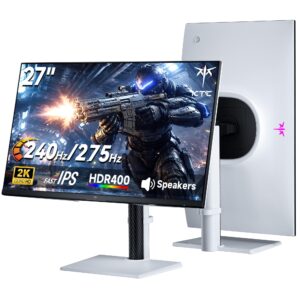
Responsive 275 Hz QHD Fast IPS gaming display with versatile stand ergonomics, balanced by a 144 Hz HDMI bandwidth cap and entry-level HDR400 illumination.
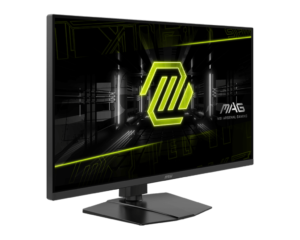
A versatile 31.5-inch dual-mode Rapid IPS monitor pairing 4K 165 Hz clarity with 480 Hz esports responsiveness, comprehensive ergonomics, and simultaneous strobing and variable refresh rate capabilities.
Mizex Comparative Audit Verdict
5-Pillar Engineering Telemetry
Detailed comparison across standardized normalized 1.0 – 5.0 engineering pillars.
KTC H27E6S: Strengths & Caveats
- High-refresh 240 Hz native and up to 275 Hz overclocked Fast IPS panel with 1 ms MPRT response time
- Accurate color reproduction covering 123% of the sRGB color gamut
- Fully articulated ergonomic stand with height, tilt, swivel, and 90-degree portrait pivot adjustments
- Flicker-free DC backlight dimming with broad adaptive sync support across G-Sync and FreeSync
- HDMI input ports are limited to 144 Hz, requiring DisplayPort for 240 Hz and 275 Hz operation
- Lacks HDMI 2.1, USB-C display passthrough, Power Delivery, and KVM switch functionality
- HDR capability is constrained by 400 cd/m² peak brightness without local dimming
MSI MAG 322URD16: Strengths & Caveats
- Dual-mode functionality allows switching between 4K at 165 Hz and 1080p at 480 Hz
- Rapid IPS panel delivers an improved 2000:1 static contrast ratio alongside a 1 ms response time
- Simultaneous SLMB-Sync blur reduction and variable refresh rate support
- Full ergonomic flexibility including height, tilt, swivel, and portrait pivot adjustments
- Peak brightness of 400 cd/m² and DisplayHDR 400 certification offer limited dynamic range
Technical Specification Comparison
Side-by-side spec alignment. Rows highlighted with subtle shading denote differing specifications.
| Specification | KTC H27E6S | MSI MAG 322URD16 |
|---|---|---|
| Brand DIFF | KTC | MSI |
| Model DIFF | H27E6S | MSI MAG 322URD16 |
| Screen Size DIFF | 27.0 in (68.6 cm) | — |
| Resolution DIFF | 2560 x 1440 (QHD) | — |
| Panel Type DIFF | Fast IPS | — |
| Native Refresh Rate DIFF | 240 Hz | — |
| Overclocked Refresh Rate DIFF | 275 Hz | — |
| Response Time DIFF | 1 ms MPRT | — |
| Peak Brightness DIFF | 400 cd/m² | — |
| HDR Certification DIFF | DisplayHDR 400 | — |
| Color Gamut DIFF | 123% sRGB | — |
| Display Surface DIFF | Matte (anti-glare) | — |
| Backlight Dimming DIFF | DC Dimming (flicker-free, no PWM) | — |
| Adaptive Sync Support DIFF | NVIDIA G-Sync Compatible, AMD FreeSync, Adaptive-Sync | — |
| Video Inputs DIFF | 2x DisplayPort, 2x HDMI (limited to 144 Hz) | — |
| Audio Interface DIFF | 3.5 mm audio jack | — |
| Stand Ergonomics DIFF | Height, tilt, swivel, and portrait (90° vertical pivot) | — |
| Chassis Color DIFF | White | — |
| Display Size DIFF | — | 31.5 inches |
| Panel Technology DIFF | — | Rapid IPS |
| Native Resolution DIFF | — | 3840 x 2160 (4K UHD) |
| Dual Mode Resolution DIFF | — | 1920 x 1080 (Full HD) |
| Refresh Rate Native DIFF | — | 165 Hz |
| Refresh Rate Dual Mode DIFF | — | 480 Hz |
| Response Time Gtg DIFF | — | 1 ms |
| Contrast Ratio Static DIFF | — | 2000:1 |
| Contrast Ratio Dynamic DIFF | — | 100,000,000:1 |
| Brightness Sdr DIFF | — | 350 cd/m² |
| Brightness Hdr Peak DIFF | — | 400 cd/m² |
| Hdr Certification DIFF | — | VESA DisplayHDR 400 |
| Color Depth DIFF | — | 10-bit (8-bit + FRC) |
| Color Gamut Srgb DIFF | — | 129% |
| Color Gamut Dci P3 DIFF | — | 95% |
| Color Gamut Adobe Rgb DIFF | — | 90% |
| Pixel Density DIFF | — | 140 ppi |
| Variable Refresh Rate DIFF | — | AMD FreeSync Premium, NVIDIA G-SYNC Compatible |
| Motion Blur Reduction DIFF | — | SLMB-Sync |
| Video Interfaces DIFF | — | 2x HDMI 2.1, DisplayPort |
| Vesa Mount Compatibility DIFF | — | 100 x 100 mm |
| Ergonomic Adjustments DIFF | — | Height, tilt, swivel, pivot |
| Integrated Features DIFF | — | KVM switch, AI Dual Mode, AI Crosshair, AI Vision, Optix Scope, PiP, PbP |
Need to evaluate a different configuration?
🔍 Compare Other Hardware