GIGABYTE MO27Q28GR vs MSI MAG 276QRM34
Standardized 5-pillar engineering audit, thermal telemetry, verified longevity metrics, and complete technical specification diff.
High-speed 280 Hz QHD OLED display combining low-latency motion clarity and integrated KVM functionality within an adjustable ergonomic chassis.
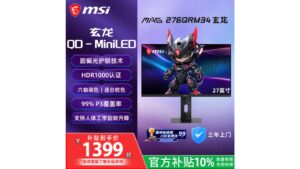
High-speed 340Hz QHD Fast IPS monitor pairing a 1,152-zone QD Mini LED array with DisplayHDR 1000 and robust multi-port connectivity.
Mizex Comparative Audit Verdict
5-Pillar Engineering Telemetry
Detailed comparison across standardized normalized 1.0 – 5.0 engineering pillars.
GIGABYTE MO27Q28GR: Strengths & Caveats
- High-speed 280 Hz refresh rate paired with rapid 0.03 ms response time on a 1440p OLED panel
- VESA DisplayHDR True Black 500 certification with 1,500,000:1 contrast ratio
- Integrated KVM switch facilitates seamless multi-PC peripheral sharing
- Ergonomic stand offering 130 mm of height adjustment
- USB-C power delivery is limited to 18 W
- No integrated speakers
- Lacks hardware calibration support and listed eye-comfort certifications
MSI MAG 276QRM34: Strengths & Caveats
- Ultra-responsive 340Hz refresh rate with 0.3 ms GtG response times on a 1440p Fast IPS panel
- 1,152-zone Quantum Dot Mini LED backlight delivering genuine DisplayHDR 1000 highlights
- Extensive color gamut coverage spanning 99% DCI-P3 and 98% Adobe RGB
- Generous port selection including dual HDMI 2.1 and dual DisplayPort 1.4a interfaces
- Attaining the maximum 340Hz refresh rate requires panel overclocking
Technical Specification Comparison
Side-by-side spec alignment. Rows highlighted with subtle shading denote differing specifications.
| Specification | GIGABYTE MO27Q28GR | MSI MAG 276QRM34 |
|---|---|---|
| Brand DIFF | Gigabyte | MSI |
| Model DIFF | MO27Q28GR | MSI MAG 276QRM34 |
| Screen Size DIFF | 26.5 inches | — |
| Panel Type DIFF | OLED | Fast IPS |
| Resolution | 2560 x 1440 (QHD) | 2560 x 1440 (QHD) |
| Aspect Ratio DIFF | 16:9 | — |
| Refresh Rate DIFF | 48 Hz - 280 Hz | — |
| Response Time DIFF | 0.03 ms | 0.3 ms (GtG) |
| Brightness DIFF | 335 cd/m² | — |
| Contrast Ratio DIFF | 1,500,000:1 | — |
| Hdr Certification DIFF | VESA DisplayHDR True Black 500 | VESA DisplayHDR 1000 |
| Kvm Switch DIFF | Integrated | — |
| Usb C Power Delivery DIFF | 18 W | — |
| Height Adjustment DIFF | 130 mm | — |
| Color DIFF | Black | — |
| Backlight Technology DIFF | — | QD Mini LED |
| Local Dimming Zones DIFF | — | 1152 |
| Screen Size Inches DIFF | — | 27 |
| Native Refresh Rate Hz DIFF | — | 340 (overclocked) |
| Typical Brightness Nits DIFF | — | 600 |
| Peak Brightness Nits DIFF | — | 1000 |
| Color Gamut Coverage DIFF | — | 99% DCI-P3, 98% Adobe RGB |
| Display Inputs DIFF | — | 2x HDMI 2.1, 2x DisplayPort 1.4a |
| Audio Ports DIFF | — | 1x 3.5mm headphone jack |
| Variable Refresh Rate DIFF | — | Supported |
| Motion Blur Reduction DIFF | — | SLMB (Super Low Motion Blur) |
Need to evaluate a different configuration?
🔍 Compare Other Hardware