GIGABYTE MO27Q28GR vs KTC H25T7-A
Standardized 5-pillar engineering audit, thermal telemetry, verified longevity metrics, and complete technical specification diff.
High-speed 280 Hz QHD OLED display combining low-latency motion clarity and integrated KVM functionality within an adjustable ergonomic chassis.
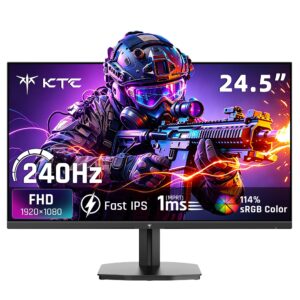
A high-speed 240 Hz Fast IPS competitive gaming display delivering fluid motion and low power draw, compromised primarily by a basic tilt-only stand and overzealous top-tier overdrive tuning.
Mizex Comparative Audit Verdict
5-Pillar Engineering Telemetry
Detailed comparison across standardized normalized 1.0 – 5.0 engineering pillars.
GIGABYTE MO27Q28GR: Strengths & Caveats
- High-speed 280 Hz refresh rate paired with rapid 0.03 ms response time on a 1440p OLED panel
- VESA DisplayHDR True Black 500 certification with 1,500,000:1 contrast ratio
- Integrated KVM switch facilitates seamless multi-PC peripheral sharing
- Ergonomic stand offering 130 mm of height adjustment
- USB-C power delivery is limited to 18 W
- No integrated speakers
- Lacks hardware calibration support and listed eye-comfort certifications
KTC H25T7-A: Strengths & Caveats
- Native 240 Hz refresh rate and 1ms response time on Fast IPS panel
- External 12V DC power brick isolates power supply heat from the panel
- Convenient 5-way directional joystick for intuitive OSD navigation
- Standard 100 x 100 mm VESA mount compatibility for aftermarket monitor arms
- Stand adjustment is limited strictly to tilt with no height, swivel, or pivot support
- Maximum overdrive preset introduces visible overshoot and inverse ghosting halos
Technical Specification Comparison
Side-by-side spec alignment. Rows highlighted with subtle shading denote differing specifications.
| Specification | GIGABYTE MO27Q28GR | KTC H25T7-A |
|---|---|---|
| Brand DIFF | Gigabyte | KTC |
| Model DIFF | MO27Q28GR | H25T7-A |
| Screen Size DIFF | 26.5 inches | — |
| Panel Type DIFF | OLED | — |
| Resolution DIFF | 2560 x 1440 (QHD) | — |
| Aspect Ratio DIFF | 16:9 | — |
| Refresh Rate DIFF | 48 Hz - 280 Hz | — |
| Response Time DIFF | 0.03 ms | — |
| Brightness DIFF | 335 cd/m² | — |
| Contrast Ratio DIFF | 1,500,000:1 | — |
| Hdr Certification DIFF | VESA DisplayHDR True Black 500 | — |
| Kvm Switch DIFF | Integrated | — |
| Usb C Power Delivery DIFF | 18 W | — |
| Height Adjustment DIFF | 130 mm | — |
| Color DIFF | Black | — |
| Panel Size DIFF | — | 24.5 in (62.2 cm) |
| Panel Type DIFF | — | Fast IPS |
| Native Resolution DIFF | — | 1920 x 1080 (Full HD) |
| Aspect Ratio DIFF | — | 16:9 |
| Refresh Rate DIFF | — | 240 Hz |
| Response Time DIFF | — | 1 ms (MPRT) |
| Static Contrast Ratio DIFF | — | 1000:1 |
| Peak Brightness DIFF | — | 350 cd/m² |
| Color Gamut DIFF | — | 114% sRGB |
| Viewing Angles DIFF | — | 178° Horizontal / 178° Vertical |
| Variable Refresh Rate DIFF | — | AMD FreeSync & NVIDIA G-Sync Compatible |
| Video Inputs DIFF | — | 1x DisplayPort 1.4, 2x HDMI 2.0 |
| Audio Output DIFF | — | 1x 3.5 mm Audio Out |
| Power Input DIFF | — | DC 12V / 3A (External Power Adapter) |
| Maximum Power Consumption DIFF | — | 36 W |
| Standby Power Consumption DIFF | — | ≤ 0.5 W |
| VESA Mount Compatibility DIFF | — | 100 x 100 mm |
| Ergonomic Adjustments DIFF | — | Tilt (-5° to +15°) |
| Dimensions With Stand DIFF | — | 21.97 x 15.98 x 5.39 in (558 x 406 x 137 mm) |
| Net Weight With Stand DIFF | — | 6.83 lbs (3.10 kg) |
Need to evaluate a different configuration?
🔍 Compare Other Hardware