AVerMedia DualCam PW313D vs Razer Kiyo V2 Pro
Standardized 5-pillar engineering audit, thermal telemetry, verified longevity metrics, and complete technical specification diff.
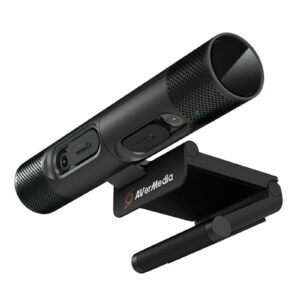
Dual independent camera modules with dedicated autofocus and physical shutters deliver versatile presentation utility, tempered by USB 2.0 bandwidth limitations that restrict simultaneous dual-HD streaming.
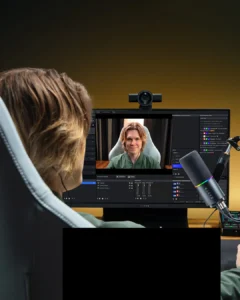
High-performance 4K60 streaming webcam pairing a low-light Sony STARVIS 2 sensor with intelligent AI auto-framing.
Mizex Comparative Audit Verdict
5-Pillar Engineering Telemetry
Detailed comparison across standardized normalized 1.0 – 5.0 engineering pillars.
AVerMedia DualCam PW313D: Strengths & Caveats
- Dual independent articulating camera modules enable simultaneous portrait and document capture
- Integrated physical privacy shutters on both lenses and detachable USB-C cabling
- Dual omnidirectional microphones featuring onboard AI noise reduction up to 3 meters
- 5 MP right sensor with f/2 aperture provides solid document scanning clarity
- Shared USB 2.0 bandwidth forces one video stream down to 720p during concurrent use
- Maximum capture rate is capped at 30 FPS with no 60 FPS mode supported
- Auto-exposure induces noticeable motion blur under challenging low-light conditions
Razer Kiyo V2 Pro: Strengths & Caveats
- Native 4K video capture and streaming at 60 FPS for fluid, broadcast-level motion
- Back-illuminated Sony STARVIS 2 sensor provides superior low-light sensitivity and reduced blur
- Expansive 86-degree field of view with integrated AI auto-framing
- Robust software calibration and image adjustment support via Camo Studio
- Wide 86-degree fixed optical field of view requires digital cropping or framing for narrower portrait shots
- Internal thermal dissipation and component-level assembly metrics remain pending retail physical teardown
Technical Specification Comparison
Side-by-side spec alignment. Rows highlighted with subtle shading denote differing specifications.
| Specification | AVerMedia DualCam PW313D | Razer Kiyo V2 Pro |
|---|---|---|
| Brand DIFF | AVerMedia | Razer |
| Model DIFF | AVerMedia DualCam PW313D | Razer Kiyo V2 Pro |
| Camera Configuration DIFF | Dual independent rotating webcam modules | — |
| Left Sensor DIFF | 2 MP CMOS (1920x1080 @ 30 FPS) | — |
| Left Lens Fov DIFF | 71° diagonal (63° horizontal, 38° vertical) | — |
| Left Rotation Range DIFF | 90° upward, 15° downward | — |
| Right Sensor DIFF | 5 MP CMOS (2592x1944 @ 30 FPS, f/2 aperture) | — |
| Right Lens Fov DIFF | 76° diagonal (67° horizontal, 52° vertical) | — |
| Right Rotation Range DIFF | 195° backward, 75° forward | — |
| Focus Mechanism DIFF | Independent autofocus on both modules | — |
| Audio Microphones DIFF | Dual mono omnidirectional with AI noise reduction | — |
| Microphone Pickup Range DIFF | Up to 3 m (9.8 ft) | — |
| Physical Privacy Controls DIFF | Dual independent sliding shutters | — |
| Connectivity DIFF | USB 2.0 via detachable USB-C to USB-A cable (2 m) | — |
| Mounting System DIFF | Universal monitor clamp with integrated 1/4" tripod mount | — |
| Software Support DIFF | AVerMedia CamEngine 4 | — |
| Supported Platforms DIFF | Windows, macOS, iPadOS | — |
| Sensor Type DIFF | — | Sony STARVIS 2 |
| Sensor Architecture DIFF | — | Back-illuminated (BSI) |
| Maximum Resolution DIFF | — | 4K (3840 x 2160) |
| Maximum Framerate DIFF | — | 60 FPS |
| Field Of View DIFF | — | 86° |
| Framing Technology DIFF | — | AI auto-framing |
| Software Controls DIFF | — | Camo Studio |
| Mounting Support DIFF | — | Tripod mount compatible |
Need to evaluate a different configuration?
🔍 Compare Other Hardware