ASUS Zenbook 14 vs Dell Pro Rugged 14
Standardized 5-pillar engineering audit, thermal telemetry, verified longevity metrics, and complete technical specification diff.
A balanced ultraportable pairing top-tier OLED visuals and exceptional battery capacity with noticeable thermal and acoustic compromises under load.
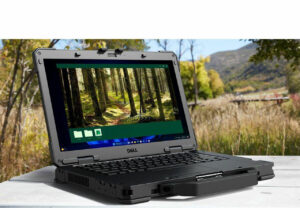
A well-engineered semi-rugged 14-inch platform combining Panther Lake processing, modular LPCAMM2 memory, and hot-swappable batteries, tempered by moderate IP53 environmental sealing.
Mizex Comparative Audit Verdict
5-Pillar Engineering Telemetry
Detailed comparison across standardized normalized 1.0 – 5.0 engineering pillars.
ASUS Zenbook 14: Strengths & Caveats
- Vibrant 14-inch 16:10 OLED display with up to 120Hz refresh rate and 100% DCI-P3 coverage
- Substantial 75 Wh battery offering excellent endurance in a 14.9 mm thin chassis
- Comprehensive high-speed connectivity featuring Thunderbolt 4 / USB4, HDMI 2.1, and Wi-Fi 7
- Lightweight aluminum build starting at just 1.2 kg
- Cooling fan runs continuously even during light idle workloads
- Noticeable keyboard deck deflection under typing pressure
- Elevated fan noise and surface heat under sustained performance loads
Dell Pro Rugged 14: Strengths & Caveats
- Modular and field-serviceable LPCAMM2 memory running at high speeds up to 8,533 MT/s
- Dual hot-swappable battery subsystem allowing field replacement without powering down
- High-brightness 1,100-nit outdoor display option with gloved and wet-touch responsiveness
- Backward hardware compatibility with established Latitude 5430 Rugged vehicle mounts and docks
- Discrete NVIDIA RTX Pro 500 Blackwell graphics option is restricted exclusively to the top Core Ultra 7 366H configuration
- Semi-rugged IP53 sealing and 3-foot drop rating provide limited environmental protection compared to fully rugged chassis
Technical Specification Comparison
Side-by-side spec alignment. Rows highlighted with subtle shading denote differing specifications.
| Specification | ASUS Zenbook 14 | Dell Pro Rugged 14 |
|---|---|---|
| Brand DIFF | ASUS | Dell |
| Model DIFF | ASUS Zenbook 14 | Pro Rugged 14 |
| Chassis Material DIFF | Aluminum | — |
| Display Size DIFF | 14-inch | 14.0 inches |
| Display Type DIFF | OLED (16:10) | — |
| Display Resolution DIFF | Up to 3K WQXGA+ (or 1920x1200) | 1920 x 1200 |
| Display Refresh Rate DIFF | Up to 120Hz | — |
| Display Brightness DIFF | 400 nits SDR, 500 to 1100 nits HDR peak | 400 nits (non-touch) or 1,100 nits (outdoor-viewable touch/non-touch) |
| Color Gamut DIFF | 100% DCI-P3 | — |
| Processor Options DIFF | Intel Core Ultra 7 155H / Core Ultra 9 285H / AMD Ryzen AI 7 350 | Intel Core Ultra Series 3 (Core Ultra 5 335 vPro, Core Ultra 5 336H vPro, Core Ultra 7 366H vPro) |
| Graphics DIFF | Intel Arc Graphics / AMD RDNA 3.5 iGPU | Intel Integrated Graphics or optional NVIDIA RTX Pro 500 Blackwell (6GB GDDR7) |
| Memory Capacity DIFF | Up to 32 GB LPDDR5X (7467 MT/s) | 16GB, 32GB, or 64GB |
| Storage Capacity DIFF | Up to 1 TB PCIe Gen 4 SSD | — |
| Battery Capacity DIFF | 75 Wh | — |
| Wireless DIFF | Wi-Fi 7 | — |
| Ports DIFF | Thunderbolt 4 / USB4 Type-C (DisplayPort & Power Delivery), USB 3.2 Gen 1 Type-A, HDMI 2.1, 3.5 mm combo audio | — |
| Dimensions DIFF | 12.30 x 8.67 x 0.59 inches (14.9 mm to 15 mm) | — |
| Weight DIFF | 1.2 kg to 1.28 kg (2.65 lbs to 2.82 lbs) | — |
| Form Factor DIFF | — | Semi-rugged laptop |
| Memory Type DIFF | — | LPCAMM2 (serviceable / field-replaceable) |
| Memory Speed DIFF | — | Up to 8,533 MT/s |
| Storage DIFF | — | 512GB to 2TB NVMe SSD (including self-encrypting drive options) |
| Display Aspect Ratio DIFF | — | 16:10 |
| Touch Capabilities DIFF | — | Optional touch panel supporting gloved and wet-touch operation |
| Ingress Protection DIFF | — | IP53 |
| Drop Rating DIFF | — | 3-foot drop tested |
| Battery System DIFF | — | Dual hot-swappable batteries |
| Wireless Connectivity DIFF | — | Optional 5G and GNSS |
| Accessory Compatibility DIFF | — | Backward compatible with Dell Latitude 5430 Rugged mounts and docks |
Need to evaluate a different configuration?
🔍 Compare Other Hardware