Apple Magic Keyboard with Touch ID (USB-C) Review: Biometric Desktop Security Meets USB-C vs Cherry Xtrfy MX 3.1 Review: Damped Aluminum Keyboard Shackled by Wires
Standardized 5-pillar engineering audit, thermal telemetry, verified longevity metrics, and complete technical specification diff.
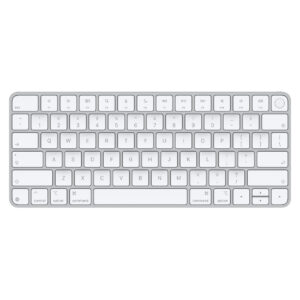
Apple Magic Keyboard with Touch ID (USB-C) Review: Biometric Desktop Security Meets USB-C
A sleek low-profile aluminum scissor keyboard pairing seamless Touch ID biometric authentication and USB-C charging with exceptional battery life, tempered by sealed non-repairable construction and single-device Bluetooth pairing.
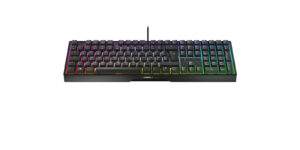
Cherry Xtrfy MX 3.1 Review: Damped Aluminum Keyboard Shackled by Wires
A robust full-size aluminum mechanical keyboard showcasing Cherry MX2A switches and integrated damping, delivering proven switch durability despite an inflexible wired-only tether.
Mizex Comparative Audit Verdict
5-Pillar Engineering Telemetry
Detailed comparison across standardized normalized 1.0 – 5.0 engineering pillars.
Apple Magic Keyboard with Touch ID (USB-C) Review: Biometric Desktop Security Meets USB-C: Strengths & Caveats
- Instantaneous Touch ID biometric authentication communicating via encrypted channel with Apple Silicon Secure Enclave.
- Updated USB-C port supporting both recharging and stable wired data operation.
- Extremely compact 0.16–0.43 in (4.1–10.9 mm) anodized aluminum chassis with rigid zero-flex construction.
- Long-lasting 2.98 Wh battery providing over a month of typical daily wireless use.
- Zero modular repairability with glued internal battery and non-replaceable scissor switches.
- Restricted to single-host Bluetooth pairing with no multi-device quick-switching button.
- Lacks key backlighting and requires an Apple silicon Mac for Touch ID functionality.
Cherry Xtrfy MX 3.1 Review: Damped Aluminum Keyboard Shackled by Wires: Strengths & Caveats
- Solid aluminum housing delivering superior torsional rigidity and deck stability
- Factory-refined Cherry MX2A mechanical switches with gold crosspoint contacts
- Integrated damping structure to absorb hollow keystroke resonance
- Vibrant customizable RGB backlighting
- Wired-only USB-A tether with no wireless connectivity options
- Faces intense competition from alternatives offering modular hot-swappable switch sockets
Technical Specification Comparison
Side-by-side spec alignment. Rows highlighted with subtle shading denote differing specifications.
| Specification | Apple Magic Keyboard with Touch ID (USB-C) Review: Biometric Desktop Security Meets USB-C | Cherry Xtrfy MX 3.1 Review: Damped Aluminum Keyboard Shackled by Wires |
|---|---|---|
| Brand DIFF | Apple | Cherry Xtrfy |
| Model DIFF | Magic Keyboard with Touch ID (USB-C) | MX 3.1 |
| Form Factor DIFF | Compact 75% / Tenkeyless (TKL) | — |
| Switch Type DIFF | Low-profile scissor mechanism with rubber dome | — |
| Key Travel DIFF | 0.04 in (1.0 mm) | — |
| Biometrics DIFF | Capacitive Touch ID sensor with Secure Enclave hardware encryption | — |
| Wireless Connectivity DIFF | Bluetooth | — |
| Wired Interface DIFF | USB-C (charging and wired data transmission) | — |
| Battery Chemistry DIFF | Rechargeable lithium-ion polymer | — |
| Battery Capacity DIFF | 2.98 Wh | — |
| Battery Life DIFF | Approximately 1 month or more per charge | — |
| Chassis Material DIFF | Anodized aluminum top plate with composite base | — |
| Dimensions DIFF | 0.16–0.43 x 10.98 x 4.52 in (4.1–10.9 x 278.9 x 114.9 mm) | — |
| Weight DIFF | 0.54 lbs (243 g / 8.57 oz) | — |
| System Requirements DIFF | Mac with Apple silicon running macOS 11.4 or later (macOS 15.1 or later recommended) | — |
| Form Factor DIFF | — | Full-size |
| Connection Type DIFF | — | Wired |
| Interface DIFF | — | USB-A |
| Switch Type DIFF | — | Cherry MX2A Red |
| Switch Technology DIFF | — | Gold crosspoint precision switch |
| Housing Material DIFF | — | Aluminum |
| Lighting DIFF | — | RGB backlighting |
| Acoustic Treatment DIFF | — | Integrated damping structure |
Need to evaluate a different configuration?
🔍 Compare Other Hardware